Kia Rio / Rio Hatchback (2022 year). Manual in english - page 10
Features of your vehicle
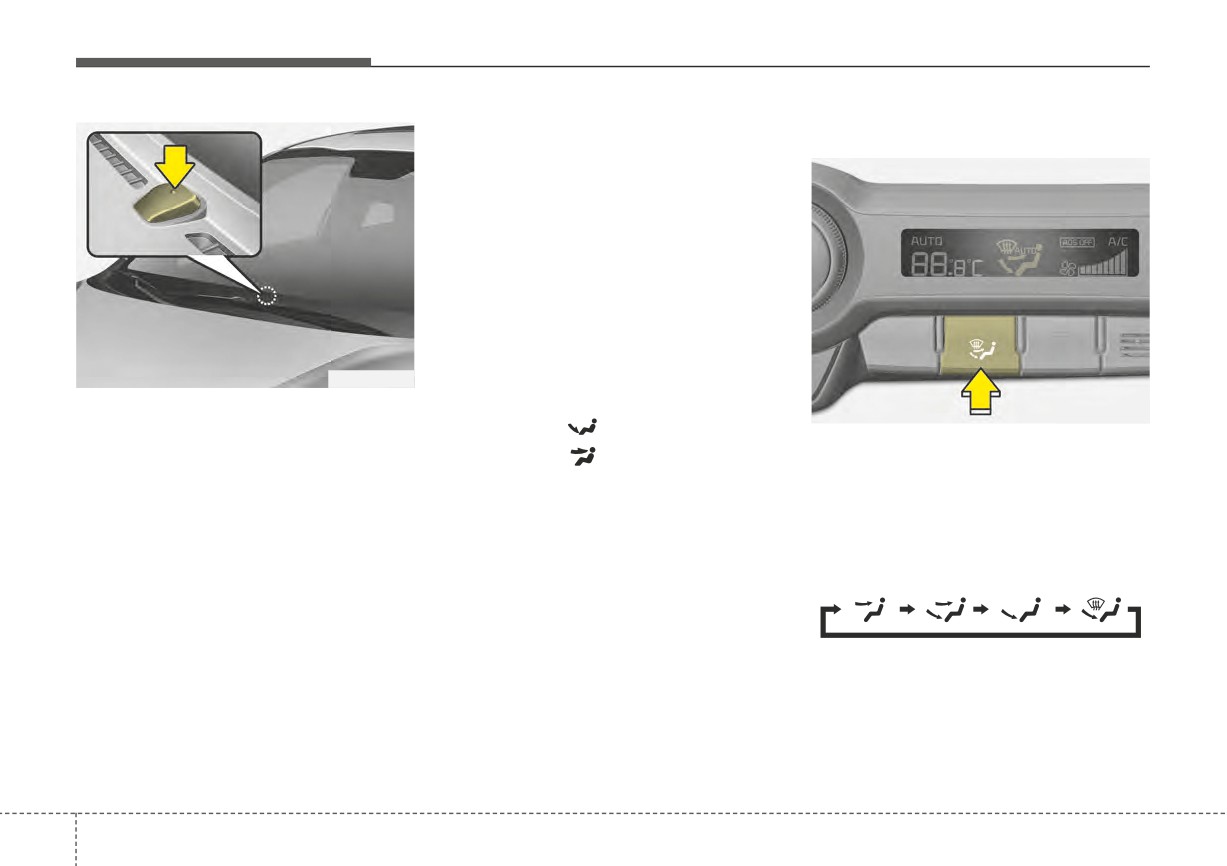
Manual heating and air condi-
Mode selection
tioning
The heating and cooling system can
be controlled manually by pushing
buttons other than the AUTO button.
In this case, the system works
sequentially according to the order of
buttons selected.
1. Start the engine.
2. Set the mode to the desired position.
OYB046437
To improve the effectiveness of
heating and cooling :
✽ NOTICE
OSC040512N
- Heating:
Never place anything over the sen-
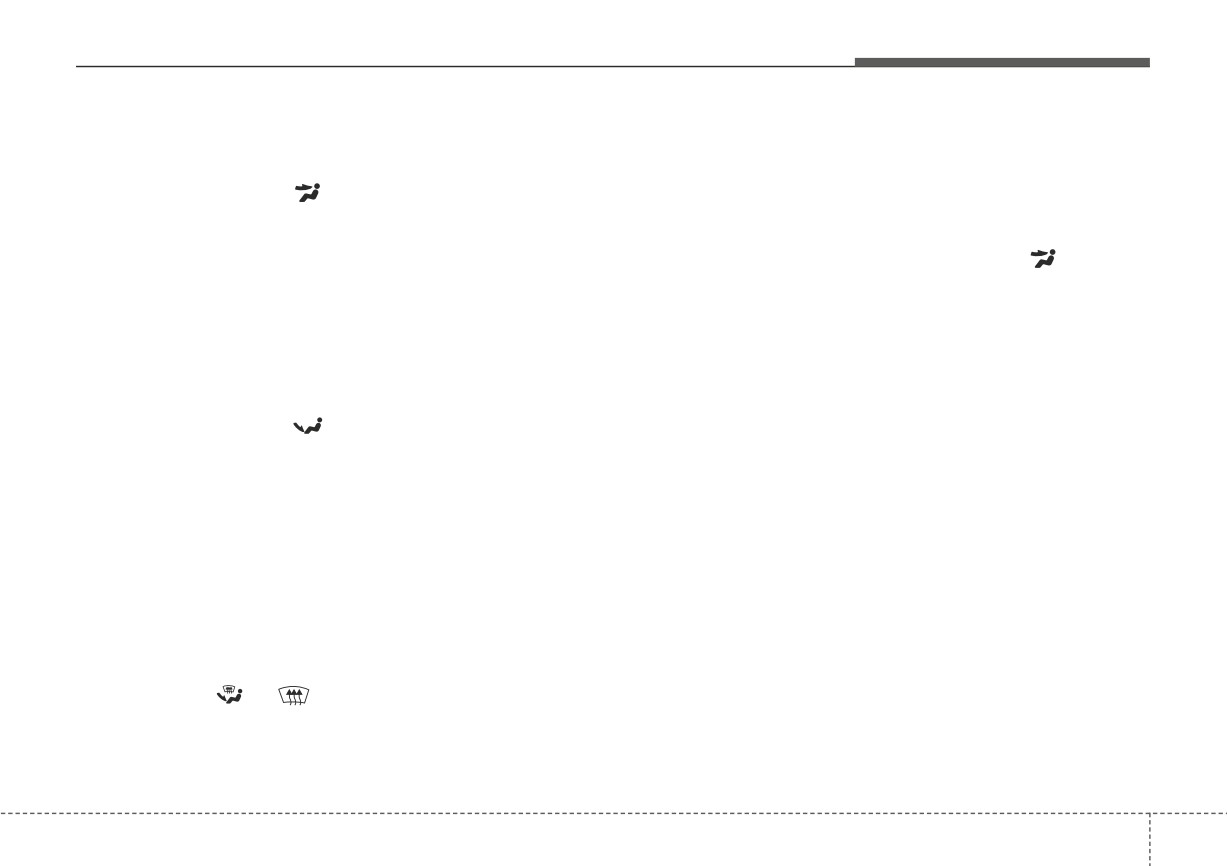
The mode selection button controls
sor located on the instrument panel
- Cooling:
the direction of the air flow through
to ensure better control of the heat-
3. Set the temperature control to the
the ventilation system.
ing and cooling system.
desired position.
Every time you press the mode
4. Set the air intake control to the
selection button, the mode will
outside (fresh) air or recirculated
change as follows:
air position.
5. Set the fan speed control to the
desired speed.
6. If air conditioning is desired, turn
the air conditioning system on.
Refer to the illustration in the
“Manual climate control system”.
Press the AUTO button in order to
convert to full automatic control of
the system.
4
124
Features of your vehicle
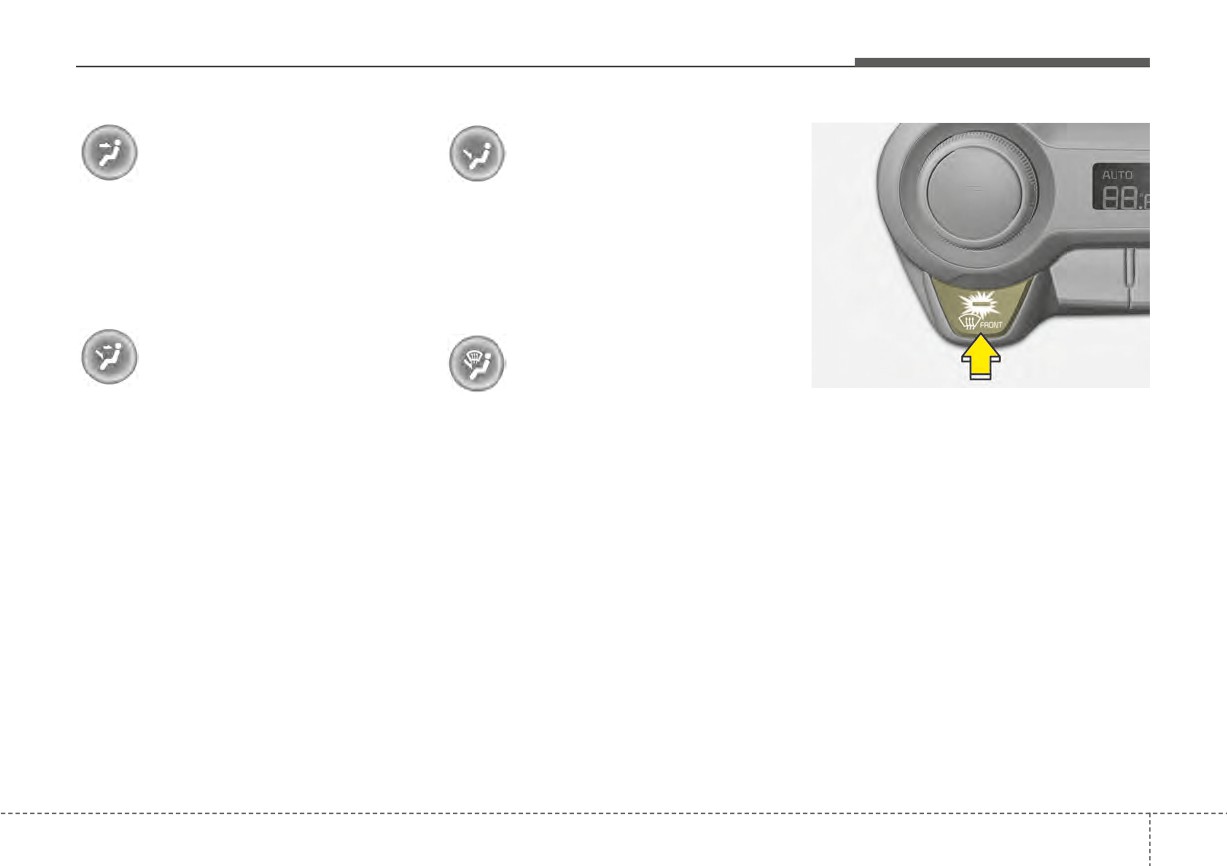
Face-Level (B, D)
Floor-Level (C, A, D, E)
Air flow is directed toward the upper
Most of the air flow is directed to the
body and face. Additionally, each
floor, with a small amount of the air
outlet can be controlled to direct the
being directed to the windshield and
air discharged from the outlet.
side window defroster.
Bi-Level (B, C, D, E)
Floor/Defrost-Level (A, C, D, E)
OSC040581N
Defrost-level
Air flow is discharged towards the
Most of the air flow is directed to the
Most of the air flow is directed to the
face and floor.
floor and the windshield with a small
windshield with a small amount of air
amount directed to the side window
directed to the side window
defrosters.
defrosters.
4
125
Features of your vehicle
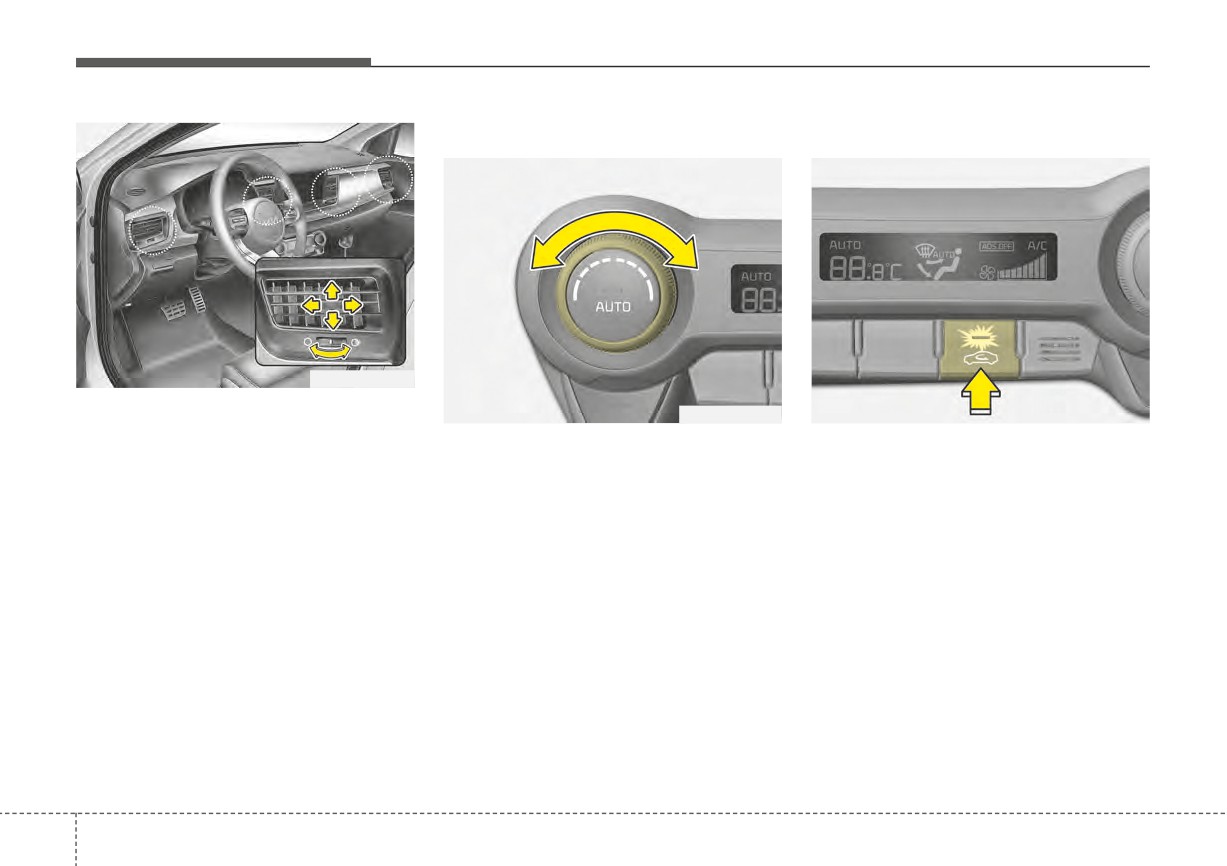
Temperature control
Air intake control
OSC041479N
Instrument panel vents
OSC040580N
OSC040513N
The outlet vents can be opened or
The temperature control knob allows
The air intake control is used to
closed separately using the thumb-
you to control the temperature of the
select outside (fresh) air position or
wheel.
air flowing from the ventilation sys-
recirculated air position.
Also, you can adjust the direction of
tem. To change the air temperature in
To change the air intake control posi-
air delivered from these vents using
the passenger compartment, turn
tion, push the control button.
the vent control lever as shown.
the knob to the right for warm air or
left for cooler air.
4
126
Features of your vehicle
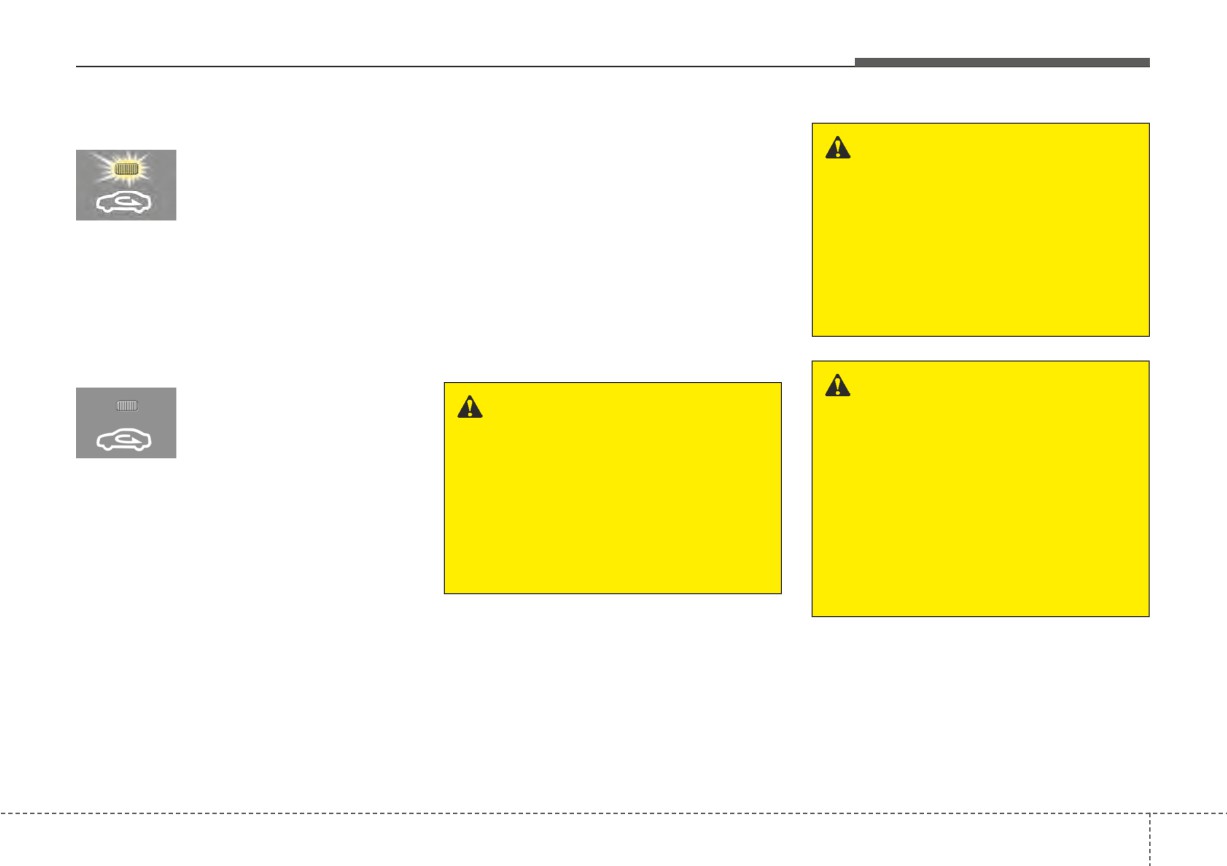
Recirculated air position
Prolonged operation of the heater in
the recirculated air position (without air
WARNING - Sleeping with
With the recirculated air
position selected, air
conditioning selected) may cause fog-
A/C on
ging of the windshield and side win-
from the passenger
Do not sleep in a vehicle with
compartment will be
dows, and the air within the passenger
the air conditioning or heating
compartment may become stale.
drawn through the heat-
system on as this may cause
ing system and heated
In addition, prolonged operation of
serious harm or death due to a
or cooled according to
the air conditioning with the recircu-
drop in the oxygen level and/or
the function selected.
lated air position selected will result
body temperature.
in excessively dry air in the passen-
ger compartment.
Outside (fresh) air position
If the recirculated air
WARNING - Recirculated
position is not selected
WARNING - Reduced
air
or turned off, air enters
Visibility
Continued use of the climate
the vehicle from outside
Continuous use of the climate
control system in the recirculat-
and is heated or cooled
control system in the recirculat-
ed air position can cause
according to the function
ed air position may allow
drowsiness or sleepiness, and
selected.
humidity to increase inside the
loss of vehicle control. Set the
vehicle which may fog the glass
air intake control to the outside
and obscure visibility.
(fresh) air position as much as
possible while driving.
4
127
Features of your vehicle
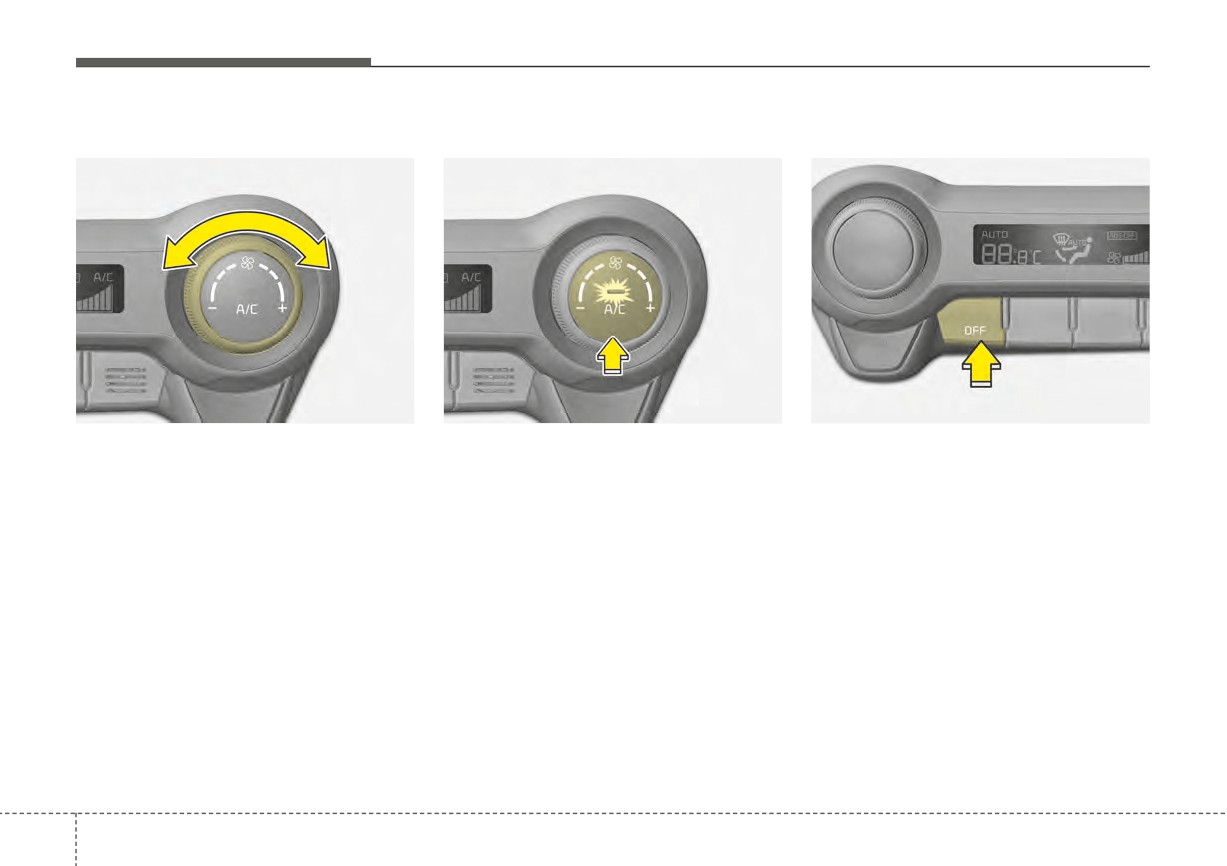
Fan speed control
Air conditioning
OFF mode
OSC040582N
OSC040583N
OSC040584N
The fan speed can be set to the
Press the A/C button to turn the air
Press the OFF button to turn off the
desired speed by operating the fan
conditioning system on
(indicator
air climate control system. However
speed control knob.
light will illuminate).
you can still operate the mode and
air intake buttons as long as the igni-
The higher the fan speed is, the
Press the button again to turn the air
more air is delivered.
conditioning system off.
tion switch is in the ON position.
Pressing the OFF button turns off the
fan.
4
128
Features of your vehicle
System operation
Operation Tips
Air conditioning
•
To keep dust or unpleasant fumes
Kia Air Conditioning Systems are
Ventilation
from entering the vehicle through
filled with R-1234yf refrigerant.
1. Set the mode to the
position.
the ventilation system, temporarily
1. Start the engine. Press the air con-
2. Set the air intake control to the
set the air intake control to the
ditioning button.
outside (fresh) air position.
recirculated air position. Be sure to
2. Set the mode to the
position.
3. Set the temperature control to the
return the control to the fresh air
desired position.
position when the dust or fumes
3. Set the air intake control to the out-
have passed to keep fresh air in
side air or recirculated air position.
4. Set the fan speed control to the
the vehicle. This will help keep the
4. Adjust the fan speed control and
desired speed.
driver alert and comfortable.
temperature control
to
maintain
•
Air for the heating/cooling system
maximum comfort.
Heating
is drawn in through the grilles just
1. Set the mode to the
position.
ahead of the windshield. Care
2. Set the air intake control to the
should be taken that these are not
outside (fresh) air position.
blocked by leaves, snow, ice or
other obstructions.
3. Set the temperature control to the
•
To prevent interior fog on the wind-
desired position.
shield, set the air intake control to
4. Set the fan speed control to the
the fresh air position and fan speed
desired speed.
to the desired position, turn on the
5. If dehumidified heating is desired,
air conditioning system, and adjust
turn the air conditioning system (if
the temperature control to the
equipped) on.
desired temperature.
• If the windshield fogs up, set the
mode to the
or
position.
4
129

Features of your vehicle
Air conditioning system operation tips
CAUTION
CAUTION
•
If the vehicle has been parked in
•
The refrigerant system should
•
When using the air condition-
direct sunlight during hot weather,
only be serviced by trained
ing system, monitor the tem-
open the windows for a short time
and certified technicians to
perature gauge closely while
to let the hot air inside the vehicle
insure proper and safe opera-
driving up hills or in heavy traf-
escape.
tion.
fic when outside temperatures
•
To help reduce moisture inside of
are high. Air conditioning sys-
•
The refrigerant system should
the windows on rainy or humid
be serviced in a well-ventilat-
tem operation may cause
days, decrease the humidity inside
engine overheating. Continue
ed place.
the vehicle by operating the air
to use the blower fan but turn
•
The air conditioning evapora-
conditioning system.
the air conditioning system off
tor (cooling coil) shall never
•
During air conditioning system
if the temperature gauge indi-
be repaired or replaced with
operation, you may occasionally
cates engine overheating.
one removed from a used or
notice a slight change in engine
•
When opening the windows in
salvaged vehicle and new
speed as the air conditioning com-
humid weather air conditioning
replacement MAC evaporators
pressor cycles. This is a normal
may create water droplets
should be certified
(and
operating characteristic of the sys-
inside the vehicle. Since exces-
labeled) as meeting
SAE
tem.
sive water droplets may cause
Standard J2842.
•
Use the air conditioning system
damage to electrical equip-
every month for a few minutes to
ment, air conditioning should
ensure maximum system perform-
only be used with the windows
ance.
closed.
•
When using the air conditioning
system, you may notice clear water
dripping (or even puddling) on the
ground under the passenger side
of the vehicle. This is a normal
operating characteristic of the sys-
tem.
4
130
Features of your vehicle
•
Operating the air conditioning sys-
Climate control air filter
✽ NOTICE
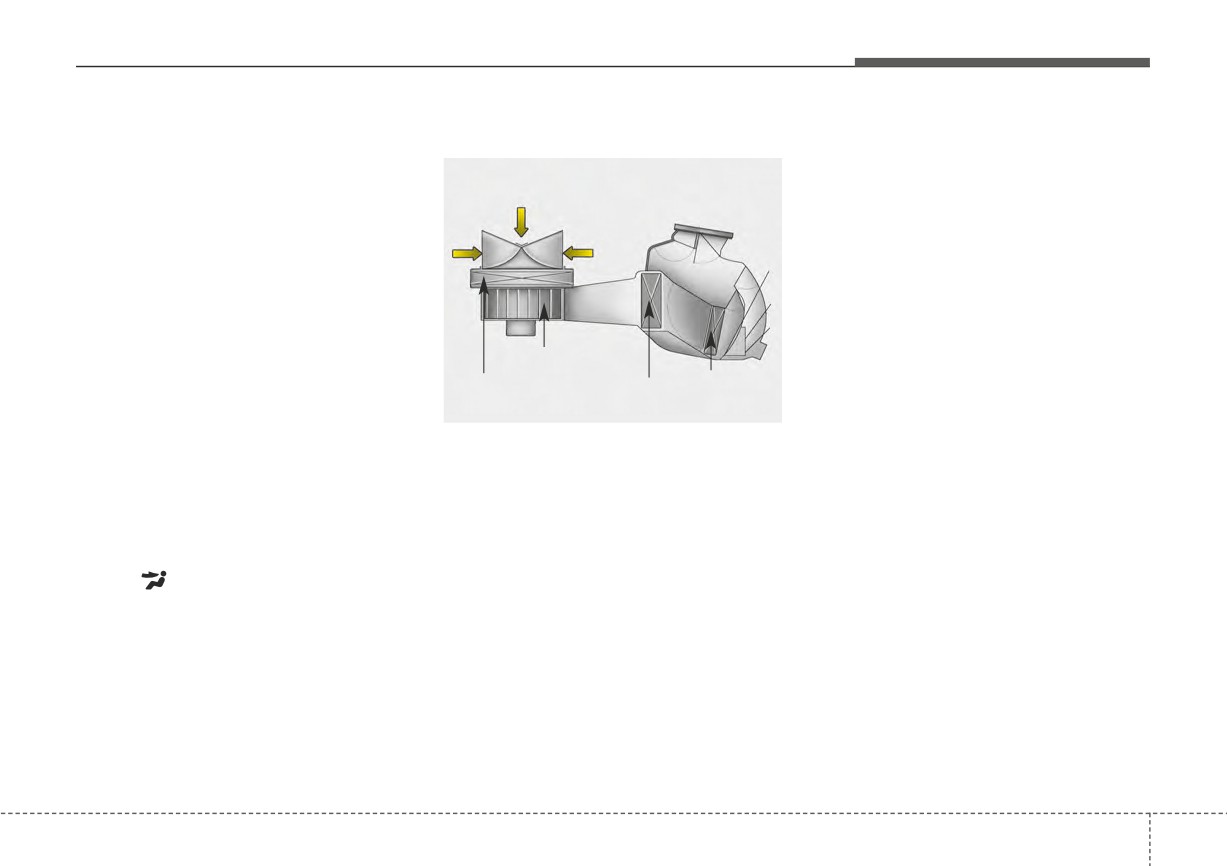
tem in the recirculated air position
•
Replace the filter according to the
provides maximum cooling, how-
Maintenance Schedule.
Outside air
ever, continual operation in this
If the vehicle is being driven in
mode may cause the air inside the
severe conditions such as dusty,
vehicle to become stale.
Recirculated
rough roads, more frequent cli-
air
•
During cooling operation, you may
mate control air filter inspections
occasionally notice a misty air flow
and changes are required.
because of rapid cooling and
•
When the air flow rate suddenly
humid air intake. This is a normal
decreases, the system should be
operating characteristic of the sys-
Blower
checked
at
an
authorized
Kia
tem.
dealer.
Climate control
EvaporatorHeater core
•
If you operate air conditioner
air filter
core
OMG075033
excessively, the difference between
the temperature of the outside air
The climate control air filter installed
and that of the windshield could
behind the glove box filters the dust or
cause the outer surface of the
other pollutants that come into the
windshield to fog up, causing loss
vehicle from the outside through the
of visibility. In this case, set the
heating and air conditioning system. If
mode selection knob or button to
dust or other pollutants accumulate in
the
position and fan speed
the filter over a period of time, the air
control to the lower speed.
flow from the air vents may decrease,
resulting in moisture accumulation on
the inside of the windshield even
when the outside (fresh) air position is
selected. If this happens, have the cli-
mate control air filter replaced by an
authorized Kia dealer.
4
131
Features of your vehicle
Checking the amount of air
conditioner refrigerant and
WARNING - Vehicles
compressor lubricant
equipped with R-1234yf
Since the refrigerant
When the amount of refrigerant is
is mildly flammable
low, the performance of the air con-
and operated at high
ditioning is reduced. Overfilling also
pressure, the air con-
has a negative influence on the air
ditioning
system
conditioning system.
should only be serv-
Therefore, if abnormal operation is
iced by trained and
found, have the system inspected by
certified technicians.
an authorized Kia dealer.
OYB086002
(Refer to the SAE
J2845)
The refrigerant label is located on
the underside of the hood.
It is important that the correct
type and amount of oil and
refrigerant are used.
All refrigerants should be
reclaimed with proper equip-
ment.
Venting refrigerants directly to
the atmosphere is harmful to
individuals and environment.
Failure to heed these warnings
can lead to serious injuries.
4
132
Features of your vehicle
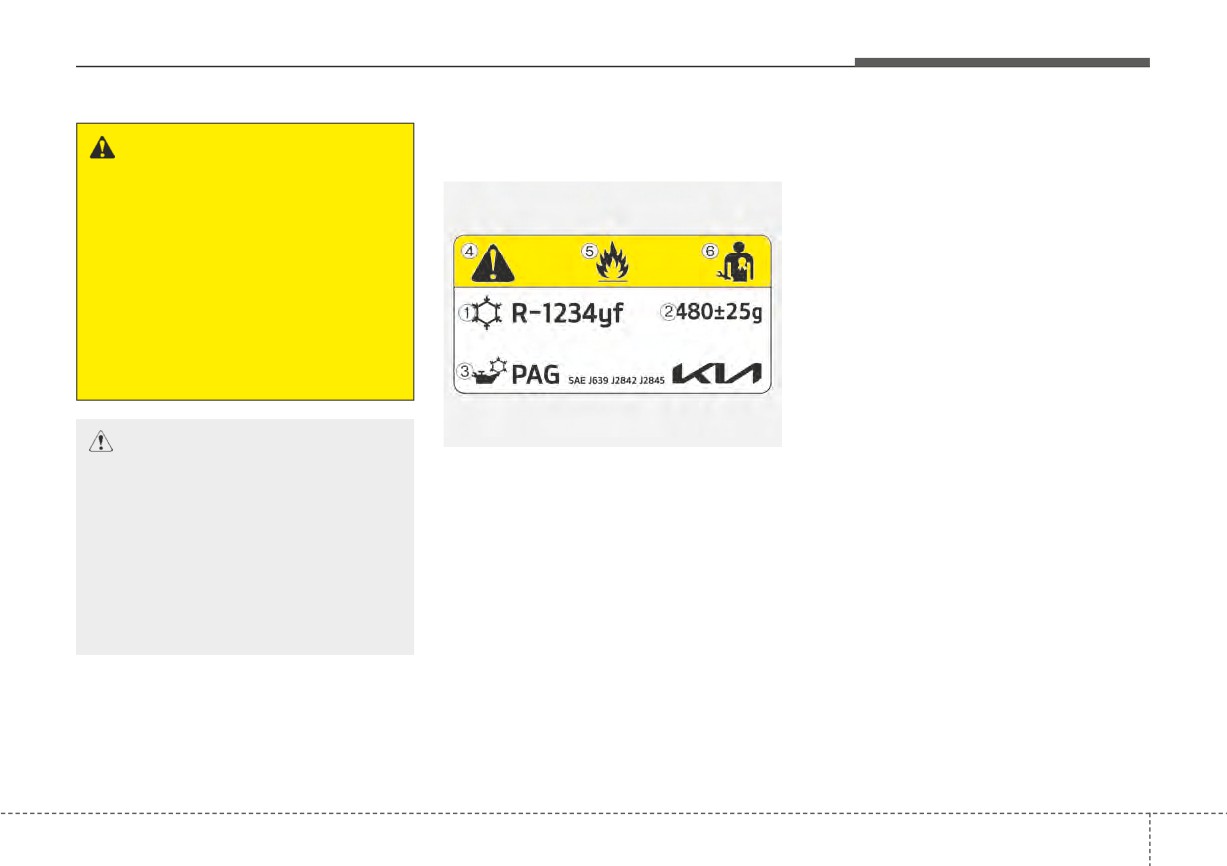
Air Conditioning refrigerant
Each symbol and specification on
WARNING
label
the air conditioning refrigerant label
The oil and refrigerant in your
is represented below :
■ Example
vehicle’s air conditioning sys-
1. Classification of refrigerant
tem is under very high pressure.
2. Amount of refrigerant
If proper service procedures are
3. Classification of Compressor lubri-
not followed an explosion may
cant
result. To reduce the risk of seri-
ous injury or death, the air con-
4. Caution
ditioning system in your vehicle
5. Flammable Refrigerant
should only be serviced by
6. Requires Registered Technician to
trained and certified technicians.
Service Air Conditioning system
OSC061044N
❈ Refer to chapter 8 for more detail
CAUTION
on the location of air conditioning
It is important that the correct
❈ The actual Air Conditioning refrig-
refrigerant label.
type and amount of oil and refrig-
erant label in the vehicle may differ
erant is used, otherwise damage
from the illustration.
to the vehicle may occur.
To prevent damage, the air con-
ditioning system in your vehicle
should only be serviced by
trained and certified technicians.
The air conditioning system should
be serviced by an authorized Kia
dealer.
4
133
Features of your vehicle
Activate upon Washer Fluid
System setting
Use
1. ENGINE START/STOP button is
To prevent the odor from entering the
ON.
inside of the vehicle, the ventilation
2. Select Floor-Level (
) air flow
system changes to Recirculated Air
direction by pressing Mode
Mode for a while when the wind-
Selection button.
shield washer fluid sprayed.
3. With pressing Air Conditioning
However, at low outside temperature,
button, press the Recirculated Air
to prevent windshield fogging, the
button more than 4 times within 2
system continues to outside air
seconds.
mode.
4. If the system is set up, the indica-
tor on Recirculated Air button will
blink 6 times.
System cancellation
1. ENGINE START/STOP button is
ON.
2. Select Floor-Level (
) air flow
direction by pressing Mode
Selection button.
3. While pressing Air Conditioning
button, press the Recirculated Air
button more than 4 times within 2
seconds.
4. If the system is cancelled, the indi-
cator on Recirculated Air button
will blink 3 times.
4
134
Features of your vehicle
WINDSHIELD DEFROSTING AND DEFOGGING
•
For maximum defrosting, set the
Manual climate control system
WARNING - Windshield
temperature control all the way to
To defog inside windshield
heating
the right/hot position and the fan
speed control to the highest speed.
Do not use the (
) or
(
)
position during cooling opera-
•
If warm air to the floor is desired
tion in extremely humid weath-
while defrosting or defogging, set the
er. The difference between the
mode to the floor-defrost position.
temperature of the outside air
•
Before driving, clear all snow and
and the windshield could cause
ice from the windshield, rear win-
the outer surface of the wind-
dow, outside rear view mirrors, and
shield to fog up, causing loss of
all side windows.
visibility.
•
Clear all snow and ice from the
hood and air inlet in the cowl grill to
improve heater and defroster effi-
OSC040315N
ciency and to reduce the probabili-
ty of fogging up the inside of the
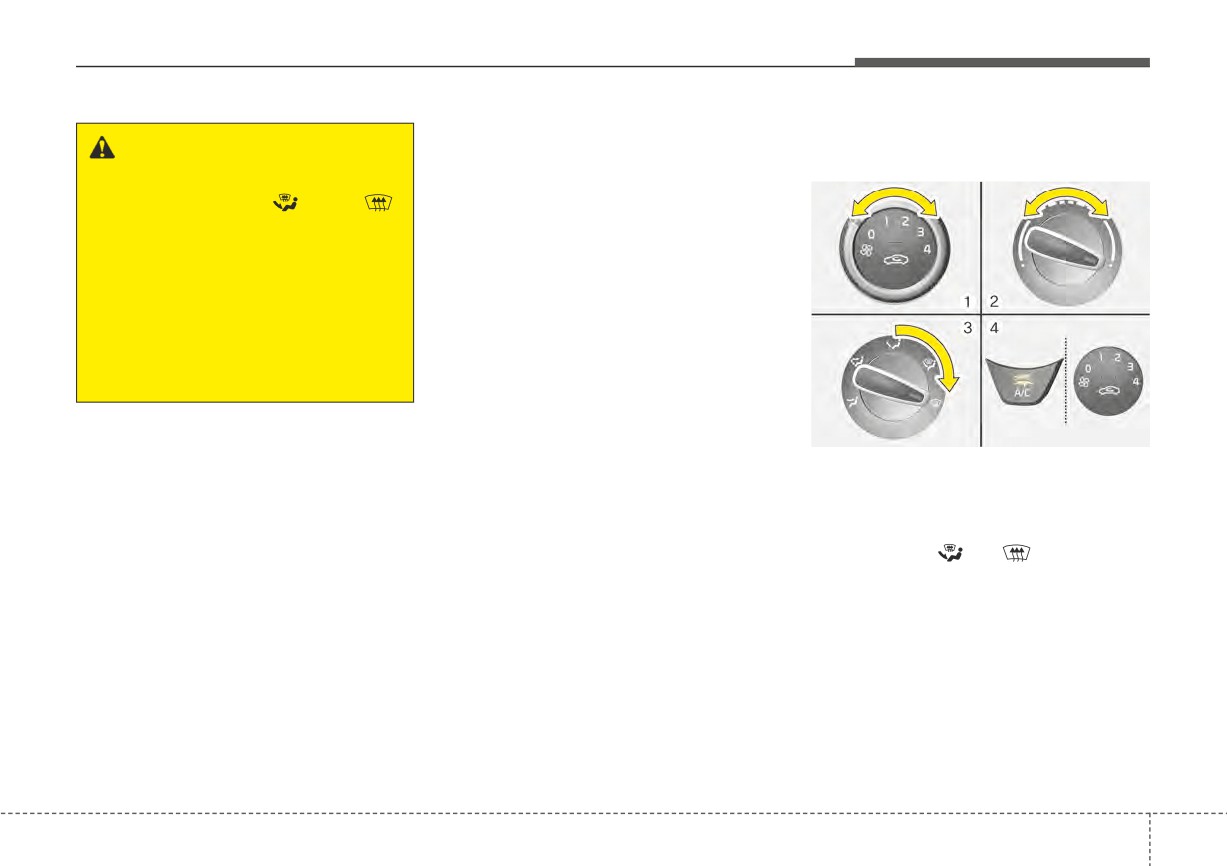
1. Select any fan speed except "0"
windshield.
position.
2. Select desired temperature.
3. Select the
or
position.
4. The outside
(fresh) air will be
selected automatically.
If the outside (fresh) air position is
not selected automatically, press the
corresponding button manually.
4
135
Features of your vehicle
To defrost outside windshield
Automatic climate control
To defrost outside windshield
system
To defog inside windshield
OSC040316N
OSC040586N
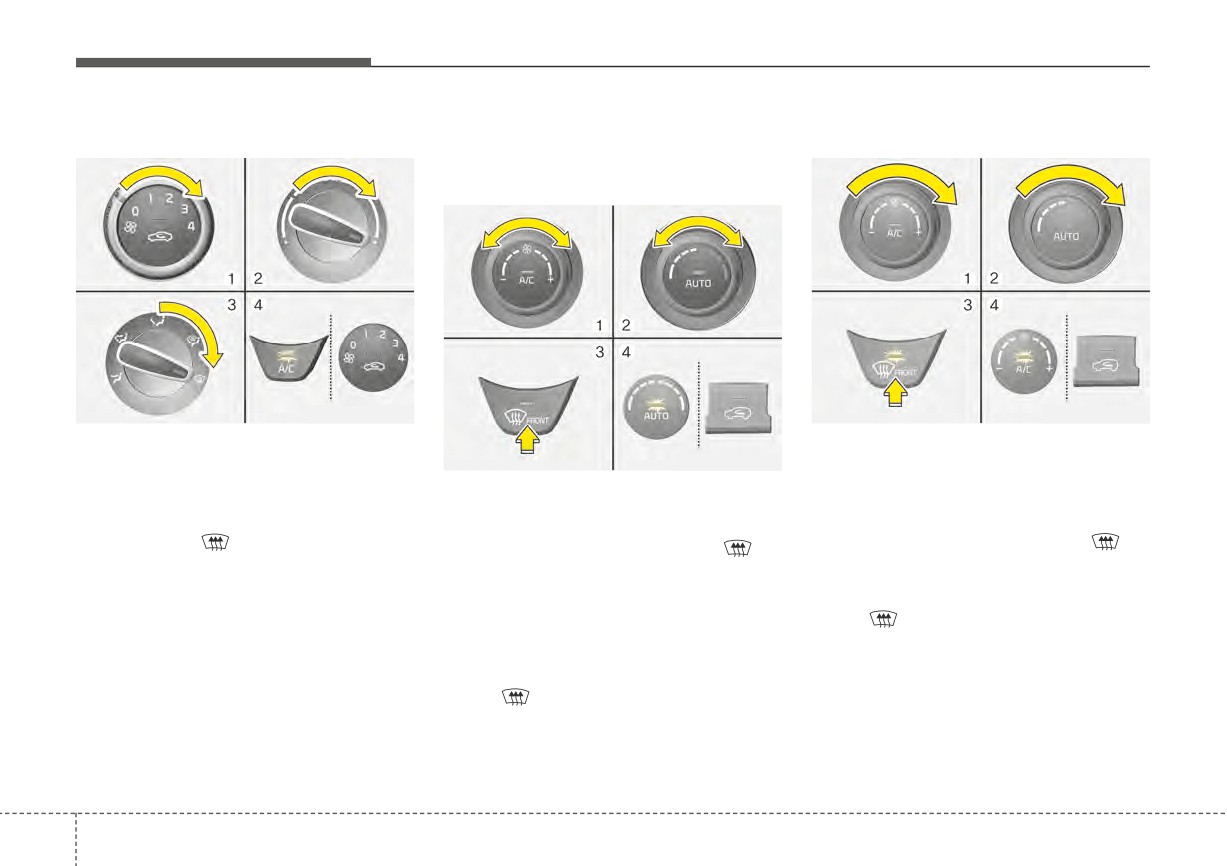
1. Set the fan speed to the highest
1. Set the fan speed to the highest
(extreme right) position.
OSC040585N
position.
2. Set the temperature to the highest
1. Select desired fan speed.
2. Set the temperature to the highest
(HI) position.
(HI) position.
2. Select desired temperature.
3. Select the
position.
3. Press the defroster button (
).
3. Press the defroster button (
).
4. The outside
(fresh) air will be
4. The outside (fresh) air position will
4. The outside (fresh) air position will
selected automatically.
be selected automatically.
be selected automatically.
If the
position is selected, lower
If the outside (fresh) air position is
fan speed is adjusted to a higher fan
not selected automatically, adjust the
speed.
corresponding button manually.
If the
position is selected, lower
fan speed is adjusted to a higher fan
speed.
4
136
Features of your vehicle
Defogging Logic
Manual climate control system
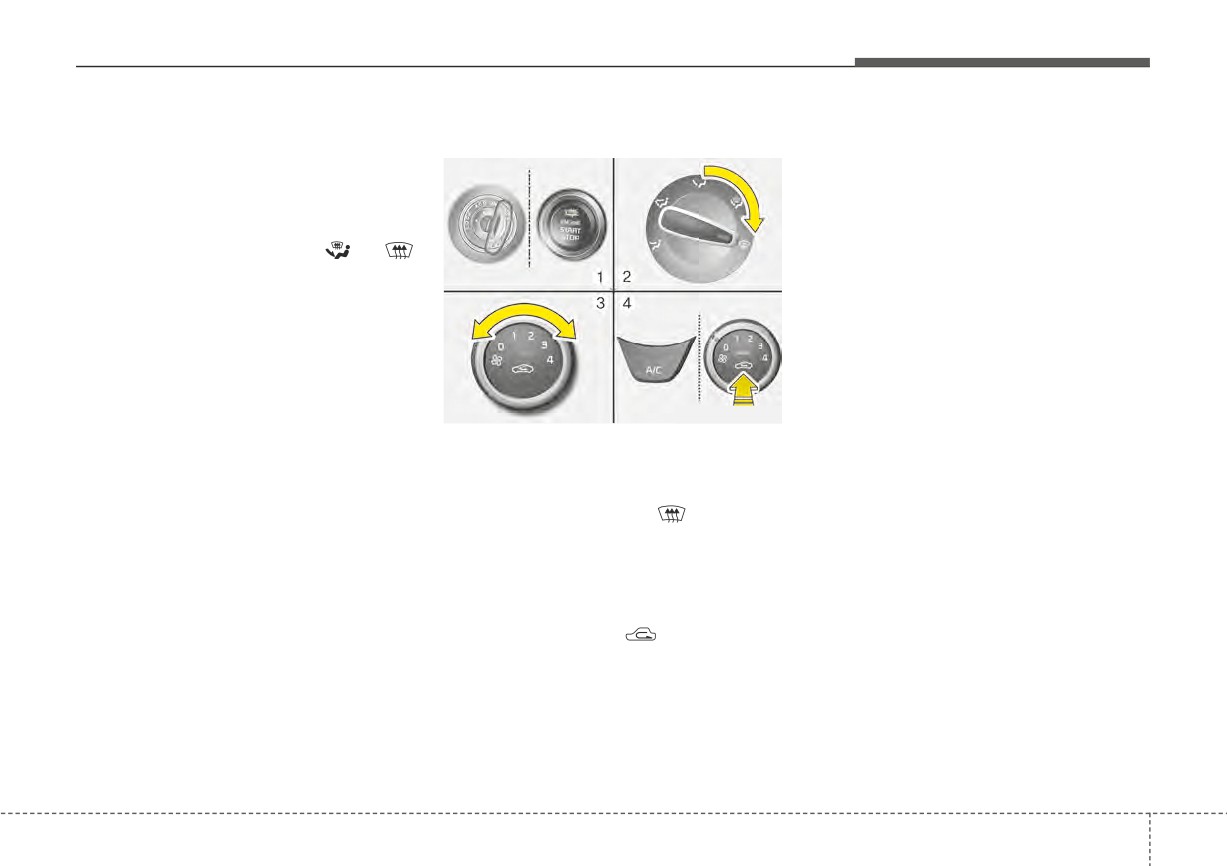
If the battery has been discharged or
disconnected, it resets to the defog
To reduce the probability of fogging
logic status.
up inside of the windshield, the air
intake or air conditioning are con-
trolled automatically according to
certain conditions such as
or
position. Logic can be disabled and
enabled by doing following :
OSC040317N
1. Turn the ignition switch to the ON
position.
2. Turn the mode selection knob to
the defrost position (
).
3. Select any fan speed except “0”
position.
4. While pressing the air conditioning
button (A/C), press the air intake
control button
(
) at least
5
times within 3 seconds.
The indicator light in the air intake
control button will blink 3 times with
0.5 second of interval. It indicates that
the defogging logic is canceled or
returned to the programmed status.
4
137
Features of your vehicle
Automatic climate control system
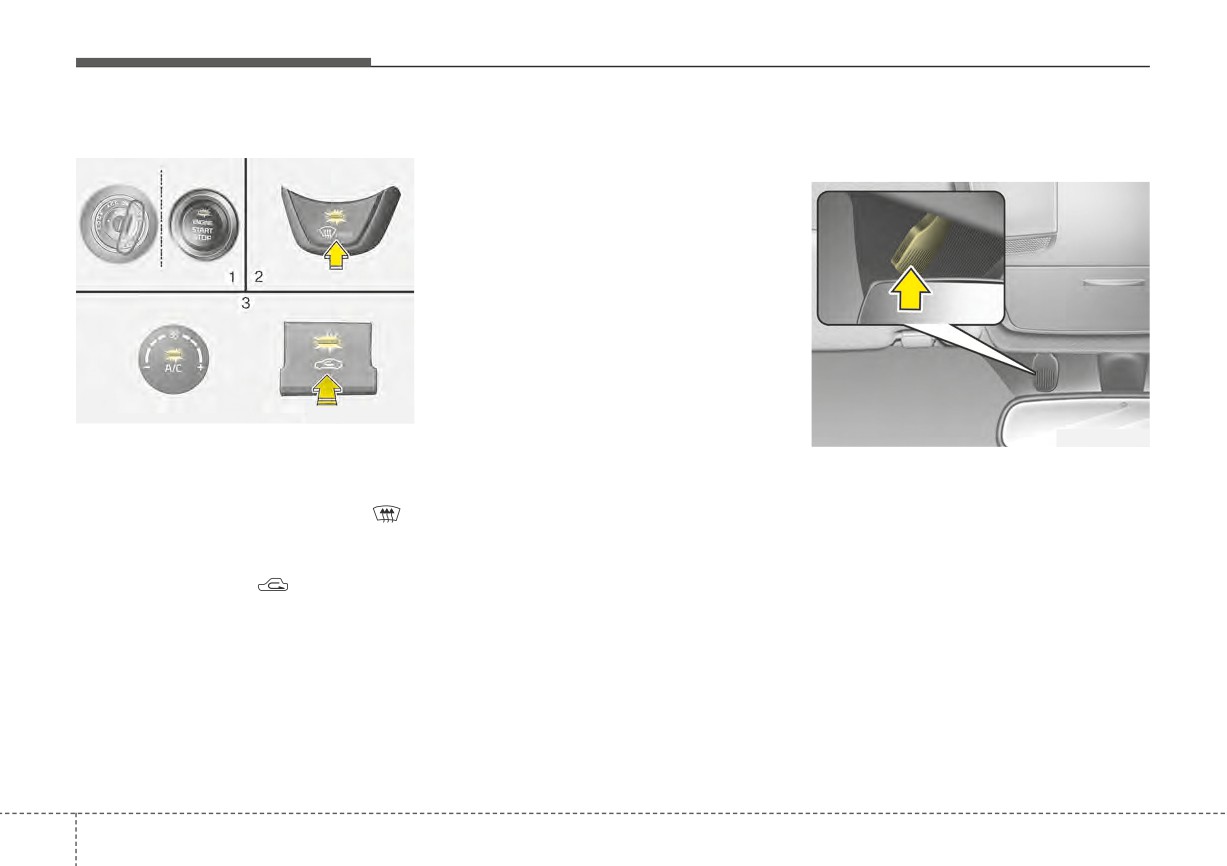
If the battery has been discharged or Auto defogging system
disconnected, it resets to the defog
(if equipped)
logic status.
OSC040587N
OSC047433N
1. Turn the ignition switch to the ON
position.
Auto defogging reduces the possibil-
2. Select the defroster position before
ity of fogging up the inside of the
pressing the defroster button (
).
windshield by automatically sensing
the moisture inside the windshield
3. While pressing the air conditioning
and air flow toward the windshield
button (A/C), press the air intake
can increase.
control button
(
) at least
5
The auto defogging system operates
times within 3 seconds.
when the AUTO mode is on.
The indicator on the air intake button
blinks
3 times with 0.5 second of
interval. It indicates that the defog-
ging logic is canceled or returned to
the programmed status.
4
138
Features of your vehicle
This indicator illuminates
The
“ADS OFF” symbol will be
when the auto defogging
shown in the climate display to
CAUTION
system senses moisture
inform you that the system is deacti-
Do not remove the sensor cover
on the inside of the wind-
vated.
located on the upper end of the
shield and is activated.
driver side windshield glass.
To re-activate the auto defogging
system again, follow the procedure
Damage to the system parts
mentioned above and the
“ADS
could occur and may not be cov-
If more moisture is in the vehicle, the
OFF” symbol will disappear.
ered by your vehicle warranty.
auto defogging system addresses
excess moisture on the inside of the
If the battery has been disconnected
windshield in stages as follows:
or discharged, it resets to the auto
defogging status.
Step 1 : Operating the air condition-
ing
✽ NOTICE
Step 2 : Outside air position
•
When the air conditioning is
turned on by Auto defogging sys-
Step 3 : Blowing air flow toward the
windshield
tem, if you try to turn off the air
conditioning, the indicator will
Step 4 : Increasing air flow toward
blink 3 times and the air condi-
the windshield
tioning will not be turned off.
•
For efficiency, do not select recir-
If your vehicle is equipped with the
culated air position while Auto
auto defogging system, it is automat-
defogging system is operating.
ically activated when the conditions
are met.
However, if you would like to deacti-
vate the auto defogging system,
keep the front defroster button
pressed longer than 3 seconds.
4
139
Features of your vehicle
STORAGE COMPARTMENT
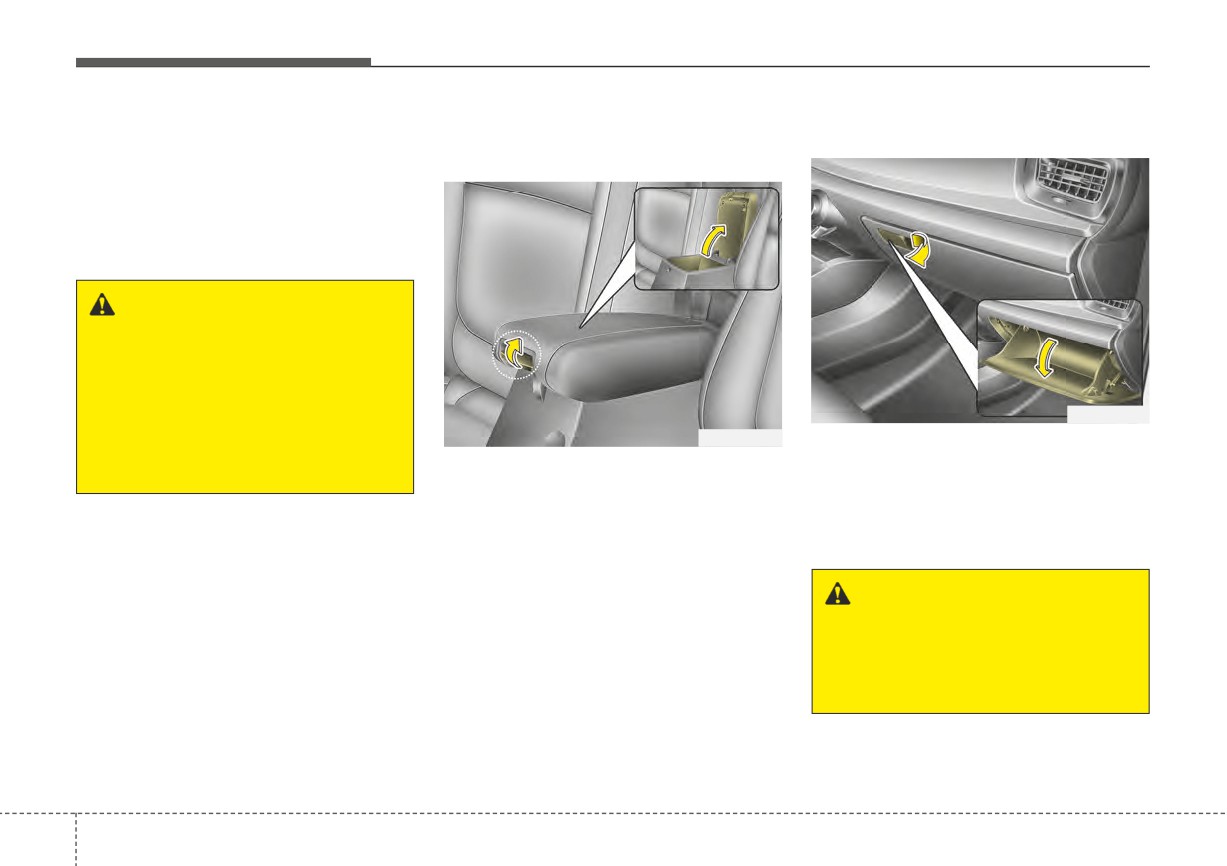
These compartments can be used to
Center console storage
Glove box
store small items.
(if equipped)
To avoid possible theft, do not leave
valuables in the storage compartment.
Always keep the storage compart-
ment covers closed while driving.
WARNING - Flammable
materials
Do not store flammable/explo-
sive materials in the vehicle.
These items may catch fire
OYB046440
and/or explode if the vehicle is
OYB046439
exposed to hot temperatures for
To open the glove box, pull the handle,
extended periods.
To open the center console storage,
and the glove box will automatically
pull up the lever.
open. Close the glove box after use.
Always keep the glove box closed
while the vehicle is in motion.
WARNING - Glove box
To reduce the risk of injury in an
accident or sudden stop, always
keep the glove box door closed
while driving.
4
140
Features of your vehicle
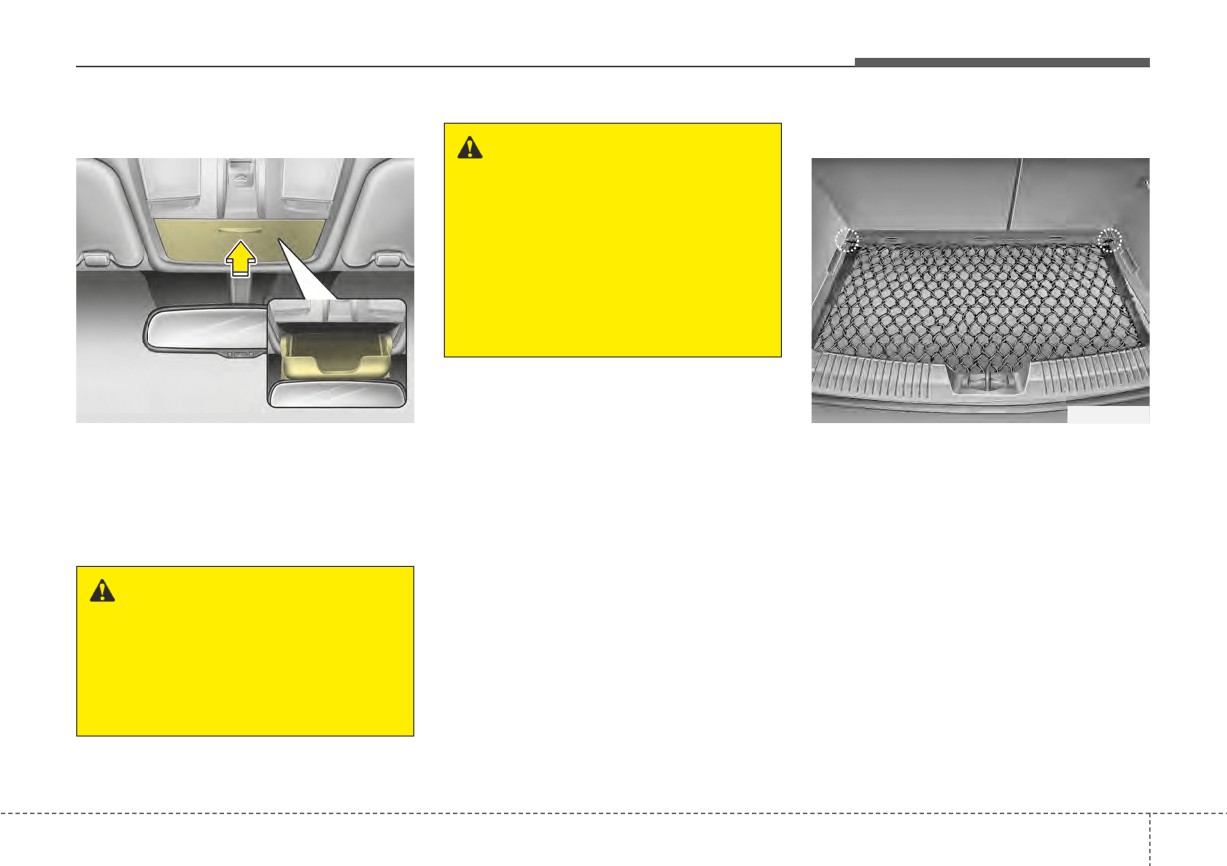
Sunglass holder (if equipped)
Luggage net holder
WARNING - Sunglass
holder
Do not keep objects except sun-
glasses inside the sunglass
holder. Heavier objects can be
thrown from the holder in the
event of a sudden stop or an
accident, possibly injuring the
passengers.
OYB046458
OUB041147
To open the sunglass holder, press
To keep items from shifting in the
the cover and the holder will slowly
cargo area, you can use the 4 hold-
open. Place your sunglasses with the
ers located in the cargo area to
attach the luggage net (if equipped).
lenses facing out. To close the sun-
glass holder, push it up.
If necessary, we recommend that
you contact an authorized Kia dealer.
WARNING
Do not open the sunglass hold-
er while the vehicle is moving.
The rear view mirror of the vehi-
cle can be blocked by an open
sunglass holder.
4
141
Features of your vehicle
CAUTION
To prevent damage to the goods
or the vehicle, care should be
taken when carrying fragile or
bulky objects in the luggage
compartment.
WARNING
To avoid bodily injury, DO NOT
overstretch the luggage net and
ALWAYS keep your face and
body out of the luggage net's
recoil path. DO NOT use when
the strap has visible signs of
wear or damage.
4
142
Features of your vehicle
INTERIOR FEATURES
Cup holder
Sunvisor
WARNING - Hot liquids
Do not place uncovered cups of
hot liquid in the cup holder
while the vehicle is in motion. If
the hot liquid spills, you may
burn yourself. Such a burn to
the driver could lead to loss of
control of the vehicle.
OYB046446
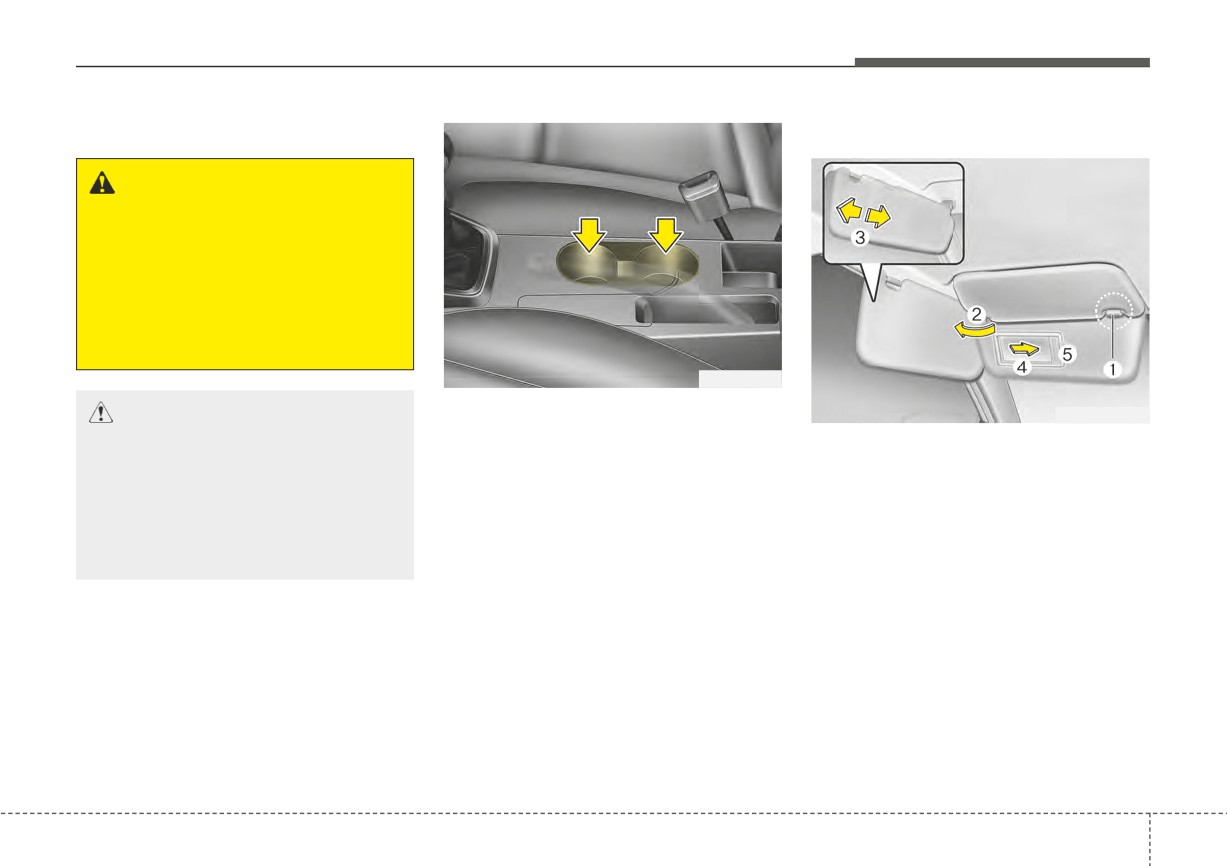
Cups or small beverage cans may be
CAUTION
OSC047434N
placed in the cup holders.
Keep your drinks sealed while
Use the sunvisor to shield direct light
driving to prevent spilling your
through the front or side windows.
drink. If liquid spills, it may get
To use the sunvisor, pull it downward.
into the vehicle's electrical/elec-
To use the sunvisor for the side win-
tronic system and damage elec-
dow, pull it downward, unsnap it from
trical/electronic parts.
the bracket (1) and swing it to the
side (2).
Adjust the sunvisor extension for-
✽ NOTICE
ward or backward (3).
When cleaning spilled liquids, do
To use the vanity mirror, pull down the
not dry the cup holder at high tem-
visor and slide the mirror cover (4).
perature. This may damage the cup
The ticket holder (5) is provided for
holder.
holding a tollgate ticket.
4
143
Features of your vehicle
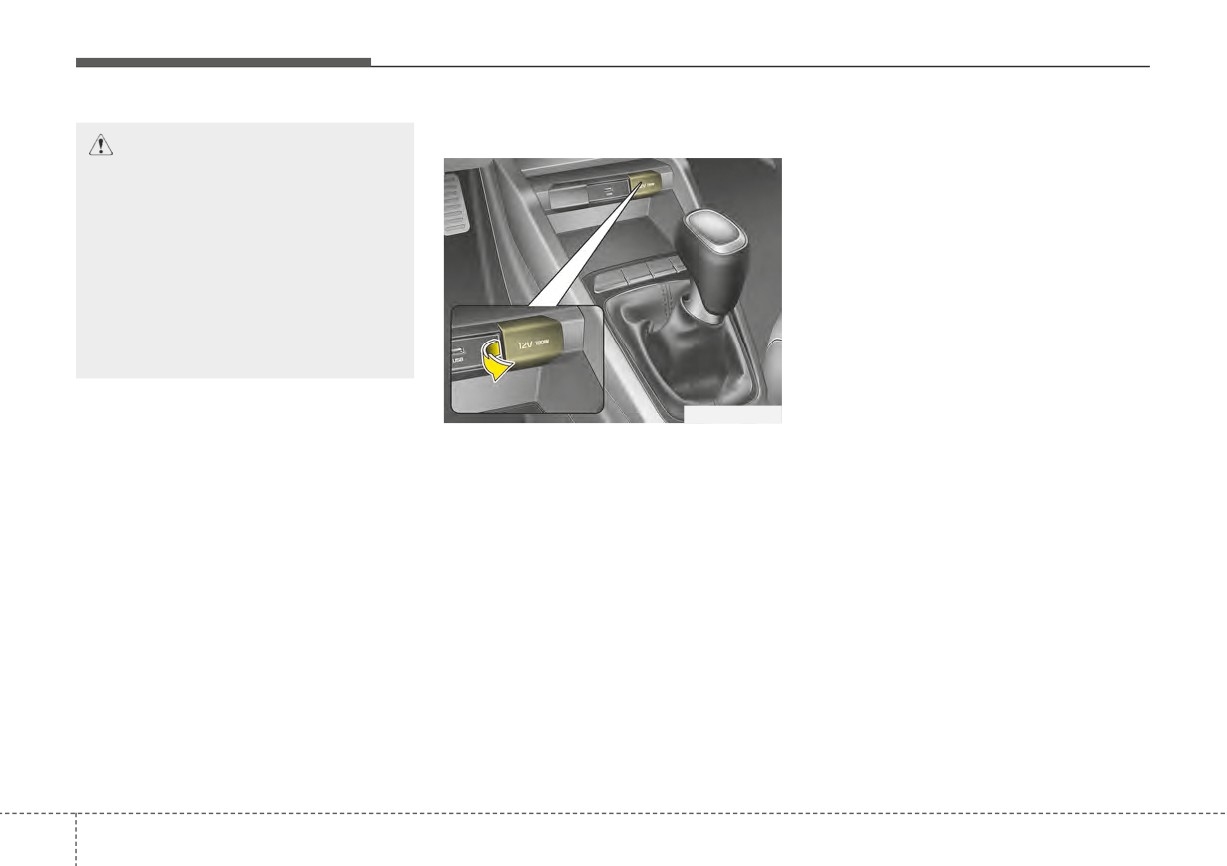
Power outlet
Close the cover when not in use.
CAUTION -
Vanity mirror
Some electronic devices can cause
lamp
electronic interference when plugged
Close the vanity mirror cover
into a vehicle’s power outlet. These
securely and return the sunvi-
devices may cause excessive audio
sor to its original position after
static and malfunctions in other elec-
use. If the vanity mirror is not
tronic systems or devices used in
closed securely, the lamp will
your vehicle.
stay on and could result in bat-
Using electrical products which
tery discharge and
possible
exceed the limited capacity might
sunvisor damage.
cause heating to the power outlet
and wiring that could lead to an elec-
trical breakdown. Always make sure
OSC040442N
the electrical part is firmly plugged
The power outlet is designed to pro-
into the power outlet. Incomplete
vide power for mobile telephones or
plugging may cause electrical break-
other devices designed to operate
down.
with vehicle electrical systems. The
Electrical products with a built-in bat-
devices should draw less than 12V,
tery might cause current flow, which
15A with the engine running.
could lead to malfunction of the elec-
Use the power outlet only when the
tric/electronic device in your vehicle.
engine is running and remove the
Only use electrical products which
accessory plug after use. Using the
include reverse current prevention
accessory plug for prolonged periods
of time with the engine off could
cause the battery to discharge.
Only use 12V electric accessories
which are less than 15A in electric
capacity.
4
144
Features of your vehicle
USB charger (if equipped)
•
Some devices are not supported
WARNING - Electric shock
for fast charging but will be
Do not put a finger or a foreign
charged with normal speed.
object (pen, etc.) into a power
•
Use the USB charger when the
outlet and do not touch with a
engine is running to prevent bat-
wet hand. You may receive an
tery discharge.
electric shock.
•
Only devices that fit the USB port
can be used.
•
The USB charger can be used only
for battery charging purposes.
•
Battery chargers cannot be
charged.
OSC040507
The USB charger is designed to
recharge batteries of small size elec-
trical devices using a USB cable. The
electrical devices can be recharged
when the ignition switch is in
ACC/ON/START position.
The battery charging state may be
monitored on the electrical device.
Disconnect the USB cable from the
USB port after use.
4
145