Kia Rio / Rio Hatchback (2022 year). Manual in english - page 7
Features of your vehicle
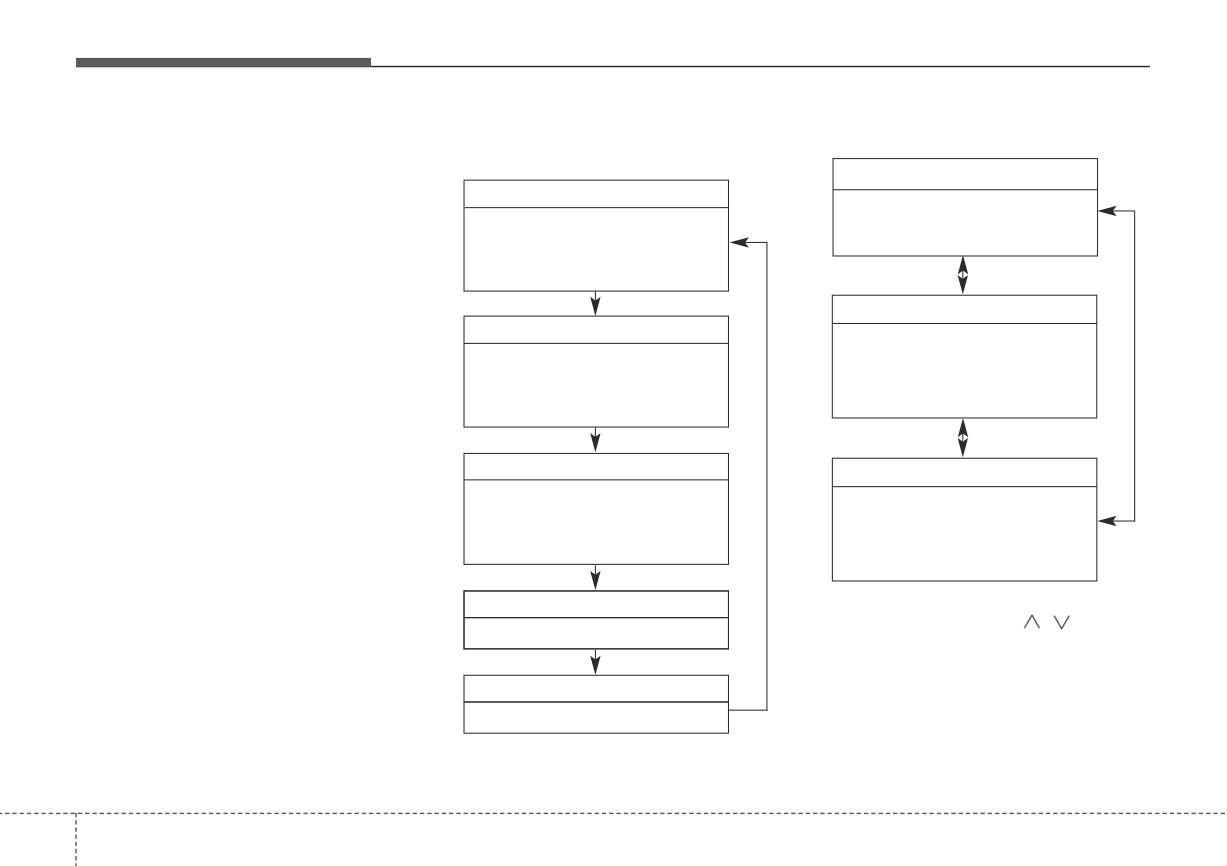
TRIP COMPUTER
Trip information (Trip computer)
Trip Modes
- For Type B cluster
The trip computer is a microcomput-
- For Type A cluster
TRIP
er-controlled driver information sys-
FUEL ECONOMY
tem that displays information related
• Average Fuel Economy
• Distance To Empty
to driving.
• Instant Fuel Economy
• Average Fuel Economy
• Instant Fuel Economy
✽ NOTICE
Some driving information stored in
Accumulate Info
the trip computer
(for example
TRIP A
• Tripmeter
Average Vehicle Speed) resets if the
• Tripmeter [A]
battery is disconnected.
• Average Fuel Economy
• Elapsed Time [A]
• Timer
• Average Vehicle Speed [A]
TRIP B
Drive Info
• Tripmeter [B]
• Tripmeter
• Elapsed Time [B]
• Average Fuel Economy
• Average Vehicle Speed [B]
• Timer
Service
To change the trip mode, scroll the
MOVE scroll switch (
/
) in the
• Service reminder
trip computer mode.
Speed
• Speed On/Off
To change the trip mode, press the
TRIP button.
4
58
Features of your vehicle
Fuel Economy
- Distance range : 1~9,999 mi or
Average Fuel Economy (2)
km
• The average fuel economy is cal-
■ Type A
• If the estimated distance is below 1
culated by the total driving dis-
mi. (1 km), the trip computer will
tance and fuel consumption since
display “---” as distance to empty.
the last average fuel economy
reset.
- Fuel economy range: 0.0 ~ 99.9
✽ NOTICE
MPG or L/100 km, km/L
•
If the vehicle is not on level ground
• The average fuel economy can be
or the battery power has been
reset both manually and automati-
interrupted, the distance to empty
cally.
function may not operate correct-
OSC040157
■ Type B
ly.
•
The distance to empty may differ
Manual reset
from the actual driving distance as
To clear the average fuel economy
it is an estimate of the available
manually, press the RESET (for Type
driving distance.
A cluster), OK (reset)
(for Type B
•
The trip computer may not regis-
cluster) on the steering wheel for
ter additional fuel if less than 1.6
more than 1 second when the aver-
gallons (6 liters) of fuel are added
age fuel economy is displayed.
to the vehicle.
•
The fuel economy and distance to
OSC040156
empty may vary significantly
based on driving conditions, driv-
Distance To Empty (1)
ing habits, and condition of the
• The range is the estimated dis-
vehicle.
tance the vehicle can be driven
with the remaining fuel.
4 59
Features of your vehicle
Automatic reset (for type B cluster)
Instant Fuel Economy (3)
Trip A/B (for type A cluster)
To make the average fuel economy
•
This mode displays the instant fuel
be reset automatically whenever refu-
economy during the last few sec-
eling, select the "Fuel Econ. Reset"
onds when the vehicle speed is
mode in User Setting menu of the
more than 5 MPH (8 km/h).
LCD display (Refer to "User settings
- Fuel economy range:
mode" on this chapter).
0.0 ~ 50.0
MPG or 0.0 ~
30.0
• OFF - You may set to default manu-
L/100km
ally by using the trip switch reset but-
ton.
• After Vehicle On - The vehicle is
automatically set to default, if open-
ing the driver's door after turning off
OSC047137N
the engine or 3 minutes passes after
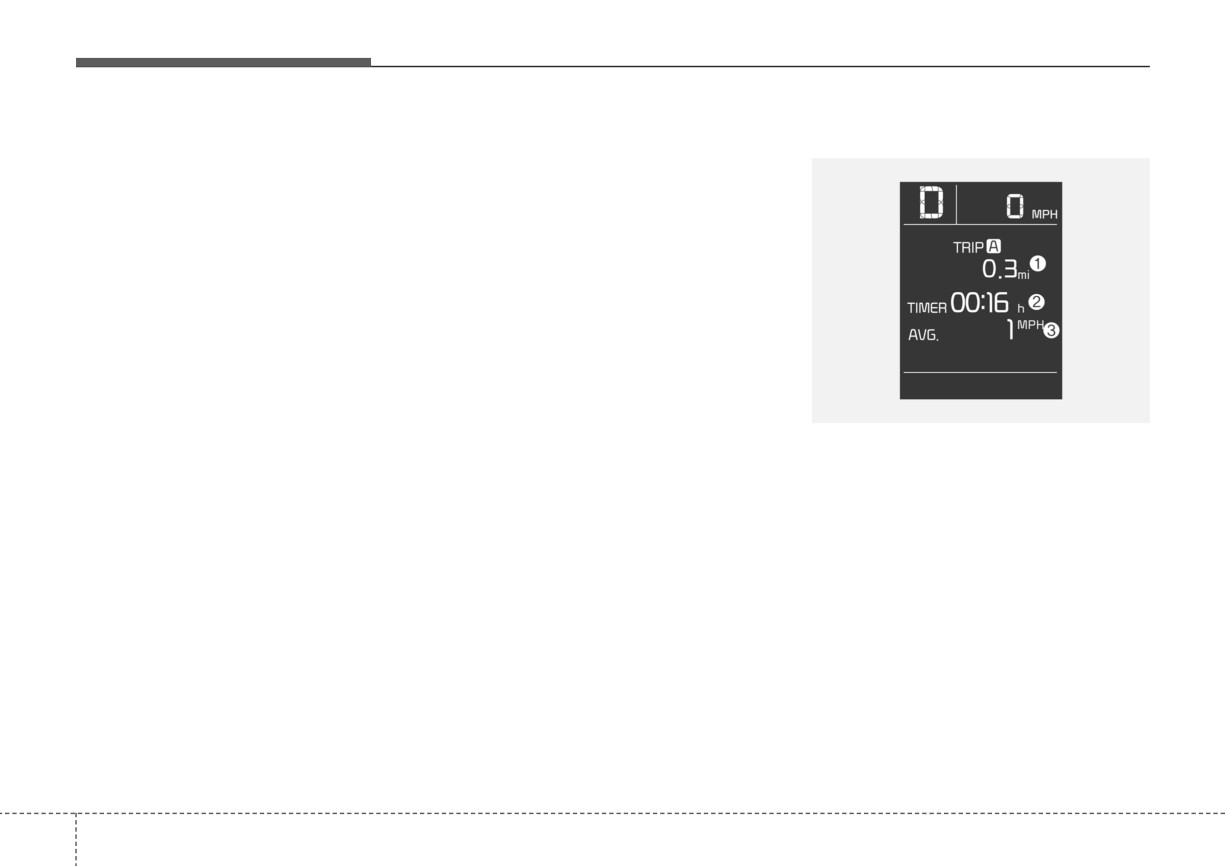
Tripmeter (1)
restarting the engine.
•
The tripmeter is the total driving dis-
• After refueling - After refueling more
tance since the last tripmeter reset.
than 1.6 gallons (6 liters) and driving
over 1 mph (1 km/h), the vehicle will
- Distance range: 0.0~ 9999.9 mi. or
km
reset to default automatically.
•
To reset the tripmeter, press the
RESET button on the steering
✽ NOTICE
wheel for more than
1 second
The average fuel economy is not dis-
when the tripmeter is displayed.
played for more accurate calculation
if the vehicle does not drive more
than 10 seconds or 0.19 miles (300
meters) since the ignition or
ENGINE STRAT/STOP button is
turned to ON.
4
60
Features of your vehicle
Elapsed Time (2)
Average Vehicle Speed (3)
Digital speedometer
• The elapsed time is the total driv-
• The average vehicle speed is cal-
■ Type A
ing time since the last elapsed time
culated by the total driving dis-
reset.
tance and driving time since the
last average vehicle speed reset.
- Time range (hh:mm) : 00:00 ~
99:59
- Speed range : 0 ~ 999 mph or
km/h
• To reset the elapsed time, press
the RESET button on the steering
• To reset the average vehicle
wheel for more than
1 second
speed, press the RESET button
when the elapsed time is dis-
on the steering wheel for more
played.
than 1 second when the average
vehicle speed is displayed.
OSC040135N
■ Type B
✽ NOTICE
Even if the vehicle is not in motion,
✽ NOTICE
the elapsed time keeps going while
• The average vehicle speed is not dis-
the engine is running.
played if the driving distance is less
than 0.19 miles (300 meters) since
the
ignition
or
ENGINE
STRAT/STOP button is turned to
ON. or the driving time is less than
10 seconds since the ignition switch
ODL3A040152
is turned to ON.
• Even if the vehicle is not in motion,
This mode
displays
the current
the average vehicle speed keeps
speed of the vehicle.
going while the engine is running.
4
61
Features of your vehicle
■ For Type A cluster
Accumulated driving information
Driving Information display mode
mode (for type B cluster)
(for type B cluster)
OSC040158N
■ For Type A cluster
OSC040159
OSC040160
Displays accumulated information
The vehicle will display Driving
starting from a mileage/fuel efficien-
Information once per each ignition
cy/time default point.
cycle.
• Accumulated information is calcu-
• Fuel efficiency is calculated after the
lated after the vehicle has run for
vehicle has run for more than 0.2
OFB047121
more than 0.2 miles (300 meters).
miles (300 meters).
Digital speed ON/OFF mode
(For
• If you press the
“OK” button for
• If opening the driver's door after turn-
Type A cluster)
more than
1 second after the
ing off the engine or 3 minutes pass-
Cumulative Information is dis-
es after restarting the engine, the
Switch to Speed Mode using the trip
played, the information will be
Driving Information is reset.
switch in Trip mode, and press and
reset.
• If you press the “OK” button for more
hold the RESET button for more than
1 second. Then it will be switched
• If the engine is running, even when
than
1 second after the Driving
from SPEED ON to SPEED OFF or
the vehicle is not in motion, the
Information is displayed, the informa-
the other way around.
information will be accumulated.
tion will be reset.
4
62
Features of your vehicle
• If the engine is running, the informa-
Service Mode (for Type A clus-
Service required
tion will be accumulated even when
ter)
If you exceed the specified service
the vehicle is not in motion.
interval, the service symbol (
) will
Service in
blink each time you turn ON the vehi-
If the remaining mileage or time
cle.
reaches 900 miles (1,500 km) or 30
To reset the service interval, press
days, the service symbol
(
) will
the RESET button for more than 5
blink for several seconds each time
seconds and then when the miles
you set the ignition switch or
and days blink press the RESET but-
ENGINE START/STOP button to the
ton for more than 1 second.
ON position.
If the service interval is not set, the
service symbol (
) will not be dis-
played.
✽ NOTICE
To change or deactivate the service
interval, consult an authorized Kia
dealer.
4
63
Features of your vehicle
LCD DISPLAY (FOR TYPE B CLUSTER)
LCD Display Mode
(2) Driving Assist mode
(4) Master Warning mode
This mode displays the state of the
This mode informs the driver the fol-
below functions.
lowing situations:
• Lane Keeping Assist (if equipped)
•
Forward Collision-Avoidance Assist
malfunction (if equipped)
Lane Following Assist (if equipped)
•
Forward Collision-Avoidance Assist
• Driver Attention Warning
(if
radar blocked (if equipped)
equipped)
•
Blind-Spot Collision Warning mal-
function (if equipped)
(3) User Settings mode
•
Blind-Spot Collision Warning radar
On this mode, you can change the
blocked (if equipped)
settings of the doors, lamps and so
•
High Beam Assist malfunction (if
OSC040119
on.
equipped)
(1) Trip Computer mode
•
LED headlamp malfunction
(if
This mode displays driving informa-
equipped)
tion like the tripmeter, fuel economy,
•
TPMS failure, low pressure
(if
and so on.
equipped), etc.
For more details, refer to
“Trip
At this time, a Master Warning icon
Computer” in this chapter.
(
) will appear on the LCD display.
If the warning situations is solved,
the master warning light will be
turned off and the Master warning
icon will disappear.
4
64
Features of your vehicle
(5) Information mode
Driving Assist mode
Settings
This mode informs of the digital
(if equipped)
To change the Driver Assistance set-
speedometer.
tings, press the OK button on the
steering wheel for more than 1 sec-
ond when the Driving Assist mode is
❈ For controlling the LCD modes,
displayed.
refer to “LCD Display Control” in
this chapter.
WARNING
While driving, please do not
change the setting mode. It may
distract your attention and
cause an accident.
OYB040553L
This mode displays the state of :
• Lane Keeping Assist (if equipped)
Lane Following Assist (if equipped)
• Driver Attention Warning
(if
equipped)
❈ For more details, refer to each
system information in chapter 5.
4
65
Features of your vehicle
User Settings Mode
Shift to P to edit settings/Engage
Item
Explanation
(for type B cluster)
parking brake to edit settings
Warning
This warning message appears if
Normal/Late
Timing
you try to adjust the User Settings
while driving.
Driver
Leading Vehicle Departure
• Intelligent Variable Transmission
Attention
Alert/Inattentive Driving
Warning
Warning
For your safety, change the User
Settings after parking the vehicle,
Forward
Active Assist/Warning
applying the parking brake and mov-
Safety
Only/Off
ing the shift lever to P (Park).
Standard LKA/Lane
Lane Safety
Departure Warning/Off
Blind-Spot
Warning Only/Off
Safety
OYB040554L
Parking Safety
Rear Cross-Traffic Safety
On this mode, you can change set-
ting of the doors, lamps, and so on.
✽ NOTICE
WARNING
The information provided may dif-
Do not adjust the User Settings
fer depending on which functions
while driving. You may lose
are applicable to your vehicle.
steering control and/or cause
an accident or serious personal
injury or death.
4
66
Features of your vehicle
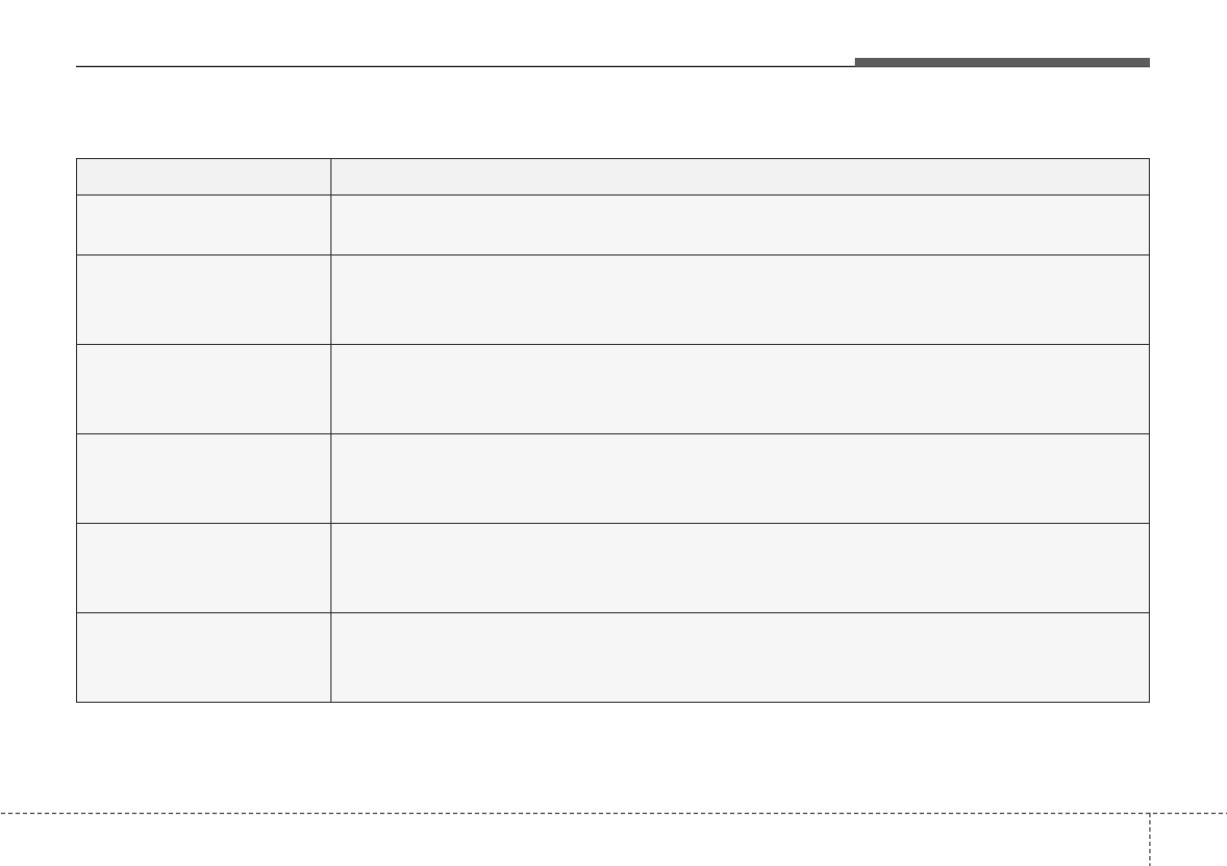
1. Driver Assistance (if equipped)
Items
Explanation
• Normal/Late
Warning Timing
To select the Warning Timing.
• Leading Vehicle Departure Alert/Inattentive Driving Warning
Driver Attention Warning
To select the function.
❈ For more details, refer to “Driver Attention Warning (DAW)” in chapter 5.
• Active Assist/Warning Only/Off
Forward Safety
To select the function.
❈ For more details, refer to “Forward Collision-Avoidance Assist (FCA)” in chapter 5.
• Standard LKA/Lane Departure Warning/Off
Lane Safety
To select the function.
❈ For more details, refer to “Lane Keeping Assist (LKA)” in chapter 5.
• Warning Only/Off
Blind-Spot Safety
To select the function.
❈ For more details, refer to “Blind-Spot Collision Warning (BCW)” in chapter 5.
• Rear Cross-Traffic Safety
Parking Safety
To select the function.
❈ For more details, refer to “Rear Cross-Traffic Collision Warning (RCCW)” in chapter 5.
❈ The information provided may differ depending on which functions are applicable to your vehicle.
4
67
Features of your vehicle
2. Lights (if equipped)
Items
Explanation
• Off : The one touch turn signal function will be deactivated.
•
3, 5, 7 Flashes : The turn signal indicator will blink 3, 5, or 7 times when the turn signal lever is
One Touch Turn Signal
moved slightly.
❈ For more details, refer to “Lighting” in this chapter.
Headlight Delay
• To activate or deactivate the headlight delay function.
High Beam Assist
• To activate or deactivate High Beam Assist.
❈ The information provided may differ depending on which functions are applicable to your vehicle.
4
68
Features of your vehicle
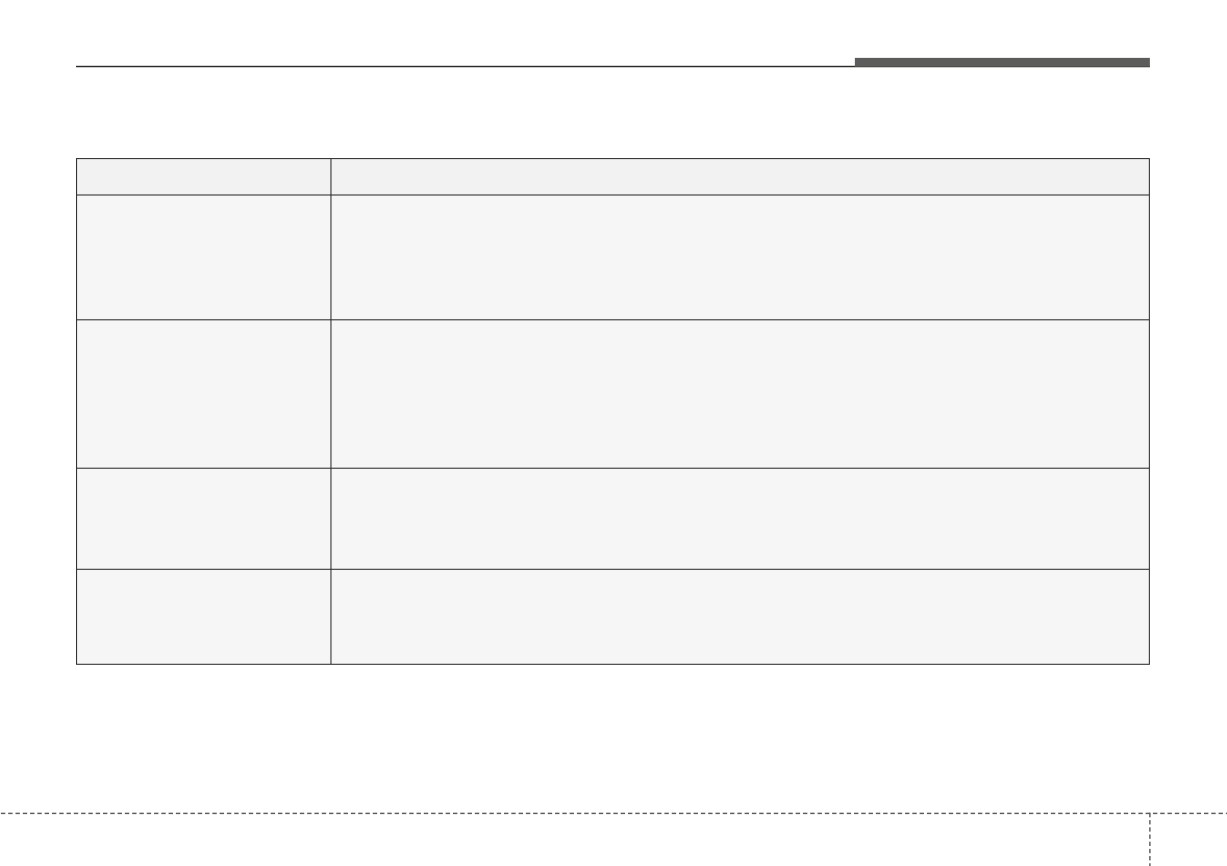
3. Door
Items
Explanation
• Enable on shift : All doors will be automatically locked if the vehicle is shifted from the P (Park)
position to the R (Reverse), N (Neutral), or D (Drive) position. (with the engine ON, it is activat-
Auto Lock
ed)
• Enable on speed: All doors will be automatically locked when the vehicle speed exceeds 9.3 mph
(15 km/h).
• On shift to P : All doors will be automatically unlocked if the gear is shifted to the P (Park) posi-
tion. (with the engine ON, it is activated)
Auto Unlock
• Vehicle off/On key out : All doors will be automatically unlocked when the ENGINE START/STOP
button is set to the OFF position or the ignition key is removed from the ignition switch.
• Off : The auto door unlock operation will be canceled.
• If this item is checked, the two press unlock will be activated.
2 Press Unlock
Press the door unlock button once to unlock the driver's door, and press the button once more
(if equipped)
within 4 seconds to unlock the rest of the doors.
• If this item is checked, the horn feedback will be activated.
Horn Feedback
After locking the door by pressing the lock button on the transmitter, if you press the lock button
(if equipped)
again within 4 seconds, the warning sound will operate once to indicate that all doors are locked.
❈ The information provided may differ depending on which functions are applicable to your vehicle.
4
69
Features of your vehicle
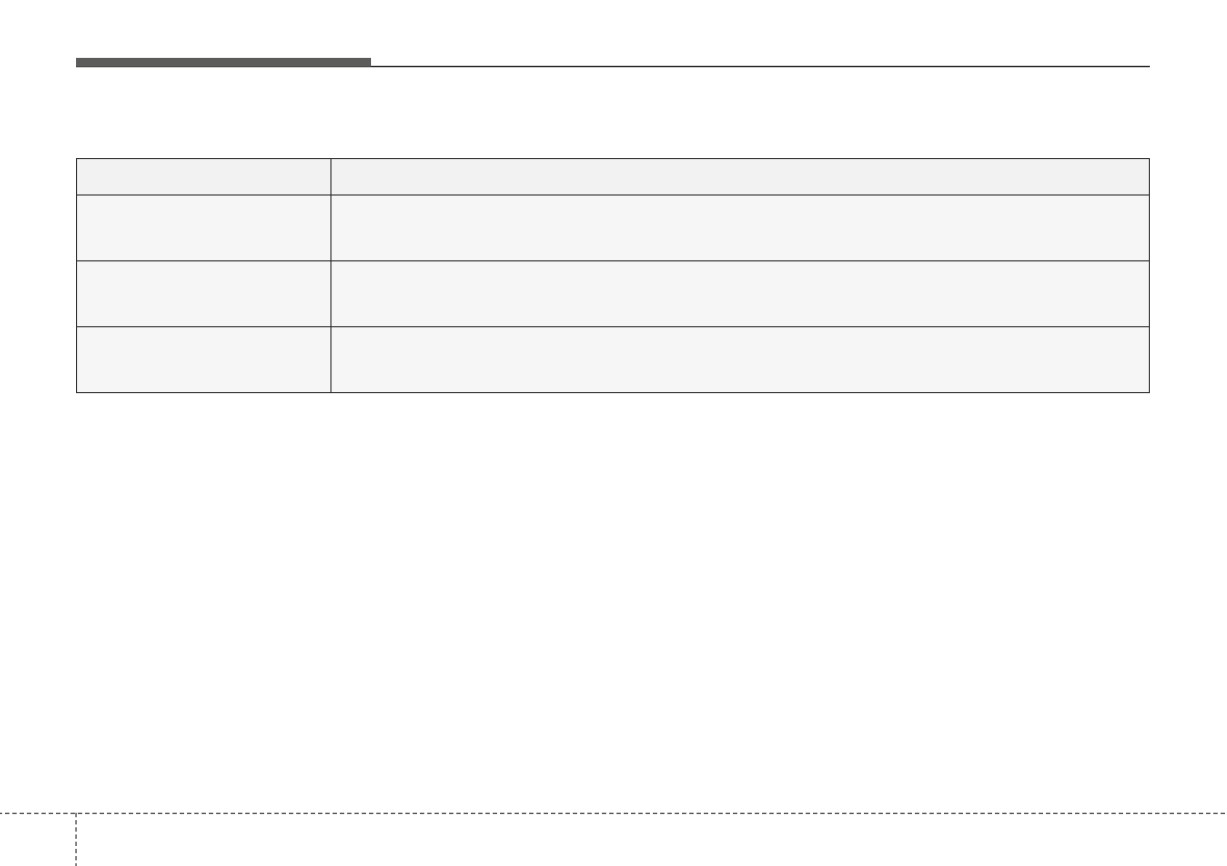
4. Convenience (if equipped)
Items
Explanation
Rear Occupant Alert
• If this item is checked, the Rear Occupant Alert will be activated.
Wiper/Lights Display
• If this item is checked, the Wiper/Lights Display will be activated.
Icy road warning
• If this item is checked, the Icy road warning display will be activated.
❈ The information provided may differ depending on which functions are applicable to your vehicle.
4
70
Features of your vehicle
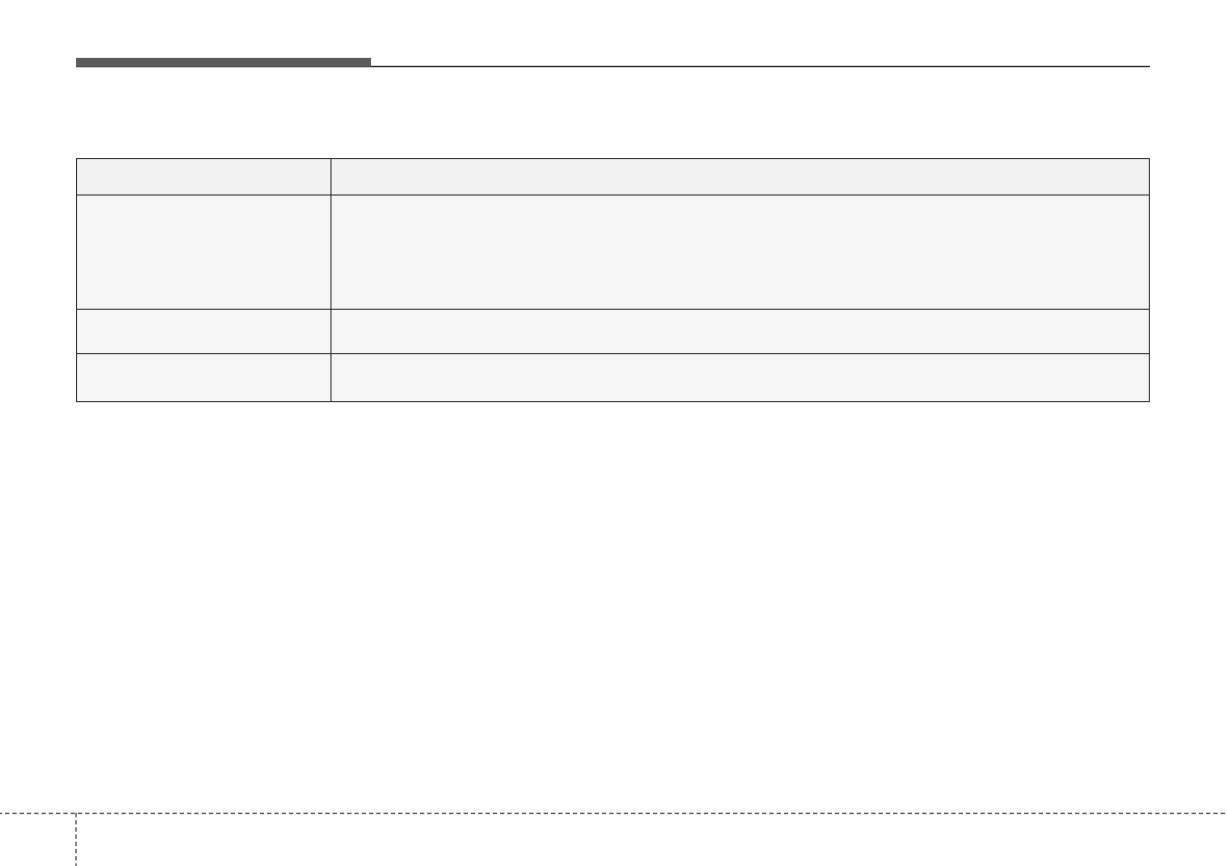
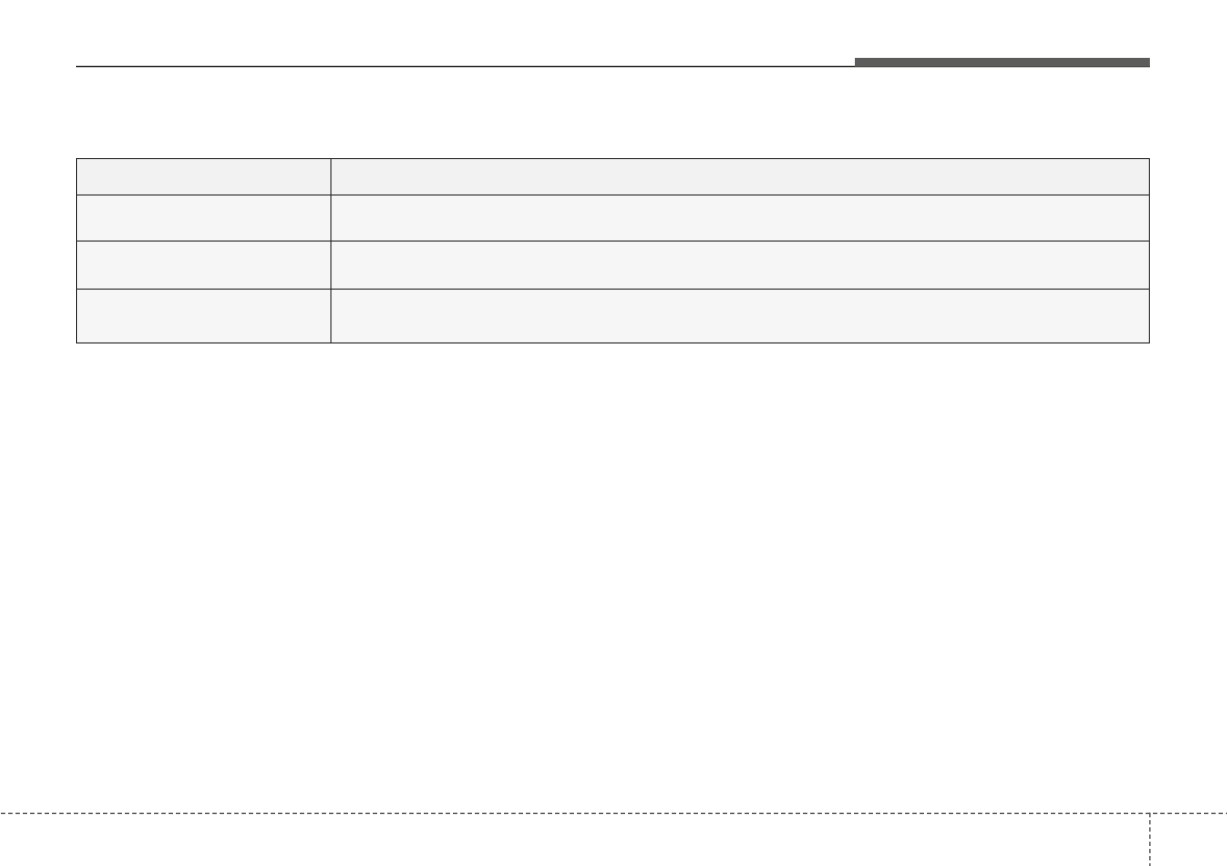
5. Service Interval (if equipped)
Items
Explanation
Enable Service Interval
• If this item is checked, the Service Interval function will be activated.
Adjust Interval
• If the service interval menu is activated, you may adjust the time and distance.
Reset
• To reset the service interval function.
✽ NOTICE
To use the service interval menu, consult an authorized Kia dealer.
If the service interval is activated and the time and distance is adjusted, messages are displayed in the following sit-
uations each time the vehicle is turned on.
- Service in: Displayed to inform the driver the remaining mileage and days to service.
- Service required: Displayed when the mileage and days to service has been reached or passed.
If any of the following conditions occur, the mileage and number of days to service may be incorrect.
- The battery cable is disconnected.
- The battery is discharged.
4
71
Features of your vehicle
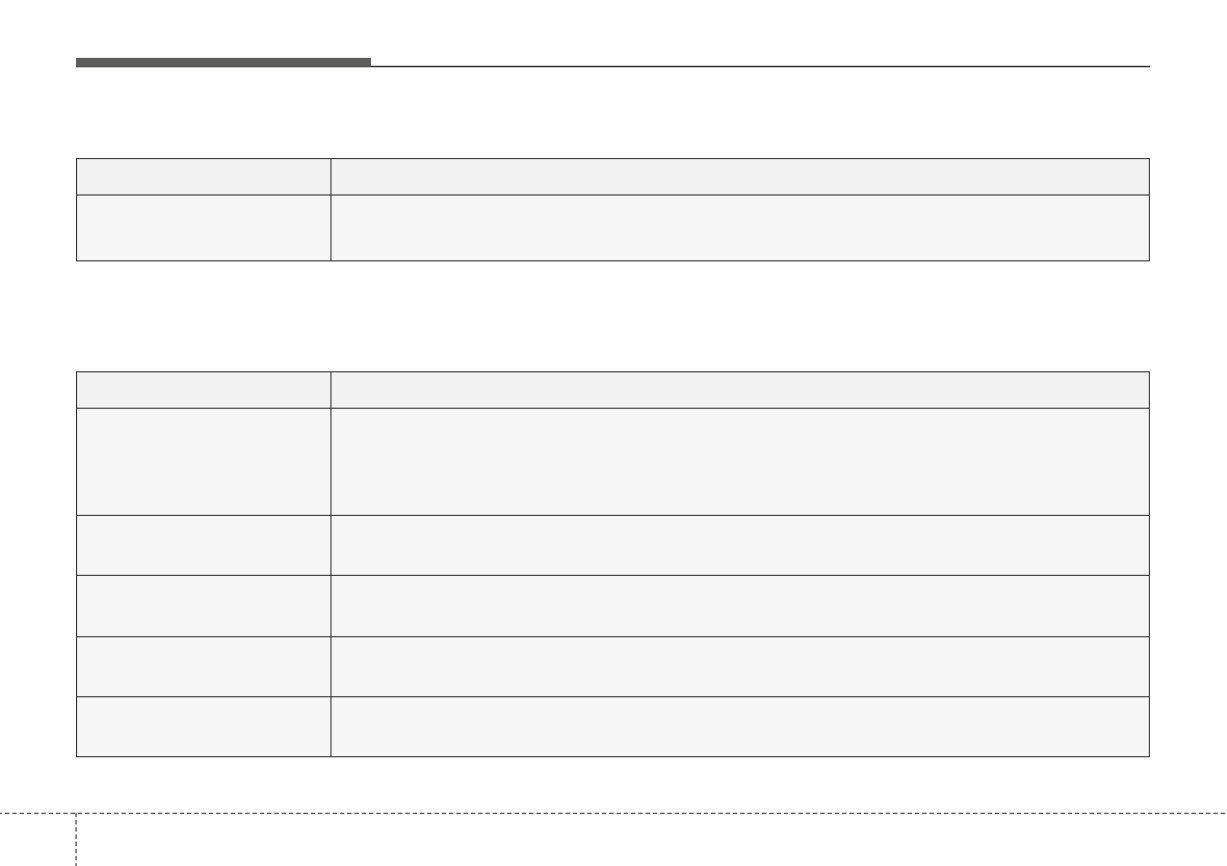
6. Theme Selection (if equipped)
Items
Explanation
• Theme A/Theme B/Theme C
Theme Selection
To select the theme of instrument cluster LCD.
7. Other (if equipped)
Items
Explanation
• Off: The average fuel economy will not reset.
• After Vehicle On/After refueling: The average fuel economy will reset automatically after vehicle
Fuel Econ. Reset
on/refueling.
❈ For more details, refer to “Trip Computer” in this chapter.
• km/h, MPH
Speed Unit
To select Speed unit.
• US gallon, UK gallon
Fuel Econ. Unit
To select the Fuel economy unit.
•
°C, °F
Temperature Unit
To select the Temperature unit.
Tire Pressure Unit
• psi, kPa, bar
(if equipped)
To select the Tire Pressure Unit.
❈ The information provided may differ depending on which functions are applicable to your vehicle.
4
72
Features of your vehicle
8. Language (if equipped)
Items
Explanation
Language
• To select language.
9. Reset
Items
Explanation
You can reset the menus in the User Settings mode. All menus in the User Settings mode are reset
Reset
to factory settings, except language and service interval.
4 73
Features of your vehicle
Warning messages (for type B
Door, hood, trunk (liftgate) open
Lights mode (if equipped)
cluster)
Warning messages appear on the
LCD to warn the driver. It is located in
the center of the instrument cluster.
The warning message may appear
differently depending on the type of
instrument cluster and some may not
show the warning message at all.
The warning message is shown in
either symbol, symbol and text, or
text type only.
OYB040559L
OYB040571L
•
This warning is displayed indicat-
This indicator displays which exterior
ing which door, the hood, or the
light is selected using the lighting
trunk (liftgate) is open.
control.
You can activate or deactivate
Wiper/Lights Display function from
the User Settings mode in the cluster
LCD display.
4
74
Features of your vehicle
Wiper mode (if equipped)
Engine Overheated
Low key battery (for smart key
This warning message illuminates
system)
when the engine coolant tempera-
• This warning message illuminates
ture is above
248°F (120°C). This
if the battery of the smart key is
means that the engine is overheated
discharged when the ENGINE
and may be damaged.
START/STOP button changes to
If your vehicle is overheated, refer to
the OFF position.
“Overheating” in chapter 6.
Press brake pedal to start engine
Shift to P (for smart key system)
(for smart key system)
• This warning message illuminates
• This warning message illuminates
if you try to turn off the engine with-
if the ENGINE START/STOP but-
OYB040573L
out the shift lever in P (Park) posi-
ton changes to the ACC position
This indicator displays which wiper
tion.
twice by pressing the button
speed is selected using the wiper
repeatedly without depressing the
• At this time, the ENGINE
control.
brake pedal.
START/STOP button turns to the
You can activate or deactivate
ACC position
(If you press the
• It means that you should depress
Wiper/Lights Display function from
ENGINE START/STOP button
the brake pedal to start the engine.
the User Settings mode in the cluster
once more, it will turn to the ON
LCD display.
position).
4
75
Features of your vehicle
Key not in vehicle (for smart key
Press START button again (for
Check BRAKE SWITCH fuse (for
system)
smart key system)
smart key system)
• This warning message illuminates
• This warning message illuminates
•
This warning message illuminates
if the smart key is not in the vehicle
if you can not operate the ENGINE
if the brake switch fuse is discon-
when you press the ENGINE
START/STOP button when there is
nected.
START/STOP button.
a problem with the ENGINE
•
It means that you should replace
START/STOP button system.
• It means that you should always
the fuse with a new one. If that is
have the smart key with you.
• It means that you could start the
not possible, you can start the
engine by pressing the ENGINE
engine by pressing the ENGINE
START/STOP button once more.
START/STOP button for
10
sec-
Key not detected (for smart key
onds in the ACC position.
• If the warning illuminates each
system)
time you press the ENGINE
• This warning message illuminates
START/STOP button, have your
if the smart key is not detected
vehicle inspected by an authorized
when you press the ENGINE
Kia dealer.
START/STOP button.
Press START button with key (for
smart key system)
• This warning message illuminates
if
you press the ENGINE
START/STOP button while the
warning message “Key not detect-
ed” is illuminating.
• At this time, the immobilizer indica-
tor light blinks.
4
76
Features of your vehicle
Shift to P or N to start engine (for
Check headlight LED
smart key system)
(if equipped)
• This warning message illuminates
• This warning message is displayed
if you try to start the engine with
if there is a problem with the LED
the shift lever not in the P (Park) or
headlight.
N (Neutral) position.
In this case, have your vehicle
inspected by an authorized Kia deal-
er.
✽ NOTICE
You can start the engine with the
shift lever in the N (Neutral) posi-
tion. But, for your safety, we recom-
mend that you start the engine with
the shift lever in the P (Park) posi-
tion.
4
77
Features of your vehicle
WARNING AND INDICATOR LIGHTS
Warning lights
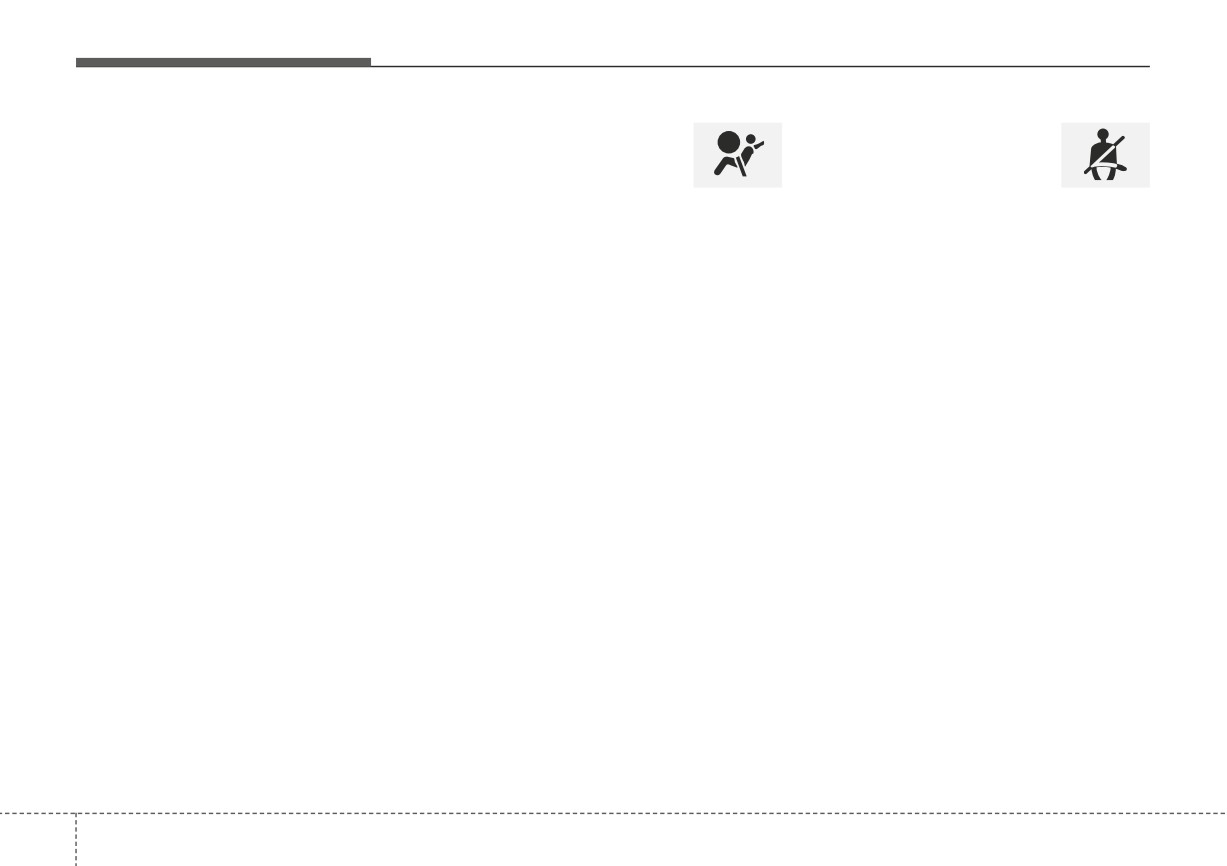
Air bag Warning Light
Seat Belt Warning Light
✽ NOTICE - Warning lights
This warning light illuminates:
This warning light informs the driver
Make sure that all warning lights
that the seat belt is not fastened.
are OFF after starting the engine. If
• Once you set the ignition switch or
any light is still ON, this indicates a
ENGINE START/STOP button to
situation that needs attention.
the ON position.
❈ For more details, refer to the “Seat
- It illuminates for approximately 6
Belts” in chapter 3.
seconds and then goes off.
• When there is a malfunction with
the SRS.
In this case, have your vehicle
inspected by an authorized Kia
dealer.
4
78
Features of your vehicle
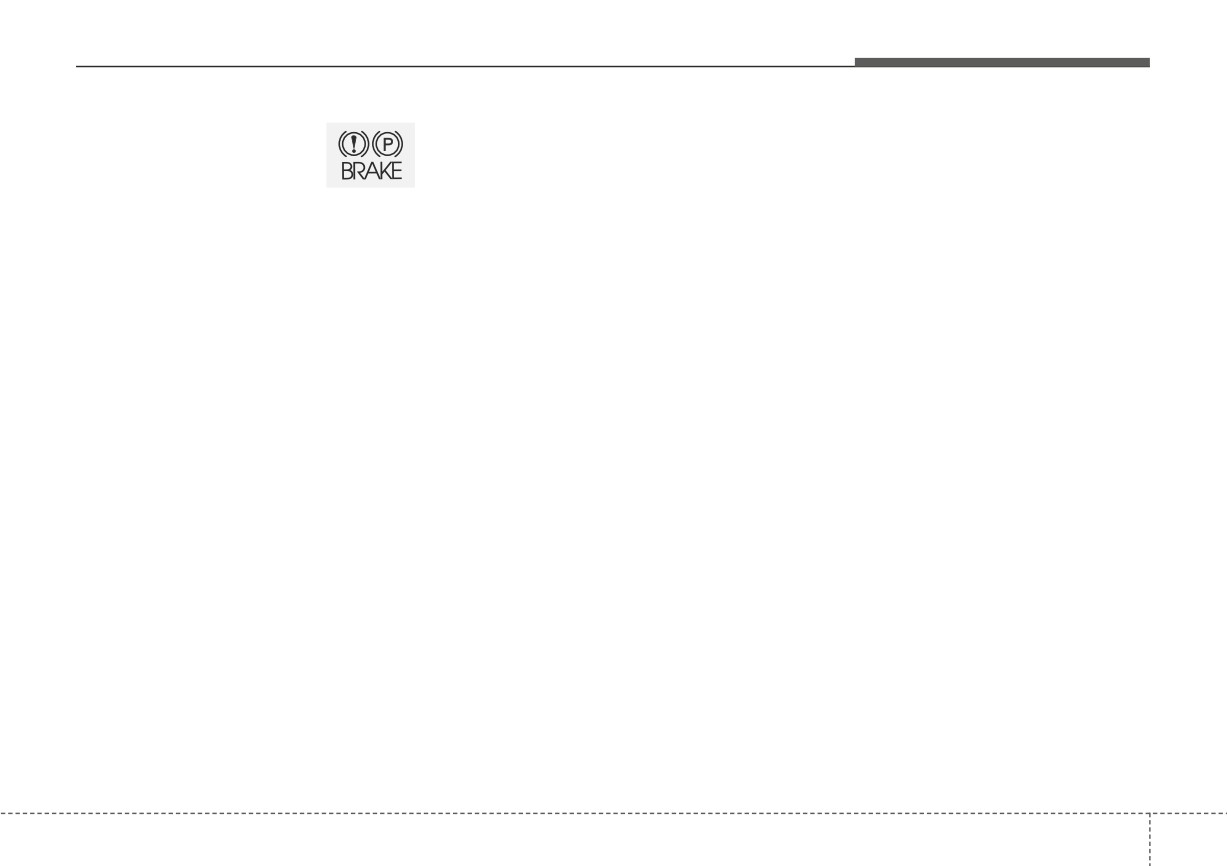
Parking Brake & Brake
If the brake fluid level in the reservoir
Dual-diagonal braking system
Fluid Warning Light
is low:
Your vehicle is equipped with dual-
1.Drive carefully to the nearest safe
diagonal braking systems. This
location and stop your vehicle.
means you still have braking on two
This warning light illuminates:
wheels even if one of the dual sys-
2.With the engine stopped, check the
•
Once you set the ignition switch or
tems should fail.
brake fluid level immediately and
ENGINE START/STOP button to
add fluid as required
(For more
With only one of the dual systems
the ON position.
details, refer to "Brake Fluid" in
working, greater pedal pressure will
- It illuminates for approximately 3
chapter 7).
be required to stop the vehicle.
seconds
Then check all brake components
Also, the vehicle will require
•
When the parking brake is applied.
for fluid leaks. If any leak on the
increased stopping distance with
•
When the brake fluid level in the
brake system is still found, the
only a portion of the brake system
reservoir is low.
warning light remains on, or the
working.
- If the warning light illuminates
brakes do not operate properly, do
If the brakes fail while you are driv-
with the parking brake released, it
not drive the vehicle.
ing, shift to a lower gear for addition-
indicates the brake fluid level in
In this case, have your vehicle
al engine braking and stop the vehi-
reservoir is low.
towed to an authorized Kia dealer
cle as soon as it is safe to do so.
and inspected.
Driving the vehicle with a warning
light ON is dangerous. If the Parking
Brake & Brake Fluid Warning Light
illuminates with the parking brake
released, it indicates that the brake
fluid level is low.
In this case, have your vehicle inspect-
ed by an authorized Kia dealer.
4
79