ISO 32000-1 Document management — Portable document format — Part 1: PDF 1.7 - page 2
EXAMPLE 1
The following shows an image that was compressed using the JBIG2 compression method and then
encoded in ASCII hexadecimal representation. Since the JBIG2 bit stream contains global segments,
these segments are placed in a separate PDF stream, as indicated by the JBIG2Globals filter parameter.
5 0 obj
<< /Type /XObject
/Subtype /Image
/Width 52
/Height 66
/ColorSpace /DeviceGray
/BitsPerComponent 1
/Length 224
/Filter
[ /ASCIIHexDecode /JBIG2Decode ]
/DecodeParms [ null << /JBIG2Globals 6 0 R >> ]
>>
stream
000000013000010000001300000034000000420000000000
00000040000000000002062000010000001e000000340000
004200000000000000000200100000000231db51ce51ffac >
endstream
endobj
6 0 obj
<< /Length 126
/Filter
/ASCIIHexDecode
>>
stream
0000000000010000000032000003fffdff02fefefe000000
01000000012ae225aea9a5a538b4d9999c5c8e56ef0f872
7f2b53d4e37ef795cc5506dffac >
endstream
endobj
The JBIG2 bit stream for this example is as follows:
EXAMPLE 2
97 4A 42 32 0D 0A 1A 0A 01 00 00 00 01 00 00 00 00 00 01
00
00 00 00 32
00 00 03 FF FD FF 02 FE FE FE 00 00 00 01 00 00 00 01 2A E2 25 AE A9 A5
A5 38 B4 D9 99 9C 5C 8E 56 EF 0F 87 27 F2 B5 3D 4E 37 EF 79 5C C5 50 6D
FF AC 00 00 00 01 30 00 01 00 00 00 13 00 00 00 34 00 00 00 42 00 00 00
00 00 00 00 00 40 00 00 00 00 00 02 06 20 00 01 00 00 00 1E 00 00 00 34
00 00 00 42 00 00 00 00 00 00 00 00 02 00 10 00 00 00 02 31 DB 51 CE 51
FF AC 00 00 00 03 31 00 01 00 00 00 00 00 00 00 04 33 01 00 00 00 00
This bit stream is made up of the following parts (in the order listed):
a) The JBIG2 file header
97 4A 42 32 0D 0A 1A 0A 01 00 00 00 01
Since the JBIG2 file header shall not used in PDF, this header is not placed in the JBIG2 stream object and
is discarded.
b) The first JBIG2 segment (segment 0)—in this case, the symbol dictionary segment
00 00 00 00 00 01 00 00 00 00 32 00 00 03 FF FD FF 02 FE FE FE 00 00 00
01 00 00 00 01 2A E2 25 AE A9 A5 A5 38 B4 D9 99 9C 5C 8E 56 EF 0F 87
27 F2 B5 3D 4E 37 EF 79 5C C5 50 6D FF AC
This is a global segment (segment page association = 0) and so shall be placed in the JBIG2Globals
stream.
33
c) The page information segment
00 00 00 01 30 00 01 00 00 00 13 00 00 00 34 00 00 00 42 00 00 00 00
00 00 00 00 40 00 00
and the immediate text region segment
00 00 00 02 06 20 00 01 00 00 00 1E 00 00 00 34 00 00 00 42 00 00 00
00 00 00 00 00 02 00 10 00 00 00 02 31 DB 51 CE 51 FF AC
These two segments constitute the contents of the JBIG2 page and shall be placed in the PDF XObject
representing this image.
d) The end-of-page segment
00 00 00 03 31 00 01 00 00 00 00
and the end-of-file segment
00 00 00 04 33 01 00 00 00 00
Since these segments shall not be used in PDF, they are discarded.
The resulting PDF image object, then, contains the page information segment and the immediate text region
segment and refers to a JBIG2Globals stream that contains the symbol dictionary segment.
7.4.8
DCTDecode Filter
The DCTDecode filter decodes grayscale or colour image data that has been encoded in the JPEG baseline
format. See Adobe Technical Note #5116 for additional information about the use of JPEG “markers.”
NOTE 1
JPEG stands for the Joint Photographic Experts Group, a group within the International Organization for
Standardization that developed the format; DCT stands for discrete cosine transform, the primary technique
used in the encoding.
JPEG encoding is a lossy compression method, designed specifically for compression of sampled continuous-
tone images and not for general data compression.
Data to be encoded using JPEG shall consist of a stream of image samples, each consisting of one, two, three,
or four colour components. The colour component values for a particular sample shall appear consecutively.
Each component value shall occupy a byte.
During encoding, several parameters shall control the algorithm and the information loss. The values of these
parameters, which include the dimensions of the image and the number of components per sample, are entirely
under the control of the encoder and shall be stored in the encoded data. DCTDecode may obtain the
parameter values it requires directly from the encoded data. However, in one instance, the parameter need not
be present in the encoded data but shall be specified in the filter parameter dictionary; see Table 13.
NOTE 2
The details of the encoding algorithm are not presented here but are in the ISO standard and in JPEG: Still
Image Data Compression Standard, by Pennebaker and Mitchell (see the Bibliography). Briefly, the JPEG
algorithm breaks an image up into blocks that are 8 samples wide by 8 samples high. Each colour component
in an image is treated separately. A two-dimensional DCT is performed on each block. This operation produces
64 coefficients, which are then quantized. Each coefficient may be quantized with a different step size. It is this
quantization that results in the loss of information in the JPEG algorithm. The quantized coefficients are then
compressed.
34

Table 13 - Optional parameter for the DCTDecode filter
Key
Type
Value
ColorTransform
integer
(Optional) A code specifying the transformation that shall be
performed on the sample values:
0 No transformation.
1 If the image has three colour components, RGB values shall be
transformed to YUV before encoding and from YUV to RGB after
decoding. If the image has four components, CMYK values shall
be transformed to YUVK before encoding and from YUVK to
CMYK after decoding. This option shall be ignored if the image has
one or two colour components.
If the encoding algorithm has inserted the Adobe-defined markera
code in the encoded data indicating the ColorTransform value, then
the colours shall be transformed, or not, after the DCT decoding has
been performed according to the value provided in the encoded data
and the value of this dictionary entry shall be ignored. If the Adobe-
defined marker code in the encoded data indicating the
ColorTransform value is not present then the value specified in this
dictionary entry will be used. If the Adobe-defined marker code in the
encoded data indicating the ColorTransform value is not present and
this dictionary entry is not present in the filter dictionary then the
default value of ColorTransform shall be 1 if the image has three
components and 0 otherwise.
a
Parameters that control the decoding process as well as other metadata is embedded within the encoded data
stream using a notation referred to as “markers”. When it defined the use of JPEG images within PostScript data
streams, Adobe System Incorporated defined a particular set of rules pertaining to which markers are to be
recognized, which are to be ignored and which are considered errors. A specific Adobe-defined marker was also
introduced. The exact rules for producing and consuming DCT encoded data within PostScript are provide in
Adobe Technical Note #5116 (reference). PDF DCT Encoding shall exactly follow those rules established by
Adobe for PostScript.
NOTE 3
The encoding algorithm can reduce the information loss by making the step size in the quantization smaller at
the expense of reducing the amount of compression achieved by the algorithm. The compression achieved by
the JPEG algorithm depends on the image being compressed and the amount of loss that is acceptable. In
general, a compression of
15 : 1 can be achieved without perceptible loss of information, and
30 : 1
compression causes little impairment of the image.
NOTE 4
Better compression is often possible for colour spaces that treat luminance and chrominance separately than
for those that do not. The RGB-to-YUV conversion provided by the filters is one attempt to separate luminance
and chrominance; it conforms to CCIR recommendation 601-1. Other colour spaces, such as the CIE 1976
L*a*b* space, may also achieve this objective. The chrominance components can then be compressed more
than the luminance by using coarser sampling or quantization, with no degradation in quality.
In addition to the baseline JPEG format, beginning with PDF 1.3, the DCTDecode filter shall support the
progressive JPEG extension. This extension does not add any entries to the DCTDecode parameter
dictionary; the distinction between baseline and progressive JPEG shall be represented in the encoded data.
NOTE 5
There is no benefit to using progressive JPEG for stream data that is embedded in a PDF file. Decoding
progressive JPEG is slower and consumes more memory than baseline JPEG. The purpose of this feature is
to enable a stream to refer to an external file whose data happens to be already encoded in progressive JPEG.
7.4.9
JPXDecode Filter
The JPXDecode filter (PDF 1.5) decodes data that has been encoded using the JPEG2000 compression
method, an ISO standard for the compression and packaging of image data.
NOTE 1
JPEG2000 defines a wavelet-based method for image compression that gives somewhat better size reduction
than other methods such as regular JPEG or CCITT. Although the filter can reproduce samples that are
losslessly compressed.
35
This filter shall only be applied to image XObjects, and not to inline images (see 8.9, "Images"). It is suitable
both for images that have a single colour component and for those that have multiple colour components. The
colour components in an image may have different numbers of bits per sample. Any value from 1 to 38 shall be
allowed.
NOTE 2
From a single JPEG2000 data stream, multiple versions of an image may be decoded. These different
versions form progressions along four degrees of freedom: sampling resolution, colour depth, band, and
location. For example, with a resolution progression, a thumbnail version of the image may be decoded from
the data, followed by a sequence of other versions of the image, each with approximately four times as many
samples (twice the width times twice the height) as the previous one. The last version is the full-resolution
image.
NOTE 3
Viewing and printing applications may gain performance benefits by using the resolution progression. If the
full-resolution image is densely sampled, the application may be able to select and decode only the data
making up a lower-resolution version, thereby spending less time decoding. Fewer bytes need be processed, a
particular benefit when viewing files over the Web. The tiling structure of the image may also provide benefits if
only certain areas of an image need to be displayed or printed.
NOTE 4
Information on these progressions is encoded in the data; no decode parameters are needed to describe them.
The decoder deals with any progressions it encounters to deliver the correct image data. Progressions that are
of no interest may simply have performance consequences.
The JPEG2000 specifications define two widely used formats, JP2 and JPX, for packaging the compressed
image data. JP2 is a subset of JPX. These packagings contain all the information needed to properly interpret
the image data, including the colour space, bits per component, and image dimensions. In other words, they
are complete descriptions of images (as opposed to image data that require outside parameters for correct
interpretation). The JPXDecode filter shall expect to read a full JPX file structure—either internal to the PDF file
or as an external file.
NOTE 5
To promote interoperability, the specifications define a subset of JPX called JPX baseline (of which JP2 is also
a subset). The complete details of the baseline set of JPX features are contained in ISO/IEC 15444-2,
Information Technology—JPEG 2000 Image Coding System: Extensions (see the Bibliography). See also
Data used in PDF image XObjects shall be limited to the JPX baseline set of features, except for enumerated
colour space 19 (CIEJab). In addition, enumerated colour space 12 (CMYK), which is part of JPX but not JPX
baseline, shall be supported in a PDF.
A JPX file describes a collection of channels that are present in the image data. A channel may have one of
three types:
•
An ordinary channel contains values that, when decoded, shall become samples for a specified colour
component.
•
An opacity channel provides samples that shall be interpreted as raw opacity information.
•
A premultiplied opacity channel shall provide samples that have been multiplied into the colour samples of
those channels with which it is associated.
Opacity and premultiplied opacity channels shall be associated with specific colour channels. There shall not
be more than one opacity channel (of either type) associated with a given colour channel.
EXAMPLE
It is possible for one opacity channel to apply to the red samples and another to apply to the green and
blue colour channels of an RGB image.
NOTE 6
The method by which the opacity information is to be used is explicitly not specified, although one possible
method shows a normal blending mode.
In addition to using opacity channels for describing transparency, JPX files also have the ability to specify
chroma-key transparency. A single colour may be specified by giving an array of values, one value for each
colour channel. Any image location that matches this colour shall be considered to be completely transparent.
36
Images in JPX files may have one of the following colour spaces:
•
A predefined colour space, chosen from a list of enumerated colour spaces. (Two of these are actually
families of spaces and parameters are included.)
•
A restricted ICC profile. These are the only sorts of ICC profiles that are allowed in JP2 files.
•
An input ICC profile of any sort defined by ICC-1.
•
A vendor-defined colour space.
More than one colour space may be specified for an image, with each space being tagged with a precedence
and an approximation value that indicates how well it represents the preferred colour space. In addition, the
image’s colour space may serve as the foundation for a palette of colours that are selected using samples
coming from the image’s data channels: the equivalent of an Indexed colour space in PDF.
There are other features in the JPX format beyond describing a simple image. These include provisions for
describing layering and giving instructions on composition, specifying simple animation, and including generic
XML metadata (along with JPEG2000-specific schemas for such data). Relevant metadata should be
replicated in the image dictionary’s Metadata stream in XMP format (see 14.3.2, "Metadata Streams").
When using the JPXDecode filter with image XObjects, the following changes to and constraints on some
entries in the image dictionary shall apply (see 8.9.5, "Image Dictionaries" for details on these entries):
•
Width and Height shall match the corresponding width and height values in the JPEG2000 data.
•
ColorSpace shall be optional since JPEG2000 data contain colour space specifications. If present, it shall
determine how the image samples are interpreted, and the colour space specifications in the JPEG2000
data shall be ignored. The number of colour channels in the JPEG2000 data shall match the number of
components in the colour space; a conforming writer shall ensure that the samples are consistent with the
colour space used.
•
Any colour space other than Pattern may be specified. If an Indexed colour space is used, it shall be
subject to the PDF limit of 256 colours. If the colour space does not match one of JPX’s enumerated colour
spaces (for example, if it has two colour components or more than four), it should be specified as a vendor
colour space in the JPX data.
•
If ColorSpace is not present in the image dictionary, the colour space information in the JPEG2000 data
shall be used. A JPEG2000 image within a PDF shall have one of: the baseline JPX colorspaces; or
enumerated colorspace 19 (CIEJab) or enumerated colorspace 12 (CMYK); or at least one ICC profile that
is valid within PDF. Conforming PDF readers shall support the JPX baseline set of enumerated colour
spaces; they shall also be responsible for dealing with the interaction between the colour spaces and the
bit depth of samples.
•
If multiple colour space specifications are given in the JPEG2000 data, a conforming reader should
attempt to use the one with the highest precedence and best approximation value. If the colour space is
given by an unsupported ICC profile, the next lower colour space, in terms of precedence and
approximation value, shall be used. If no supported colour space is found, the colour space used shall be
DeviceGray, DeviceRGB, or DeviceCMYK, depending on the whether the number of channels in the
JPEG2000 data is 1,3, or 4.
•
SMaskInData specifies whether soft-mask information packaged with the image samples shall be used
(see 11.6.5.3, "Soft-Mask Images"); if it is, the SMask entry shall not be present. If SMaskInData is
nonzero, there shall be only one opacity channel in the JPEG2000 data and it shall apply to all colour
channels.
•
Decode shall be ignored, except in the case where the image is treated as a mask; that is, when
ImageMask is true. In this case, the JPEG2000 data shall provide a single colour channel with 1-bit
samples.
37

7.4.10
Crypt Filter
The Crypt filter (PDF 1.5) allows the document-level security handler (see 7.6, "Encryption") to determine
which algorithms should be used to decrypt the input data. The Name parameter in the decode parameters
dictionary for this filter (see Table 14) shall specify which of the named crypt filters in the document (see 7.6.5,
"Crypt Filters") shall be used. The Crypt filter shall be the first filter in the Filter array entry.
Table 14 - Optional parameters for Crypt filters
Key
Type
Value
Type
name
(Optional) If present, shall be CryptFilterDecodeParms for a Crypt
filter decode parameter dictionary.
Name
name
(Optional) The name of the crypt filter that shall be used to decrypt this
stream. The name shall correspond to an entry in the CF entry of the
encryption dictionary (see Table 20) or one of the standard crypt filters
(see Table 26).
Default value: Identity.
In addition, the decode parameters dictionary may include entries that are private to the security handler.
Security handlers may use information from both the crypt filter decode parameters dictionary and the crypt
filter dictionaries (see Table 25) when decrypting data or providing a key to decrypt data.
NOTE
When adding private data to the decode parameters dictionary, security handlers should name these entries in
conformance with the PDF name registry (see Annex E).
If a stream specifies a crypt filter, then the security handler does not apply "Algorithm 1: Encryption of data
using the RC4 or AES algorithms" in 7.6.2, "General Encryption Algorithm," to the key prior to decrypting the
stream. Instead, the security handler shall decrypt the stream using the key as is. Sub-clause 7.4, "Filters,"
explains how a stream specifies filters.
7.5
File Structure
7.5.1
General
This sub-clause describes how objects are organized in a PDF file for efficient random access and incremental
update. A basic conforming PDF file shall be constructed of following four elements (see Figure 2):
•
A one-line header identifying the version of the PDF specification to which the file conforms
•
A body containing the objects that make up the document contained in the file
•
A cross-reference table containing information about the indirect objects in the file
•
A trailer giving the location of the cross-reference table and of certain special objects within the body of the
file
This initial structure may be modified by later updates, which append additional elements to the end of the file;
see 7.5.6, "Incremental Updates," for details.
38

Header
Body
Cross-reference
table
Trailer
Figure 2 - Initial structure of a PDF file
As a matter of convention, the tokens in a PDF file are arranged into lines; see 7.2, "Lexical Conventions."
Each line shall be terminated by an end-of-line (EOL) marker, which may be a CARRIAGE RETURN (0Dh), a
LINE FEED (0Ah), or both. PDF files with binary data may have arbitrarily long lines.
NOTE
To increase compatibility with compliant programs that process PDF files, lines that are not part of stream
object data are limited to no more than 255 characters, with one exception. Beginning with PDF 1.3, the
Contents string of a signature dictionary (see 12.8, "Digital Signatures") is not subject to the restriction on line
length.
The rules described here are sufficient to produce a basic conforming PDF file. However, additional rules apply
to organizing a PDF file to enable efficient incremental access to a document’s components in a network
environment. This form of organization, called Linearized PDF, is described in Annex F.
7.5.2
File Header
The first line of a PDF file shall be a header consisting of the 5 characters
%PDF- followed by a version
number of the form 1.N, where N is a digit between 0 and 7.
A conforming reader shall accept files with any of the following headers:
%PDF-1. 0
%PDF-1. 1
%PDF-1. 2
%PDF-1. 3
%PDF-1. 4
%PDF-1. 5
%PDF-1. 6
%PDF-1. 7
Beginning with PDF 1.4, the Version entry in the document’s catalog dictionary (located via the Root entry in
the file’s trailer, as described in 7.5.5, "File Trailer"), if present, shall be used instead of the version specified in
the Header.
39
NOTE
This allows a conforming writer to update the version using an incremental update (see 7.5.6, "Incremental
Updates").
Under some conditions, a conforming reader may be able to process PDF files conforming to a later version
than it was designed to accept. New PDF features are often introduced in such a way that they can safely be
ignored by a conforming reader that does not understand them (see I.2, "PDF Version Numbers").
This part of ISO 32000 defines the Extensions entry in the document’s catalog dictionary. If present, it shall
identify any developer-defined extensions that are contained in this PDF file. See 7.12, “Extensions Dictionary”.
If a PDF file contains binary data, as most do (see 7.2, "Lexical Conventions"), the header line shall be
immediately followed by a comment line containing at least four binary characters—that is, characters whose
codes are 128 or greater. This ensures proper behaviour of file transfer applications that inspect data near the
beginning of a file to determine whether to treat the file’s contents as text or as binary.
7.5.3
File Body
The body of a PDF file shall consist of a sequence of indirect objects representing the contents of a document.
The objects, which are of the basic types described in 7.3, "Objects," represent components of the document
such as fonts, pages, and sampled images. Beginning with PDF 1.5, the body can also contain object streams,
each of which contains a sequence of indirect objects; see 7.5.7, "Object Streams."
7.5.4
Cross-Reference Table
The cross-reference table contains information that permits random access to indirect objects within the file so
that the entire file need not be read to locate any particular object. The table shall contain a one-line entry for
each indirect object, specifying the byte offset of that object within the body of the file. (Beginning with PDF 1.5,
some or all of the cross-reference information may alternatively be contained in cross-reference streams; see
7.5.8, "Cross-Reference Streams.")
NOTE 1
The cross-reference table is the only part of a PDF file with a fixed format, which permits entries in the table to
be accessed randomly.
The table comprises one or more cross-reference sections. Initially, the entire table consists of a single section
(or two sections if the file is linearized; see Annex F). One additional section shall be added each time the file is
incrementally updated (see 7.5.6, "Incremental Updates").
Each cross-reference section shall begin with a line containing the keyword xref. Following this line shall be
one or more cross-reference subsections, which may appear in any order. For a file that has never been
incrementally updated, the cross-reference section shall contain only one subsection, whose object numbering
begins at 0.
NOTE 2
The subsection structure is useful for incremental updates, since it allows a new cross-reference section to be
added to the PDF file, containing entries only for objects that have been added or deleted.
Each cross-reference subsection shall contain entries for a contiguous range of object numbers. The
subsection shall begin with a line containing two numbers separated by a SPACE (20h), denoting the object
number of the first object in this subsection and the number of entries in the subsection.
EXAMPLE 1
The following line introduces a subsection containing five objects numbered consecutively from 28 to 32.
28 5
A given object number shall not have an entry in more than one subsection within a single section.
Following this line are the cross-reference entries themselves, one per line. Each entry shall be exactly 20
bytes long, including the end-of-line marker. There are two kinds of cross-reference entries: one for objects that
are in use and another for objects that have been deleted and therefore are free. Both types of entries have
40
similar basic formats, distinguished by the keyword n (for an in-use entry) or f (for a free entry). The format of
an in-use entry shall be:
nnnnnnnnnn ggggg n eol
where:
nnnnnnnnnn shall be a 10-digit byte offset in the decoded stream
ggggg shall be a 5-digit generation number
n shall be a keyword identifying this as an in-use entry
eol shall be a 2-character end-of-line sequence
The byte offset in the decoded stream shall be a 10-digit number, padded with leading zeros if necessary,
giving the number of bytes from the beginning of the file to the beginning of the object. It shall be separated
from the generation number by a single SPACE. The generation number shall be a 5-digit number, also padded
with leading zeros if necessary. Following the generation number shall be a single SPACE, the keyword n, and
a 2-character end-of-line sequence consisting of one of the following: SP CR, SP LF, or CR LF. Thus, the
overall length of the entry shall always be exactly 20 bytes.
The cross-reference entry for a free object has essentially the same format, except that the keyword shall be f
instead of n and the interpretation of the first item is different:
nnnnnnnnnn ggggg f eol
where:
nnnnnnnnnn shall be the 10-digit object number of the next free object
ggggg shall be a 5-digit generation number
f shall be a keyword identifying this as a free entry
eol shall be a 2-character end-of-line sequence
There are two ways an entry may be a member of the free entries list. Using the basic mechanism the free
entries in the cross-reference table may form a linked list, with each free entry containing the object number of
the next. The first entry in the table (object number 0) shall always be free and shall have a generation number
of 65,535; it is shall be the head of the linked list of free objects. The last free entry (the tail of the linked list)
links back to object number 0. Using the second mechanism, the table may contain other free entries that link
back to object number 0 and have a generation number of 65,535, even though these entries are not in the
linked list itself.
Except for object number 0, all objects in the cross-reference table shall initially have generation numbers of 0.
When an indirect object is deleted, its cross-reference entry shall be marked free and it shall be added to the
linked list of free entries. The entry’s generation number shall be incremented by 1 to indicate the generation
number to be used the next time an object with that object number is created. Thus, each time the entry is
reused, it is given a new generation number. The maximum generation number is 65,535; when a cross-
reference entry reaches this value, it shall never be reused.
The cross-reference table (comprising the original cross-reference section and all update sections) shall
contain one entry for each object number from 0 to the maximum object number defined in the file, even if one
or more of the object numbers in this range do not actually occur in the file.
EXAMPLE 2
The following shows a cross-reference section consisting of a single subsection with six entries: four that
are in use (objects number 1, 2, 4, and 5) and two that are free (objects number 0 and 3). Object number
3 has been deleted, and the next object created with that object number is given a generation number of 7.
41
xref
0 6
0000000003 65535 f
0000000017 00000 n
0000000081 00000 n
0000000000 00007 f
0000000331 00000 n
0000000409 00000 n
EXAMPLE 3
The following shows a cross-reference section with four subsections, containing a total of five entries. The
first subsection contains one entry, for object number 0, which is free. The second subsection contains
one entry, for object number 3, which is in use. The third subsection contains two entries, for objects
number 23 and 24, both of which are in use. Object number 23 has been reused, as can be seen from the
fact that it has a generation number of 2. The fourth subsection contains one entry, for object number 30,
which is in use.
xref
0 1
0000000000 65535 f
3 1
0000025325 00000 n
23 2
0000025518 00002 n
0000025635 00000 n
30 1
0000025777 00000 n
See H.7, "Updating Example", for a more extensive example of the structure of a PDF file that has been
updated several times.
7.5.5
File Trailer
The trailer of a PDF file enables a conforming reader to quickly find the cross-reference table and certain
special objects. Conforming readers should read a PDF file from its end. The last line of the file shall contain
only the end-of-file marker, %%EOF. The two preceding lines shall contain, one per line and in order, the
keyword startxref and the byte offset in the decoded stream from the beginning of the file to the beginning of
the xref keyword in the last cross-reference section. The startxref line shall be preceded by the trailer
dictionary, consisting of the keyword trailer followed by a series of key-value pairs enclosed in double angle
brackets (<<… >>) (using LESS-THAN SIGNs (3Ch) and GREATER-THAN SIGNs (3Eh)). Thus, the trailer has
the following overall structure:
trailer
<< key1 value1
key2 value2
…
keyn valuen
>>
startxref
Byte_offset_of_last_cross-reference_section
%%EOF
42

Table 15 lists the contents of the trailer dictionary.
Table 15 - Entries in the file trailer dictionary
Key
Type
Value
Size
integer
(Required; shall not be an indirect reference) The total number of entries in
the file’s cross-reference table, as defined by the combination of the original
section and all update sections. Equivalently, this value shall be 1 greater
than the highest object number defined in the file.
Any object in a cross-reference section whose number is greater than this
value shall be ignored and defined to be missing by a conforming reader.
Prev
integer
(Present only if the file has more than one cross-reference section; shall be
an indirect reference) The byte offset in the decoded stream from the
beginning of the file to the beginning of the previous cross-reference section.
Root
dictionary
(Required; shall be an indirect reference) The catalog dictionary for the PDF
document contained in the file (see 7.7.2, "Document Catalog").
Encrypt
dictionary
(Required if document is encrypted; PDF 1.1) The document’s encryption
dictionary (see 7.6, "Encryption").
Info
dictionary
(Optional; shall be an indirect reference) The document’s information
dictionary (see 14.3.3, "Document Information Dictionary").
ID
array
(Required if an Encrypt entry is present; optional otherwise; PDF 1.1) An
array of two byte-strings constituting a file identifier
(see
14.4, "File
Identifiers") for the file. If there is an Encrypt entry this array and the two
byte-strings shall be direct objects and shall be unencrypted.
NOTE 1
Because the ID entries are not encrypted it is possible to check
the ID key to assure that the correct file is being accessed
without decrypting the file. The restrictions that the string be a
direct object and not be encrypted assure that this is possible.
NOTE 2
Although this entry is optional, its absence might prevent the file
from functioning in some workflows that depend on files being
uniquely identified.
NOTE 3
The values of the ID strings are used as input to the encryption
algorithm. If these strings were indirect, or if the ID array were
indirect, these strings would be encrypted when written. This
would result in a circular condition for a reader: the ID strings
must be decrypted in order to use them to decrypt strings,
including the ID strings themselves. The preceding restriction
prevents this circular condition.
NOTE
Table 19 defines an additional entry, XRefStm, that appears only in the trailer of hybrid-reference files,
described in 7.5.8.4, "Compatibility with Applications That Do Not Support Compressed Reference Streams."
EXAMPLE
This example shows a trailer for a file that has never been updated (as indicated by the absence of a Prev
entry in the trailer dictionary).
trailer
<< /Size 22
/Root 2 0 R
/Info
1 0 R
/ID [
< 81b14aafa313db63dbd6f981e49f94f4 >
< 81b14aafa313db63dbd6f981e49f94f4 >
]
>>
startxref
18799
%%EOF
43
7.5.6
Incremental Updates
The contents of a PDF file can be updated incrementally without rewriting the entire file. When updating a PDF
file incrementally, changes shall be appended to the end of the file, leaving its original contents intact.
NOTE 1
The main advantage to updating a file in this way is that small changes to a large document can be saved
quickly. There are additional advantages:
In certain contexts, such as when editing a document across an HTTP connection or using OLE embedding (a
Windows-specific technology), a conforming writer cannot overwrite the contents of the original file.
Incremental updates may be used to save changes to documents in these contexts.
NOTE 2
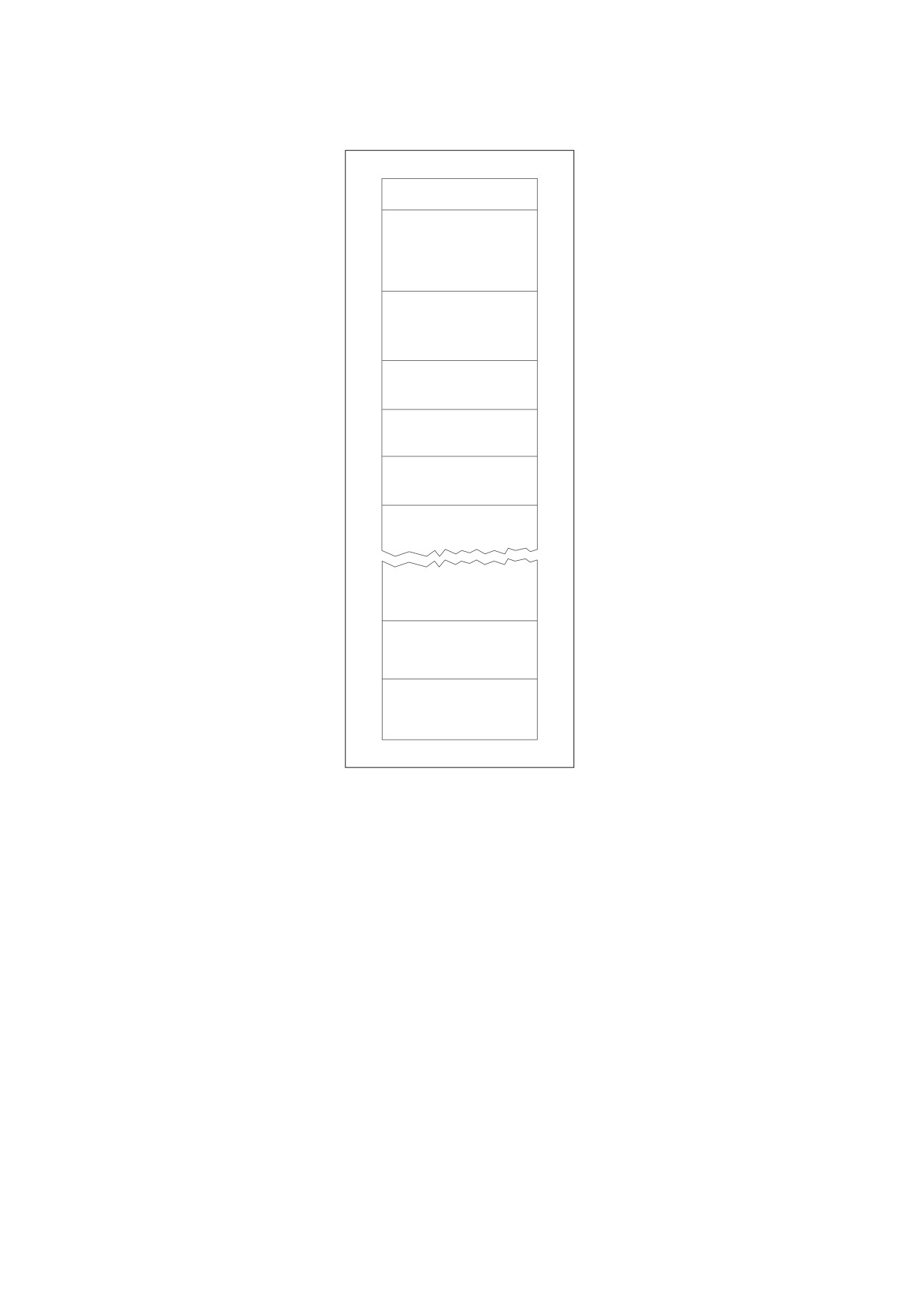
The resulting file has the structure shown in Figure 3. A complete example of an updated file is shown in H.7,
"Updating Example".
A cross-reference section for an incremental update shall contain entries only for objects that have been
changed, replaced, or deleted. Deleted objects shall be left unchanged in the file, but shall be marked as
deleted by means of their cross-reference entries. The added trailer shall contain all the entries except the Prev
entry (if present) from the previous trailer, whether modified or not. In addition, the added trailer dictionary shall
contain a Prev entry giving the location of the previous cross-reference section (see Table 15). Each trailer
shall be terminated by its own end-of-file (%%EOF) marker.
NOTE 3
As shown in Figure 3, a file that has been updated several times contains several trailers. Because updates
are appended to PDF files, a file may have several copies of an object with the same object identifier (object
number and generation number).
EXAMPLE
Several copies of an object can occur if a text annotation (see 12.5, "Annotations") is changed several
times and the file is saved between changes. Because the text annotation object is not deleted, it retains
the same object number and generation number as before. The updated copy of the object is included in
the new update section added to the file.
The update’s cross-reference section shall include a byte offset to this new copy of the object, overriding the
old byte offset contained in the original cross-reference section. When a conforming reader reads the file, it
shall build its cross-reference information in such a way that the most recent copy of each object shall be the
one accessed from the file.
In versions of PDF 1.4 or later a conforming writer may use the Version entry in the document’s catalog
dictionary (see 7.7.2, "Document Catalog") to override the version specified in the header. A conforming writer
may also need to update the Extensions dictionary, see 7.12, “Extensions Dictionary”, if the update either
deleted or added developer-defined extensions.
NOTE 4
The version entry enables the version to be altered when performing an incremental update.
44
Header
Original
body
Original
cross-reference
section
Original trailer
Body update 1
Cross-reference
section 1
Updated trailer 1
Body update n
Cross-reference
section n
Updated trailer n
Figure 3 - Structure of an updated PDF file
7.5.7
Object Streams
An object stream, is a stream object in which a sequence of indirect objects may be stored, as an alternative to
their being stored at the outermost file level.
NOTE 1
Object streams are first introduced in PDF 1.5. The purpose of object streams is to allow indirect objects other
than streams to be stored more compactly by using the facilities provided by stream compression filters.
NOTE 2
The term “compressed object” is used regardless of whether the stream is actually encoded with a
compression filter.
The following objects shall not be stored in an object stream:
•
Stream objects
•
Objects with a generation number other than zero
•
A document’s encryption dictionary (see 7.6, "Encryption")
•
An object representing the value of the Length entry in an object stream dictionary
45

•
In linearized files (see Annex F), the document catalog, the linearization dictionary, and page objects shall
not appear in an object stream.
NOTE 3
Indirect references to objects inside object streams use the normal syntax: for example, 14 0 R. Access to
these objects requires a different way of storing cross-reference information; see 7.5.8, "Cross-Reference
Streams." Use of compressed objects requires a PDF 1.5 conforming reader. However, compressed objects
can be stored in a manner that a PDF 1.4 conforming reader can ignore.
In addition to the regular keys for streams shown in Table 5, the stream dictionary describing an object stream
contains the following entries:
Table 16 - Additional entries specific to an object stream dictionary
key
type
description
Type
name
(Required) The type of PDF object that this dictionary describes; shall be
ObjStm for an object stream.
N
integer
(Required) The number of indirect objects stored in the stream.
First
integer
(Required) The byte offset in the decoded stream of the first compressed
object.
Extends
stream
(Optional) A reference to another object stream, of which the current object
stream shall be considered an extension. Both streams are considered part
of a collection of object streams (see below). A given collection consists of a
set of streams whose Extends links form a directed acyclic graph.
A conforming writer determines which objects, if any, to store in object streams.
EXAMPLE 1
It can be useful to store objects having common characteristics together, such as “fonts on page 1,” or
“Comments for draft #3.” These objects are known as a collection.
NOTE 4
To avoid a degradation of performance, such as would occur when downloading and decompressing a large
object stream to access a single compressed object, the number of objects in an individual object stream
should be limited. This may require a group of object streams to be linked as a collection, which can be done
by means of the Extends entry in the object stream dictionary.
NOTE 5
Extends may also be used when a collection is being updated to include new objects. Rather than modifying
the original object stream, which could entail duplicating much of the stream data, the new objects can be
stored in a separate object stream. This is particularly important when adding an update section to a
document.
The stream data in an object stream shall contain the following items:
•
N pairs of integers separated by white space, where the first integer in each pair shall represent the object
number of a compressed object and the second integer shall represent the byte offset in the decoded
stream of that object, relative to the first object stored in the object stream, the value of the stream's first
entry. The offsets shall be in increasing order.
NOTE 6
There is no restriction on the order of objects in the object stream; in particular, the objects need not be stored
in object-number order.
•
The value of the First entry in the stream dictionary shall be the byte offset in the decoded stream of the
first object.
•
The N objects are stored consecutively. Only the object values are stored in the stream; the obj and
endobj keywords shall not be used.
NOTE 7
A compressed dictionary or array may contain indirect references.
An object in an object stream shall not consist solely of an object reference.
46
EXAMPLE 2
3 0 R
In an encrypted file (i.e., entire object stream is encrypted), strings occurring anywhere in an object stream
shall not be separately encrypted.
A conforming writer shall store the first object immediately after the last byte offset. A conforming reader shall
rely on the First entry in the stream dictionary to locate the first object.
An object stream itself, like any stream, shall be an indirect object, and therefore, there shall be an entry for it in
a cross-reference table or cross-reference stream (see 7.5.8, "Cross-Reference Streams"), although there
might not be any references to it (of the form 243 0 R).
The generation number of an object stream and of any compressed object shall be zero. If either an object
stream or a compressed object is deleted and the object number is freed, that object number shall be reused
only for an ordinary (uncompressed) object other than an object stream. When new object streams and
compressed objects are created, they shall always be assigned new object numbers, not old ones taken from
the free list.
EXAMPLE 3
The following shows three objects (two fonts and a font descriptor) as they would be represented in a
PDF 1.4 or earlier file, along with a cross-reference table.
11 0 obj
<< /Type /Font
/Subtype /TrueType
...other entries...
/FontDescriptor 12 0 R
>>
endobj
12 0 obj
<< /Type /FontDescriptor
/Ascent 891
...other entries...
/FontFile2 22 0 R
>>
endobj
13 0 obj
<< /Type /Font
/Subtype /Type0
...other entries...
/ToUnicode 10 0 R
>>
endobj
xref
0 32
0000000000 65535 f
... cross-reference entries for objects 1 through 10 ...
0000001434 00000 n
0000001735 00000 n
0000002155 00000 n
... cross-reference entries for objects 14 and on ...
trailer
<< /Size 32
/Root ...
>>
NOTE 8
For readability, the object stream has been shown unencoded. In a real PDF 1.5 file, Flate encoding would
typically be used to gain the benefits of compression.
47
EXAMPLE 4
The following shows the same objects from the previous example stored in an object stream in a PDF 1.5
file, along with a cross-reference stream.
The cross-reference stream (see 7.5.8, "Cross-Reference Streams") contains entries for the fonts (objects
11 and 13) and the descriptor (object 12), which are compressed objects in an object stream. The first
field of these entries is the entry type (2), the second field is the number of the object stream (15), and the
third field is the position within the sequence of objects in the object stream (0, 1, and 2). The cross-
reference stream also contains a type 1 entry for the object stream itself.
15 0 obj
% The object stream
<< /Type /ObjStm
/Length 1856
/N 3
% The number of objects in the stream
/First 24
% The byte offset in the decoded stream of the first object
% The object numbers and offsets of the objects, relative to the first are shown on the first line of
% the stream (i.e., 11 0 12 547 13 665).
>>
stream
11 0 12 547 13 665
<< /Type /Font
/Subtype /TrueType
...other keys...
/FontDescriptor 12 0 R
>>
<< /Type /FontDescriptor
/Ascent 891
...other keys...
/FontFile2 22 0 R
>>
<< /Type /Font
/Subtype /Type0
...other keys...
/ToUnicode 10 0 R
>>
endstream
endobj
99 0 obj
% The cross-reference stream
<< /Type /XRef
/Index [0 32]
% This section has one subsection with 32 objects
/W [1 2 2]
% Each entry has 3 fields: 1, 2 and 2 bytes in width,
% respectively
/Filter /ASCIIHexDecode
% For readability in this example
/Size 32
>>
stream
00 0000 FFFF
... cross-references for objects 1 through 10 ...
02 000F 0000
02 000F 0001
02 000F 0002
... cross-reference for object 14 ...
01 BA5E 0000
endstream
endobj
startxref
54321
%%EOF
NOTE 9
The number 54321 in Example 4 is the offset for object 99 0.
48
7.5.8
Cross-Reference Streams
7.5.8.1
General
Beginning with PDF 1.5, cross-reference information may be stored in a cross-reference stream instead of in a
cross-reference table. Cross-reference streams provide the following advantages:
•
A more compact representation of cross-reference information
•
The ability to access compressed objects that are stored in object streams (see 7.5.7, "Object Streams")
and to allow new cross-reference entry types to be added in the future
Cross-reference streams are stream objects (see 7.3.8, "Stream Objects"), and contain a dictionary and a data
stream. Each cross-reference stream contains the information equivalent to the cross-reference table (see
7.5.4, "Cross-Reference Table") and trailer (see 7.5.5, "File Trailer") for one cross-reference section.
EXAMPLE
In this example, the trailer dictionary entries are stored in the stream dictionary, and the cross-reference
table entries are stored as the stream data.
... objects ...
12 0 obj
% Cross-reference stream
<< /Type /XRef
% Cross-reference stream dictionary
/Size ...
/Root ...
>>
stream
... Stream data containing cross-reference information ...
endstream
endobj
... more objects ...
startxref
byte_offset_of_cross-reference_stream (points to object 12)
%%EOF
The value following the startxref keyword shall be the offset of the cross-reference stream rather than the xref
keyword. For files that use cross-reference streams entirely (that is, files that are not hybrid-reference files; see
7.5.8.4, "Compatibility with Applications That Do Not Support Compressed Reference Streams"), the keywords
xref and trailer shall no longer be used. Therefore, with the exception of the startxref address %%EOF
segment and comments, a file may be entirely a sequence of objects.
In linearized files (see F.3, "Linearized PDF Document Structure"), the document catalog, the linearization
dictionary, and page objects shall not appear in an object stream.
7.5.8.2
Cross-Reference Stream Dictionary
Cross-reference streams may contain the entries shown in Table 17 in addition to the entries common to all
streams (Table 5) and trailer dictionaries (Table 15). Since some of the information in the cross-reference
stream is needed by the conforming reader to construct the index that allows indirect references to be resolved,
the entries in cross-reference streams shall be subject to the following restrictions:
•
The values of all entries shown in Table 17 shall be direct objects; indirect references shall not be
permitted. For arrays (the Index and W entries), all of their elements shall be direct objects as well. If the
stream is encoded, the Filter and DecodeParms entries in Table 5 shall also be direct objects.
•
Other cross-reference stream entries not listed in Table 17 may be indirect; in fact, some (such as Root in
Table 15) shall be indirect.
49

•
The cross-reference stream shall not be encrypted and strings appearing in the cross-reference stream
dictionary shall not be encrypted. It shall not have a Filter entry that specifies a Crypt filter (see 7.4.10,
"Crypt Filter").
Table 17 - Additional entries specific to a cross-reference stream dictionary
key
type
description
Type
name
(Required) The type of PDF object that this dictionary describes; shall be
XRef for a cross-reference stream.
Size
integer
(Required) The number one greater than the highest object number used in
this section or in any section for which this shall be an update. It shall be
equivalent to the Size entry in a trailer dictionary.
Index
array
(Optional) An array containing a pair of integers for each subsection in this
section. The first integer shall be the first object number in the subsection;
the second integer shall be the number of entries in the subsection
The array shall be sorted in ascending order by object number. Subsections
cannot overlap; an object number may have at most one entry in a section.
Default value: [0 Size].
Prev
integer
(Present only if the file has more than one cross-reference stream; not
meaningful in hybrid-reference files; see
7.5.8.4, "Compatibility with
Applications That Do Not Support Compressed Reference Streams") The
byte offset in the decoded stream from the beginning of the file to the
beginning of the previous cross-reference stream. This entry has the same
function as the Prev entry in the trailer dictionary (Table 15).
W
array
(Required) An array of integers representing the size of the fields in a single
cross-reference entry. Table 18 describes the types of entries and their
fields. For PDF 1.5, W always contains three integers; the value of each
integer shall be the number of bytes (in the decoded stream) of the
corresponding field.
EXAMPLE
[1 2 1] means that the fields are one byte, two bytes, and
one byte, respectively.
A value of zero for an element in the W array indicates that the
corresponding field shall not be present in the stream, and the default value
shall be used, if there is one. If the first element is zero, the type field shall
not be present, and shall default to type 1.
The sum of the items shall be the total length of each entry; it can be used
with the Index array to determine the starting position of each subsection.
Different cross-reference streams in a PDF file may use different values for
W.
7.5.8.3
Cross-Reference Stream Data
Each entry in a cross-reference stream shall have one or more fields, the first of which designates the entry’s
type (see Table 18). In PDF 1.5 through PDF 1.7, only types 0, 1, and 2 are allowed. Any other value shall be
interpreted as a reference to the null object, thus permitting new entry types to be defined in the future.
50

The fields are written in increasing order of field number; the length of each field shall be determined by the
corresponding value in the W entry (see Table 17). Fields requiring more than one byte are stored with the
high-order byte first.
Table 18 - Entries in a cross-reference stream
Type
Field
Description
0
1
The type of this entry, which shall be 0. Type 0 entries define
the linked list of free objects (corresponding to f entries in a
cross-reference table).
2
The object number of the next free object.
3
The generation number to use if this object number is used
again.
1
1
The type of this entry, which shall be 1. Type 1 entries define
objects that are in use but are not compressed (corresponding
to n entries in a cross-reference table).
2
The byte offset of the object, starting from the beginning of the
file.
3
The generation number of the object. Default value: 0.
2
1
The type of this entry, which shall be 2. Type 2 entries define
compressed objects.
2
The object number of the object stream in which this object is
stored. (The generation number of the object stream shall be
implicitly 0.)
3
The index of this object within the object stream.
Like any stream, a cross-reference stream shall be an indirect object. Therefore, an entry for it shall exist in
either a cross-reference stream (usually itself) or in a cross-reference table (in hybrid-reference files; see
7.5.8.4, "Compatibility with Applications That Do Not Support Compressed Reference Streams").
7.5.8.4
Compatibility with Applications That Do Not Support Compressed Reference Streams
Readers designed only to support versions of PDF before PDF 1.5, and hence do not support cross-reference
streams, cannot access objects that are referenced by cross-reference streams. If a file uses cross-reference
streams exclusively, it cannot be opened by such readers.
However, it is possible to construct a file called a hybrid-reference file that is readable by readers designed only
to support versions of PDF before PDF 1.5. Such a file contains objects referenced by standard cross-
reference tables in addition to objects in object streams that are referenced by cross-reference streams.
In these files, the trailer dictionary may contain, in addition to the entry for trailers shown in Table 15, an entry,
as shown in Table 19. This entry may be ignored by readers designed only to support versions of PDF before
PDF 1.5, which therefore have no access to entries in the cross-reference stream the entry refers to.
Table 19 - Additional entries in a hybrid-reference file’s trailer dictionary
Key
Type
Value
XRefStm
integer
(Optional) The byte offset in the decoded stream from the beginning of the file
of a cross-reference stream.
51
The Size entry of the trailer shall be large enough to include all objects, including those defined in the cross-
reference stream referenced by the XRefStm entry. However, to allow random access, a main cross-reference
section shall contain entries for all objects numbered 0 through Size - 1 (see 7.5.4, "Cross-Reference Table").
Therefore, the XRefStm entry shall not be used in the trailer dictionary of the main cross-reference section but
only in an update cross-reference section.
When a conforming reader opens a hybrid-reference file, objects with entries in cross-reference streams are
not hidden. When the conforming reader searches for an object, if an entry is not found in any given standard
cross-reference section, the search shall proceed to a cross-reference stream specified by the XRefStm entry
before looking in the previous cross-reference section (the Prev entry in the trailer).
Hidden objects, therefore, have two cross-reference entries. One is in the cross-reference stream. The other is
a free entry in some previous section, typically the section referenced by the Prev entry. A conforming reader
shall look in the cross-reference stream first, shall find the object there, and shall ignore the free entry in the
previous section. A reader designed only to support versions of PDF before PDF 1.5 ignores the cross-
reference stream and looks in the previous section, where it finds the free entry. The free entry shall have a
next-generation number of 65535 so that the object number shall not be reused.
There are limitations on which objects in a hybrid-reference file can be hidden without making the file appear
invalid to readers designed only to support versions of PDF before PDF 1.5. In particular, the root of the PDF
file and the document catalog (see 7.7.2, "Document Catalog") shall not be hidden, nor any object that is visible
from the root. Such objects can be determined by starting from the root and working recursively:
•
In any dictionary that is visible, direct objects shall be visible. The value of any required key-value pair shall
be visible.
•
In any array that is visible, every element shall be visible.
•
Resource dictionaries in content streams shall be visible. Although a resource dictionary is not required,
strictly speaking, the content stream to which it is attached is assumed to contain references to the
resources.
In general, the objects that may be hidden are optional objects specified by indirect references. A conforming
reader can resolve those references by processing the cross-reference streams. In a reader designed only to
support versions of PDF before PDF 1.5, the objects appear to be free, and the references shall be treated as
references to the null object.
EXAMPLE 1
The Outlines entry in the catalog dictionary is optional. Therefore, its value may be an indirect reference
to a hidden object. A reader designed only to support versions of PDF before PDF 1.5 treats it as a
reference to the null object, which is equivalent to having omitted the entry entirely; a conforming reader
recognizes it.
If the value of the Outlines entry is an indirect reference to a visible object, the entire outline tree shall be
visible because nodes in the outline tree contain required pointers to other nodes.
Items that shall be visible include the entire page tree, fonts, font descriptors, and width tables. Objects that
may be hidden in a hybrid-reference file include the structure tree, the outline tree, article threads, annotations,
destinations, Web Capture information, and page labels,.
EXAMPLE 2
In this example, an ASCIIHexDecode filter is specified to make the format and contents of the cross-
reference stream readable.
This example shows a hybrid-reference file containing a main cross-reference section and an update
cross-reference section with an XRefStm entry that points to a cross-reference stream (object 11), which
in turn has references to an object stream (object 2).
In this example, the catalog (object 1) contains an indirect reference (3 0 R) to the root of the structure
tree. The search for the object starts at the update cross-reference table, which has no objects in it. The
search proceeds depending on the version of the conforming reader.
52
One choice for a reader designed only to support versions of PDF before PDF 1.5 is to continue the
search by following the Prev pointer to the main cross-reference table. That table defines object 3 as a
free object, which is treated as the null object. Therefore, the entry is considered missing, and the
document has no structure tree.
Another choice for a conforming reader, is to continue the search by following the XRefStm pointer to the
cross-reference stream (object 11). It defines object 3 as a compressed object, stored at index 0 in the
object stream (2 0 obj). Therefore, the document has a structure tree.
1 0 obj
% The document root, at offset 23.
<< /Type /Catalog
/StructTreeRoot 3 0 R
…
>>
endobj
12 0 obj
…
endobj
…
99 0 obj
…
endobj
% The main xref section, at offset 2664 is next with entries for objects 0-99.
% Objects 2 through 11 are marked free and objects 12, 13 and 99 are marked in use.
xref
0 100
0000000002 65535 f
0000000023 00000 n
0000000003 65535 f
0000000004 65535 f
0000000005 65535 f
0000000006 65535 f
0000000007 65535 f
0000000008 65535 f
0000000009 65535 f
0000000010 65535 f
0000000011 65535 f
0000000000 65535 f
0000000045 00000 n
0000000179 00000 n
… cross-reference entries for objects 14 through 98 ...
0000002201 00000 n
trailer
<< /Size 100
/Root 1 0 R
/ID …
>>
% The main xref section starts at offset 2664.
startxref
2664
%%EOF
2 0 obj
% The object stream, at offset 3722
<< /Length ...
/N 8
% This stream contains 8 objects.
/First 47
% The stream-offset of the first object
>>
stream
3 0 4 50 5 72 … the numbers and stream-offsets of the remaining 5 objects followed by dictionary
objects 3-5 ...
<< /Type /StructTreeRoot
/K 4 0 R
/RoleMap 5 0 R
53
/ClassMap 6 0 R
/ParentTree 7 0 R
/ParentTreeNextKey 8
>>
<< /S /Workbook
/P 8 0 R
/K 9 0 R
>>
<< /Workbook /Div
/Worksheet /Sect
/TextBox /Figure
/Shape /Figure
>>
… definitions for objects 6 through 10 ...
endstream
endobj
11 0 obj
% The cross-reference stream, at offset 4899
<< /Type /XRef
/Index [2 10]
% This stream contains entries for objects 2 through 11
/Size 100
/W [1 2 1]
% The byte-widths of each field
/Filter /ASCIIHexDecode
% For readability only
…
>>
stream
01 0E8A 0
02 0002 00
02 0002 01
02 0002 02
02 0002 03
02 0002 04
02 0002 05
02 0002 06
02 0002 07
01 1323 0
endstream
endobj
% The entries above are for: object 2 (0x0E8A = 3722), object 3 (in object stream 2, index 0),
% object 4 (in object stream 2, index 1) ... object 10 (in object stream 2, index 7),
% object 11 (0x1323 = 4899).
% The update xref section starting at offset 5640. There are no entries in this section.
xref
0 0
trailer
<< /Size 100
/Prev 2664
% Offset of previous xref section
/XRefStm 4899
/Root 1 0 R
/ID …
>>
startxref
5640
%%EOF
The previous example illustrates several other points:
•
The object stream is unencoded and the cross-reference stream uses an ASCII hexadecimal encoding for
clarity. In practice, both streams should be Flate-encoded. PDF comments shall not be included in a cross-
reference table or in cross-reference streams.
•
The hidden objects, 2 through 11, are numbered consecutively. In practice, hidden objects and other free
items in a cross-reference table need not be linked in ascending order until the end.
54
•
The update cross-reference table need not contain any entries. A conforming writer that uses the hybrid-
reference format creates the main cross-reference table, the update cross-reference table, and the cross-
reference stream at the same time. Objects 12 and 13, for example, are not compressed. They might have
entries in the update table. Since objects 2 and 11, the object stream and the cross-reference stream, are
not compressed, they might also be defined in the update table. Since they are part of the hidden section,
however, it makes sense to define them in the cross-reference stream.
•
The update cross-reference section shall appear at the end of the file, but otherwise, there are no ordering
restrictions on any of the objects or on the main cross-reference section. However, a file that uses both the
hybrid-reference format and the linearized format has ordering requirements (see Annex F).
7.6
Encryption
7.6.1
General
A PDF document can be encrypted (PDF 1.1) to protect its contents from unauthorized access. Encryption
applies to all strings and streams in the document's PDF file, with the following exceptions:
•
The values for the ID entry in the trailer
•
Any strings in an Encrypt dictionary
•
Any strings that are inside streams such as content streams and compressed object streams, which
themselves are encrypted
Encryption is not applied to other object types such as integers and boolean values, which are used primarily to
convey information about the document's structure rather than its contents. Leaving these values unencrypted
allows random access to the objects within a document, whereas encrypting the strings and streams protects
the document's contents.
When a PDF stream object (see 7.3.8, "Stream Objects") refers to an external file, the stream’s contents shall
not be encrypted, since they are not part of the PDF file itself. However, if the contents of the stream are
embedded within the PDF file (see 7.11.4, "Embedded File Streams"), they shall be encrypted like any other
stream in the file. Beginning with PDF 1.5, embedded files can be encrypted in an otherwise unencrypted
document (see 7.6.5, "Crypt Filters").
Encryption-related information shall be stored in a document’s encryption dictionary, which shall be the value of
the Encrypt entry in the document’s trailer dictionary (see Table 15). The absence of this entry from the trailer
dictionary means that a conforming reader shall consider the document to be not encrypted. The entries shown
in Table 20 are common to all encryption dictionaries.
The encryption dictionary’s Filter entry identifies the file’s security handler, a software module that implements
various aspects of the encryption process and controls access to the contents of the encrypted document. PDF
specifies a standard password-based security handler that all conforming readers shall support, but conforming
readers can optionally provide additional security handlers of their own.
The SubFilter entry specifies the syntax of the encryption dictionary contents. It allows interoperability between
handlers; that is, a document can be decrypted by a handler other than the preferred one (the Filter entry) if
they both support the format specified by SubFilter.
The V entry, in specifying which algorithm to use, determines the length of the encryption key, on which the
encryption (and decryption) of data in a PDF file shall be based. For V values 2 and 3, the Length entry
specifies the exact length of the encryption key. In PDF 1.5, a value of 4 for V permits the security handler to
use its own encryption and decryption algorithms and to specify crypt filters to use on specific streams (see
7.6.5, "Crypt Filters").
The remaining contents of the encryption dictionary shall be determined by the security handler and may vary
from one handler to another. Entries for the standard security handler are described in 7.6.3, "Standard
55

Security Handler."
Entries for public-key security handlers are described in
7.6.4, "Public-Key Security
Handlers."
Table 20 - Entries common to all encryption dictionaries
Key
Type
Value
Filter
name
(Required) The name of the preferred security handler for this document. It shall
be the name of the security handler that was used to encrypt the document. If
SubFilter is not present, only this security handler shall be used when opening
the document. If it is present, a conforming reader can use any security handler
that implements the format specified by SubFilter.
Standard shall be the name of the built-in password-based security handler.
Names for other security handlers may be registered by using the procedure
described in Annex E.
SubFilter
name
(Optional; PDF
1.3) A name that completely specifies the format and
interpretation of the contents of the encryption dictionary. It allows security
handlers other than the one specified by Filter to decrypt the document. If this
entry is absent, other security handlers shall not decrypt the document.
NOTE
This entry was introduced in PDF 1.3 to support the use of public-
key cryptography in PDF files
(see 7.6.4, "Public-Key Security
Handlers"); however, it was not incorporated into the PDF
Reference until the fourth edition (PDF 1.5).
V
number
(Optional) A code specifying the algorithm to be used in encrypting and
decrypting the document:
0
An algorithm that is undocumented. This value shall not be used.
1
"Algorithm 1: Encryption of data using the RC4 or AES algorithms" in 7.6.2,
"General Encryption Algorithm," with an encryption key length of 40 bits; see
below.
2
(PDF 1.4) "Algorithm 1: Encryption of data using the RC4 or AES algorithms"
in 7.6.2, "General Encryption Algorithm," but permitting encryption key lengths
greater than 40 bits.
3
(PDF 1.4) An unpublished algorithm that permits encryption key lengths
ranging from 40 to 128 bits. This value shall not appear in a conforming PDF
file.
4
(PDF 1.5) The security handler defines the use of encryption and decryption
in the document, using the rules specified by the CF, StmF, and StrF entries.
The default value if this entry is omitted shall be 0, but when present should be a
value of 1 or greater.
Length
integer
(Optional; PDF 1.4; only if V is 2 or 3) The length of the encryption key, in bits.
The value shall be a multiple of 8, in the range 40 to 128. Default value: 40.
CF
dictionary
(Optional; meaningful only when the value of V is 4; PDF 1.5) A dictionary whose
keys shall be crypt filter names and whose values shall be the corresponding
crypt filter dictionaries (see Table 25). Every crypt filter used in the document
shall have an entry in this dictionary, except for the standard crypt filter names
(see Table 26).
The conforming reader shall ignore entries in CF dictionary with the keys equal to
those listed in Table 26 and use properties of the respective standard crypt filters.
StmF
name
(Optional; meaningful only when the value of V is 4; PDF 1.5) The name of the
crypt filter that shall be used by default when decrypting streams. The name shall
be a key in the CF dictionary or a standard crypt filter name specified in Table 26.
All streams in the document, except for cross-reference streams (see 7.5.8,
"Cross-Reference Streams") or streams that have a Crypt entry in their Filter
array (see Table 6), shall be decrypted by the security handler, using this crypt
filter.
Default value: Identity.
56

Table 20 - Entries common to all encryption dictionaries (continued)
Key
Type
Value
StrF
name
(Optional; meaningful only when the value of V is 4; PDF 1.5) The name of the
crypt filter that shall be used when decrypting all strings in the document. The
name shall be a key in the CF dictionary or a standard crypt filter name specified
in Table 26.
Default value: Identity.
EFF
name
(Optional; meaningful only when the value of V is 4; PDF 1.6) The name of the
crypt filter that shall be used when encrypting embedded file streams that do not
have their own crypt filter specifier; it shall correspond to a key in the CF
dictionary or a standard crypt filter name specified in Table 26.
This entry shall be provided by the security handler. Conforming writers shall
respect this value when encrypting embedded files, except for embedded file
streams that have their own crypt filter specifier. If this entry is not present, and
the embedded file stream does not contain a crypt filter specifier, the stream shall
be encrypted using the default stream crypt filter specified by StmF.
Unlike strings within the body of the document, those in the encryption dictionary shall be direct objects. The
contents of the encryption dictionary shall not be encrypted (the algorithm specified by the V entry). Security
handlers shall be responsible for encrypting any data in the encryption dictionary that they need to protect.
NOTE
Conforming writers have two choices if the encryption methods and syntax provided by PDF are not sufficient
for their needs: they can provide an alternate security handler or they can encrypt whole PDF documents
themselves, not making use of PDF security.
7.6.2
General Encryption Algorithm
One of the following algorithms shall be used when encrypting data in a PDF file:
•
A proprietary encryption algorithm known as RC4. RC4 is a symmetric stream cipher: the same algorithm
shall be used for both encryption and decryption, and the algorithm does not change the length of the data.
RC4 is a copyrighted, proprietary algorithm of RSA Security, Inc. Independent software vendors may be
required to license RC4 to develop software that encrypts or decrypts PDF documents. For further
information, visit the RSA Web site at
< http://www.rsasecurity.com > or send e-mail to
< products@rsasecurity.com >.
•
The AES (Advanced Encryption Standard) algorithm (beginning with PDF 1.6). AES is a symmetric block
cipher: the same algorithm shall be used for both encryption and decryption, and the length of the data
when encrypted is rounded up to a multiple of the block size, which is fixed to always be 16 bytes, as
specified in FIPS 197, Advanced Encryption Standard (AES); see the Bibliography).
Strings and streams encrypted with AES shall use a padding scheme that is described in Internet RFC
2898, PKCS #5: Password-Based Cryptography Specification Version 2.0; see the Bibliography. For an
original message length of M, the pad shall consist of 16 - (M mod 16) bytes whose value shall also be 16
- (M mod 16).
EXAMPLE
A 9-byte message has a pad of 7 bytes, each with the value 0x07. The pad can be unambiguously
removed to determine the original message length when decrypting. Note that the pad is present when M
is evenly divisible by 16; it contains 16 bytes of 0x10.
PDF’s standard encryption methods also make use of the MD5 message-digest algorithm for key generation
purposes (described in Internet RFC 1321, The MD5 Message-Digest Algorithm; see the Bibliography).
The encryption of data in a PDF file shall be based on the use of an encryption key computed by the security
handler. Different security handlers compute the encryption key using their own mechanisms. Regardless of
how the key is computed, its use in the encryption of data shall always be the same (see "Algorithm 1:
57
Encryption of data using the RC4 or AES algorithms"). Because the RC4 algorithm and AES algorithms are
symmetric, this same sequence of steps shall be used both to encrypt and to decrypt data.
Algorithms in
7.6,
“Encryption” are uniquely numbered within that clause in a manner that maintains
compatibility with previous documentation.
Algorithm 1: Encryption of data using the RC4 or AES algorithms
a) Obtain the object number and generation number from the object identifier of the string or stream to be
encrypted (see 7.3.10, "Indirect Objects"). If the string is a direct object, use the identifier of the indirect
object containing it.
b) For all strings and streams without crypt filter specifier; treating the object number and generation number
as binary integers, extend the original n-byte encryption key to n + 5 bytes by appending the low-order 3
bytes of the object number and the low-order 2 bytes of the generation number in that order, low-order byte
first. (n is 5 unless the value of V in the encryption dictionary is greater than 1, in which case n is the value
of Length divided by 8.)
If using the AES algorithm, extend the encryption key an additional 4 bytes by adding the value “sAlT”,
which corresponds to the hexadecimal values 0x73, 0x41, 0x6C, 0x54. (This addition is done for backward
compatibility and is not intended to provide additional security.)
c) Initialize the MD5 hash function and pass the result of step (b) as input to this function.
d) Use the first (n + 5) bytes, up to a maximum of 16, of the output from the MD5 hash as the key for the RC4
or AES symmetric key algorithms, along with the string or stream data to be encrypted.
If using the AES algorithm, the Cipher Block Chaining (CBC) mode, which requires an initialization vector,
is used. The block size parameter is set to 16 bytes, and the initialization vector is a 16-byte random
number that is stored as the first 16 bytes of the encrypted stream or string.
The output is the encrypted data to be stored in the PDF file.
Stream data shall be encrypted after applying all stream encoding filters and shall be decrypted before applying
any stream decoding filters. The number of bytes to be encrypted or decrypted shall be given by the Length
entry in the stream dictionary. Decryption of strings (other than those in the encryption dictionary) shall be done
after escape-sequence processing and hexadecimal decoding as appropriate to the string representation
described in 7.3.4, "String Objects."
7.6.3
Standard Security Handler
7.6.3.1
General
PDF’s standard security handler shall allow access permissions and up to two passwords to be specified for a
document: an owner password and a user password. An application’s decision to encrypt a document shall be
based on whether the user creating the document specifies any passwords or access restrictions.
EXAMPLE
A conforming writer may have a security settings dialog box that the user can invoke before saving the
PDF file.
If passwords or access restrictions are specified, the document shall be encrypted, and the permissions and
information required to validate the passwords shall be stored in the encryption dictionary. Documents in which
only file attachments are encrypted shall use the same password as the user and owner password.
NOTE 1
A conforming writer may also create an encrypted document without any user interaction if it has some other
source of information about what passwords and permissions to use.
58
If a user attempts to open an encrypted document that has a user password, the conforming reader shall first
try to authenticate the encrypted document using the padding string defined in 7.6.3.3, "Encryption Key
Algorithm" (default user password):
•
If this authentication attempt is successful, the conforming reader may open, decrypt and display the
document on the screen.
•
If this authentication attempt fails, the application should prompt for a password. Correctly supplying either
password (owner or user password) should enable the user to open the document, decrypt it, and display it
on the screen.
Whether additional operations shall be allowed on a decrypted document depends on which password (if any)
was supplied when the document was opened and on any access restrictions that were specified when the
document was created:
•
Opening the document with the correct owner password should allow full (owner) access to the document.
This unlimited access includes the ability to change the document’s passwords and access permissions.
•
Opening the document with the correct user password (or opening a document with the default password)
should allow additional operations to be performed according to the user access permissions specified in
the document’s encryption dictionary.
Access permissions shall be specified in the form of flags corresponding to the various operations, and the set
of operations to which they correspond shall depend on the security handler’s revision number (also stored in
the encryption dictionary). If the security handler’s revision number is 2 or greater, the operations to which user
access can be controlled shall be as follows:
•
Modifying the document’s contents
•
Copying or otherwise extracting text and graphics from the document, including extraction for accessibility
purposes (that is, to make the contents of the document accessible through assistive technologies such as
screen readers or Braille output devices; see 14.9, "Accessibility Support".
•
Adding or modifying text annotations (see 12.5.6.4, "Text Annotations") and interactive form fields (see
12.7, "Interactive Forms")
•
Printing the document
If the security handler’s revision number is 3 or greater, user access to the following operations shall be
controlled more selectively:
•
Filling in forms (that is, filling in existing interactive form fields) and signing the document (which amounts
to filling in existing signature fields, a type of interactive form field).
•
Assembling the document: inserting, rotating, or deleting pages and creating navigation elements such as
bookmarks or thumbnail images (see 12.3, "Document-Level Navigation").
•
Printing to a representation from which a faithful digital copy of the PDF content could be generated.
Disallowing such printing may result in degradation of output quality.
In addition, security handlers of revisions 3 and greater shall enable the extraction of text and graphics (in
support of accessibility to users with disabilities or for other purposes) to be controlled separately.
If a security handler of revision 4 is specified, the standard security handler shall support crypt filters (see 7.6.5,
"Crypt Filters"). The support shall be limited to the Identity crypt filter (see Table 26) and crypt filters named
StdCF whose dictionaries contain a CFM value of V2 or AESV2 and an AuthEvent value of DocOpen. Public-
Key security handlers in this case shall use crypt filters named DefaultCryptFilter when all document content
is encrypted, and shall use crypt filters named DefEmbeddedFile when file attachments only are encrypted in
59

place of StdCF name. This nomenclature shall not be used as indicator of the type of the security handler or
encryption.
Once the document has been opened and decrypted successfully, a conforming reader technically has access
to the entire contents of the document. There is nothing inherent in PDF encryption that enforces the document
permissions specified in the encryption dictionary. Conforming readers shall respect the intent of the document
creator by restricting user access to an encrypted PDF file according to the permissions contained in the file.
NOTE 2
PDF 1.5 introduces a set of access permissions that do not require the document to be encrypted (see 12.8.4,
"Permissions"). This enables limited access to a document when a user is not be able to respond to a prompt
for a password. For example, there may be conforming readers that do not have a person running them such
as printing off-line or on a server.
7.6.3.2
Standard Encryption Dictionary
Table 21 shows the encryption dictionary entries for the standard security handler (in addition to those in
Table 20).
Table 21 - Additional encryption dictionary entries for the standard security handler
Key
Type
Value
R
number
(Required) A number specifying which revision of the standard security
handler shall be used to interpret this dictionary:
2
if the document is encrypted with a V value less than 2 (see Table 20)
and does not have any of the access permissions set to 0 (by means of
the P entry, below) that are designated “Security handlers of revision 3
or greater” in Table 22
3
if the document is encrypted with a V value of 2 or 3, or has any
“Security handlers of revision 3 or greater” access permissions set to 0
4
if the document is encrypted with a V value of 4
O
string
(Required) A 32-byte string, based on both the owner and user passwords,
that shall be used in computing the encryption key and in determining
whether a valid owner password was entered. For more information, see
7.6.3.3, "Encryption Key Algorithm," and 7.6.3.4, "Password Algorithms."
U
string
(Required) A 32-byte string, based on the user password, that shall be
used in determining whether to prompt the user for a password and, if so,
whether a valid user or owner password was entered. For more
information, see 7.6.3.4, "Password Algorithms."
P
integer
(Required) A set of flags specifying which operations shall be permitted
when the document is opened with user access (see Table 22).
EncryptMetadata
boolean
(Optional; meaningful only when the value of V is 4; PDF 1.5) Indicates
whether the document-level metadata stream
(see
14.3.2, "Metadata
Streams") shall be encrypted. Conforming products should respect this
value.
Default value: true.
The values of the O and U entries in this dictionary shall be used to determine whether a password entered
when the document is opened is the correct owner password, user password, or neither.
The value of the P entry shall be interpreted as an unsigned 32-bit quantity containing a set of flags specifying
which access permissions shall be granted when the document is opened with user access. Table 22 shows
the meanings of these flags. Bit positions within the flag word shall be numbered from 1 (low-order) to 32 (high-
order). A
1 bit in any position shall enable the corresponding access permission. Which bits shall be
meaningful, and in some cases how they shall be interpreted, shall depend on the security handler’s revision
number (specified in the encryption dictionary’s R entry).
60

Conforming readers shall ignore all flags other than those at bit positions 3, 4, 5, 6, 9, 10, 11, and 12.
NOTE
PDF integer objects can be interpreted as binary values in a signed twos-complement form. Since all the
reserved high-order flag bits in the encryption dictionary’s P value are required to be 1, the integer value P
shall be specified as a negative integer. For example, assuming revision 2 of the security handler, the value -
44 permits printing and copying but disallows modifying the contents and annotations.
Table 22 - User access permissions
Bit position
Meaning
3
(Security handlers of revision 2) Print the document.
(Security handlers of revision
3 or greater) Print the
document
(possibly not at the highest quality level,
depending on whether bit 12 is also set).
4
Modify the contents of the document by operations other than
those controlled by bits 6, 9, and 11.
5
(Security handlers of revision 2) Copy or otherwise extract
text and graphics from the document, including extracting text
and graphics
(in support of accessibility to users with
disabilities or for other purposes).
(Security handlers of revision 3 or greater) Copy or otherwise
extract text and graphics from the document by operations
other than that controlled by bit 10.
6
Add or modify text annotations, fill in interactive form fields,
and, if bit 4 is also set, create or modify interactive form fields
(including signature fields).
9
(Security handlers of revision 3 or greater) Fill in existing
interactive form fields (including signature fields), even if bit 6
is clear.
10
(Security handlers of revision 3 or greater) Extract text and
graphics (in support of accessibility to users with disabilities
or for other purposes).
11
(Security handlers of revision 3 or greater) Assemble the
document
(insert, rotate, or delete pages and create
bookmarks or thumbnail images), even if bit 4 is clear.
12
(Security handlers of revision
3 or greater) Print the
document to a representation from which a faithful digital
copy of the PDF content could be generated. When this bit is
clear
(and bit
3 is set), printing is limited to a low-level
representation of the appearance, possibly of degraded
quality.
7.6.3.3 Encryption Key Algorithm
As noted earlier, one function of a security handler is to generate an encryption key for use in encrypting and
decrypting the contents of a document. Given a password string, the standard security handler computes an
encryption key as shown in "Algorithm 2: Computing an encryption key".
Algorithm 2: Computing an encryption key
a) Pad or truncate the password string to exactly 32 bytes. If the password string is more than 32 bytes long,
use only its first 32 bytes; if it is less than 32 bytes long, pad it by appending the required number of
additional bytes from the beginning of the following padding string:
61
< 28 BF 4E 5E 4E 75 8A 41 64 00 4E 56 FF FA 01 08
2E 2E 00 B6 D0 68 3E 80 2F 0C A9 FE 64 53 69 7A
>
That is, if the password string is n bytes long, append the first 32 - n bytes of the padding string to the end
of the password string. If the password string is empty (zero-length), meaning there is no user password,
substitute the entire padding string in its place.
b) Initialize the MD5 hash function and pass the result of step (a) as input to this function.
c) Pass the value of the encryption dictionary’s O entry to the MD5 hash function. ("Algorithm 3: Computing
the encryption dictionary’s O (owner password) value" shows how the O value is computed.)
d) Convert the integer value of the P entry to a 32-bit unsigned binary number and pass these bytes to the
MD5 hash function, low-order byte first.
e) Pass the first element of the file’s file identifier array (the value of the ID entry in the document’s trailer
dictionary; see Table 15) to the MD5 hash function.
NOTE
The first element of the ID array generally remains the same for a given document. However, in some
situations, conforming writers may regenerate the ID array if a new generation of a document is created.
Security handlers are encouraged not to rely on the ID in the encryption key computation.
f)
(Security handlers of revision 4 or greater) If document metadata is not being encrypted, pass 4 bytes with
the value 0xFFFFFFFF to the MD5 hash function.
g) Finish the hash.
h)
(Security handlers of revision 3 or greater) Do the following 50 times: Take the output from the previous
MD5 hash and pass the first n bytes of the output as input into a new MD5 hash, where n is the number of
bytes of the encryption key as defined by the value of the encryption dictionary’s Length entry.
i)
Set the encryption key to the first n bytes of the output from the final MD5 hash, where n shall always be 5
for security handlers of revision 2 but, for security handlers of revision 3 or greater, shall depend on the
value of the encryption dictionary’s Length entry.
This algorithm, when applied to the user password string, produces the encryption key used to encrypt or
decrypt string and stream data according to "Algorithm 1: Encryption of data using the RC4 or AES algorithms"
in 7.6.2, "General Encryption Algorithm." Parts of this algorithm are also used in the algorithms described
below.
7.6.3.4
Password Algorithms
In addition to the encryption key, the standard security handler shall provide the contents of the encryption
dictionary (Table 20 and Table 21). The values of the Filter, V, Length, R, and P entries are straightforward, but
the computation of the O (owner password) and U (user password) entries requires further explanation. The
algorithms 3 through 7 that follow show how the values of the owner password and user password entries shall
be computed (with separate versions of the latter depending on the revision of the security handler).
Algorithm 3: Computing the encryption dictionary’s O (owner password) value
a) Pad or truncate the owner password string as described in step (a) of "Algorithm 2: Computing an
encryption key". If there is no owner password, use the user password instead.
b) Initialize the MD5 hash function and pass the result of step (a) as input to this function.
c)
(Security handlers of revision 3 or greater) Do the following 50 times: Take the output from the previous
MD5 hash and pass it as input into a new MD5 hash.
62
d) Create an RC4 encryption key using the first n bytes of the output from the final MD5 hash, where n shall
always be 5 for security handlers of revision 2 but, for security handlers of revision 3 or greater, shall
depend on the value of the encryption dictionary’s Length entry.
e) Pad or truncate the user password string as described in step (a) of "Algorithm 2: Computing an encryption
key".
f)
Encrypt the result of step (e), using an RC4 encryption function with the encryption key obtained in step
(d).
g)
(Security handlers of revision 3 or greater) Do the following 19 times: Take the output from the previous
invocation of the RC4 function and pass it as input to a new invocation of the function; use an encryption
key generated by taking each byte of the encryption key obtained in step (d) and performing an XOR
(exclusive or) operation between that byte and the single-byte value of the iteration counter (from 1 to 19).
h) Store the output from the final invocation of the RC4 function as the value of the O entry in the encryption
dictionary.
Algorithm 4: Computing the encryption dictionary’s U (user password) value (Security handlers of
revision 2)
a) Create an encryption key based on the user password string, as described in "Algorithm 2: Computing an
encryption key".
b) Encrypt the 32-byte padding string shown in step (a) of "Algorithm 2: Computing an encryption key", using
an RC4 encryption function with the encryption key from the preceding step.
c) Store the result of step (b) as the value of the U entry in the encryption dictionary.
Algorithm 5: Computing the encryption dictionary’s U (user password) value (Security handlers of
revision 3 or greater)
a) Create an encryption key based on the user password string, as described in "Algorithm 2: Computing an
encryption key".
b) Initialize the MD5 hash function and pass the 32-byte padding string shown in step (a) of "Algorithm 2:
Computing an encryption key" as input to this function.
c) Pass the first element of the file’s file identifier array (the value of the ID entry in the document’s trailer
dictionary; see Table 15) to the hash function and finish the hash.
d) Encrypt the 16-byte result of the hash, using an RC4 encryption function with the encryption key from step
(a).
e) Do the following 19 times: Take the output from the previous invocation of the RC4 function and pass it as
input to a new invocation of the function; use an encryption key generated by taking each byte of the
original encryption key obtained in step (a) and performing an XOR (exclusive or) operation between that
byte and the single-byte value of the iteration counter (from 1 to 19).
f)
Append 16 bytes of arbitrary padding to the output from the final invocation of the RC4 function and store
the 32-byte result as the value of the U entry in the encryption dictionary.
NOTE
The standard security handler uses the algorithms 6 and 7 that follow, to determine whether a supplied
password string is the correct user or owner password. Note too that algorithm 6 can be used to determine
whether a document’s user password is the empty string, and therefore whether to suppress prompting for a
password when the document is opened.
63
Algorithm 6: Authenticating the user password
a) Perform all but the last step of "Algorithm 4: Computing the encryption dictionary’s U (user password)
value (Security handlers of revision 2)" or "Algorithm 5: Computing the encryption dictionary’s U (user
password) value (Security handlers of revision 3 or greater)" using the supplied password string.
b) If the result of step (a) is equal to the value of the encryption dictionary’s U entry (comparing on the first 16
bytes in the case of security handlers of revision 3 or greater), the password supplied is the correct user
password. The key obtained in step (a) (that is, in the first step of "Algorithm 4: Computing the encryption
dictionary’s U (user password) value (Security handlers of revision 2)" or "Algorithm 5: Computing the
encryption dictionary’s U (user password) value (Security handlers of revision 3 or greater)") shall be used
to decrypt the document.
Algorithm 7: Authenticating the owner password
a) Compute an encryption key from the supplied password string, as described in steps (a) to (d) of
"Algorithm 3: Computing the encryption dictionary’s O (owner password) value".
b)
(Security handlers of revision 2 only) Decrypt the value of the encryption dictionary’s O entry, using an RC4
encryption function with the encryption key computed in step (a).
(Security handlers of revision 3 or greater) Do the following 20 times: Decrypt the value of the encryption
dictionary’s O entry (first iteration) or the output from the previous iteration (all subsequent iterations),
using an RC4 encryption function with a different encryption key at each iteration. The key shall be
generated by taking the original key (obtained in step (a)) and performing an XOR (exclusive or) operation
between each byte of the key and the single-byte value of the iteration counter (from 19 to 0).
c) The result of step (b) purports to be the user password. Authenticate this user password using "Algorithm
6: Authenticating the user password". If it is correct, the password supplied is the correct owner password.
7.6.4
Public-Key Security Handlers
7.6.4.1
General
Security handlers may use public-key encryption technology to encrypt a document (or strings and streams
within a document). When doing so, specifying one or more lists of recipients, where each list has its own
unique access permissions may be done. Only specified recipients shall open the encrypted document or
content, unlike the standard security handler, where a password determines access. The permissions defined
for public-key security handlers are shown in Table 24 in 7.6.4.2, "Public-Key Encryption Dictionary".
Public-key security handlers use the industry standard Public Key Cryptographic Standard Number
7
(PKCS#7) binary encoding syntax to encode recipient list, decryption key, and access permission information.
The PKCS#7 specification is in Internet RFC 2315, PKCS #7: Cryptographic Message Syntax, Version 1.5 (see
the Bibliography).
When encrypting the data, each recipient’s X.509 public key certificate
(as described in ITU-T
Recommendation X.509; see the Bibliography) shall be available. When decrypting the data, the conforming
reader shall scan the recipient list for which the content is encrypted and shall attempt to find a match with a
certificate that belongs to the user. If a match is found, the user requires access to the corresponding private
key, which may require authentication, possibly using a password. Once access is obtained, the private key
shall be used to decrypt the encrypted data.
7.6.4.2
Public-Key Encryption Dictionary
Encryption dictionaries for public-key security handlers contain the common entries shown in Table 20, whose
values are described above. In addition, they may contain the entry shown in Table 23 as described below.
The Filter entry shall be the name of a public-key security handler.
64

NOTE
Examples of existing security handlers that support public-key encryption are Entrust.PPKEF,
Adobe.PPKLite, and Adobe.PubSec. This handler will be the preferred handler when encrypting the
document.
Permitted values of the SubFilter entry for use with conforming public-key security handlers are
adbe.pkcs7.s3, adbe.pkcs7.s4, which shall be used when not using crypt filters (see 7.6.5, "Crypt Filters")
and adbe.pkcs7.s5, which shall be used when using crypt filters.
The CF, StmF, and StrF entries may be present when SubFilter is adbe.pkcs7.s5.
Table 23 - Additional encryption dictionary entries for public-key security handlers
Key
Type
Value
Recipients
array
(Required when SubFilter is adbe.pkcs7.s3 or adbe.pkcs7.s4; PDF 1.3)
An array of byte-strings, where each string is a PKCS#7 object listing
recipients who have been granted equal access rights to the document. The
data contained in the PKCS#7 object shall include both a cryptographic key
that shall be used to decrypt the encrypted data and the access permissions
(see Table 24) that apply to the recipient list. There shall be only one
PKCS#7 object per unique set of access permissions; if a recipient appears
in more than one list, the permissions used shall be those in the first
matching list.
When SubFilter is adbe.pkcs7.s5, recipient lists shall be specified in the
crypt filter dictionary; see Table 27.
P
integer
(Required) A set of flags specifying which operations shall be permitted
when the document is opened with user access. If bit 2 is set to 1, all other
bits are ignored and all operations are permitted. If bit
2 is set to
0,
permission for operations are based on the values of the remaining flags
defined in Table 24.
The value of the P entry shall be interpreted as an unsigned 32-bit quantity containing a set of flags specifying
which access permissions shall be granted when the document is opened with user access. Table 24 shows
the meanings of these flags. Bit positions within the flag word shall be numbered from 1 (low-order) to 32 (high-
order). A 1 bit in any position shall enable the corresponding access permission.
Conforming readers shall ignore all flags other than those at bit positions 2, 3, 4, 5, 6, 9, 10, 11, and 12.
Table 24 - Public-Key security handler user access permissions
Bit position
Meaning
2
When set permits change of encryption and enables all other
permissions.
3
Print the document (possibly not at the highest quality level,
depending on whether bit 12 is also set).
4
Modify the contents of the document by operations other than
those controlled by bits 6, 9, and 11.
5
Copy or otherwise extract text and graphics from the
document by operations other than that controlled by bit 10.
6
Add or modify text annotations, fill in interactive form fields,
and, if bit 4 is also set, create or modify interactive form fields
(including signature fields).
9
Fill in existing interactive form fields
(including signature
fields), even if bit 6 is clear.
10
Extract text and graphics (in support of accessibility to users
with disabilities or for other purposes).
65
Table 24 - Public-Key security handler user access permissions (continued)
Bit position
Meaning
11
Assemble the document (insert, rotate, or delete pages and
create bookmarks or thumbnail images), even if bit 4 is clear.
12
Print the document to a representation from which a faithful
digital copy of the PDF content could be generated. When
this bit is clear (and bit 3 is set), printing is limited to a low-
level representation of the appearance, possibly of degraded
quality.
7.6.4.3
Public-Key Encryption Algorithms
Figure 4 illustrates how PKCS#7 objects shall be used when encrypting PDF files. A PKCS#7 object is
designed to encapsulate and encrypt what is referred to as the enveloped data.
Plaintext byte array
PKCS#7 Object
20-byte seed
Permissions*
* Permissions not pres-
Enveloped data
ent when PKCS#7 object
Decrypt
is referenced from Crypt
filter decode parameter
dictionary
Plaintext key
Used to generate
encryption key
John Doe
Decrypt
Encrypted key
Jeff Smith
Encrypted key
John Doe’s private key
Figure 4 - Public-key encryption algorithm
The enveloped data in the PKCS#7 object contains keying material that shall be used to decrypt the document
(or individual strings or streams in the document, when crypt filters are used; see 7.6.5, "Crypt Filters"). A key
shall be used to encrypt (and decrypt) the enveloped data. This key (the plaintext key in Figure 4) shall be
encrypted for each recipient, using that recipient’s public key, and shall be stored in the PKCS#7 object (as the
encrypted key for each recipient). To decrypt the document, that key shall be decrypted using the recipient’s
private key, which yields a decrypted (plaintext) key. That key, in turn, shall be used to decrypt the enveloped
data in the PKCS#7 object, resulting in a byte array that includes the following information:
•
A 20-byte seed that shall be used to create the encryption key that is used by "Algorithm 1: Encryption of
data using the RC4 or AES algorithms". The seed shall be a unique random number generated by the
security handler that encrypted the document.
•
A 4-byte value defining the permissions, least significant byte first. See Table 24 for the possible
permission values.
•
When SubFilter is adbe.pkcs7.s3, the relevant permissions shall be only those specified for revision 2 of
the standard security handler.
•
For adbe.pkcs7.s4, security handlers of revision 3 permissions shall apply.
•
For adbe.pkcs7.s5, which supports the use of crypt filters, the permissions shall be the same as
adbe.pkcs7.s4 when the crypt filter is referenced from the StmF or StrF entries of the encryption
66
dictionary. When referenced from the Crypt filter decode parameter dictionary of a stream object (see
Table 14), the 4 bytes of permissions shall be absent from the enveloped data.
The algorithms that shall be used to encrypt the enveloped data in the PKCS#7 object are: RC4 with key
lengths up to 256-bits, DES, Triple DES, RC2 with key lengths up to 128 bits, 128-bit AES in Cipher Block
Chaining (CBC) mode, 192-bit AES in CBC mode, 256-bit AES in CBC mode. The PKCS#7 specification is in
Internet RFC 2315, PKCS #7: Cryptographic Message Syntax, Version 1.5 (see the Bibliography).
The encryption key used by "Algorithm 1: Encryption of data using the RC4 or AES algorithms" shall be
calculated by means of an SHA-1 message digest operation that digests the following data, in order:
a) The 20 bytes of seed
b) The bytes of each item in the Recipients array of PKCS#7 objects in the order in which they appear in the
array
c)
4 bytes with the value 0xFF if the key being generated is intended for use in document-level encryption
and the document metadata is being left as plaintext
The first n/8 bytes of the resulting digest shall be used as the encryption key, where n is the bit length of the
encryption key.
7.6.5
Crypt Filters
PDF 1.5 introduces crypt filters, which provide finer granularity control of encryption within a PDF file. The use
of crypt filters involves the following structures:
•
The encryption dictionary (see Table 20) contains entries that enumerate the crypt filters in the document
(CF) and specify which ones are used by default to decrypt all the streams (StmF) and strings (StrF) in the
document. In addition, the value of the V entry shall be 4 to use crypt filters.
•
Each crypt filter specified in the CF entry of the encryption dictionary shall be represented by a crypt filter
dictionary, whose entries are shown in Table 25.
•
A stream filter type, the Crypt filter (see 7.4.10, "Crypt Filter") can be specified for any stream in the
document to override the default filter for streams. A conforming reader shall provide a standard Identity
filter which shall pass the data unchanged (see Table 26) to allow specific streams, such as document
metadata, to be unencrypted in an otherwise encrypted document. The stream’s DecodeParms entry shall
contain a Crypt filter decode parameters dictionary (see Table 14) whose Name entry specifies the
particular crypt filter to be used (if missing, Identity is used). Different streams may specify different crypt
filters.
Authorization to decrypt a stream shall always be obtained before the stream can be accessed. This typically
occurs when the document is opened, as specified by a value of DocOpen for the AuthEvent entry in the crypt
filter dictionary. Conforming readers and security handlers shall treat any attempt to access a stream for which
authorization has failed as an error. AuthEvent can also be EFOpen, which indicates the presence of an
embedded file that is encrypted with a crypt filter that may be different from the crypt filters used by default to
encrypt strings and streams in the document.
In the file specification dictionary (see 7.11.3, "File Specification Dictionaries"), related files (RF) shall use the
same crypt filter as the embedded file (EF).
67

A value of None for the CFM entry in the crypt filter dictionary allows the security handler to do its own
decryption. This allows the handler to tightly control key management and use any preferred symmetric-key
cryptographic algorithm.
Table 25 - Entries common to all crypt filter dictionaries
Key
Type
Value
Type
name
(Optional) If present, shall be CryptFilter for a crypt filter dictionary.
CFM
name
(Optional) The method used, if any, by the conforming reader to
decrypt data. The following values shall be supported:
None The application shall not decrypt data but shall direct the
input stream to the security handler for decryption.
V2
The application shall ask the security handler for the
encryption key and shall implicitly decrypt data with
"Algorithm 1: Encryption of data using the RC4 or AES
algorithms", using the RC4 algorithm.
AESV2
(PDF 1.6) The application shall ask the security handler for
the encryption key and shall implicitly decrypt data with
"Algorithm 1: Encryption of data using the RC4 or AES
algorithms", using the AES algorithm in Cipher Block
Chaining (CBC) mode with a 16-byte block size and an
initialization vector that shall be randomly generated and
placed as the first 16 bytes in the stream or string.
When the value is V2 or AESV2, the application may ask once for this
encryption key and cache the key for subsequent use for streams that
use the same crypt filter. Therefore, there shall be a one-to-one
relationship between a crypt filter name and the corresponding
encryption key.
Only the values listed here shall be supported. Applications that
encounter other values shall report that the file is encrypted with an
unsupported algorithm.
Default value: None.
AuthEvent
name
(Optional) The event to be used to trigger the authorization that is
required to access encryption keys used by this filter. If authorization
fails, the event shall fail. Valid values shall be:
DocOpen: Authorization shall be required when a document is
opened.
EFOpen: Authorization shall be required when accessing
embedded files.
Default value: DocOpen.
If this filter is used as the value of StrF or StmF in the encryption
dictionary (see Table 20), the conforming reader shall ignore this key
and behave as if the value is DocOpen.
Length
integer
(Optional) The bit length of the encryption key. It shall be a multiple of
8 in the range of 40 to 128.
Security handlers may define their own use of the Length entry and
should use it to define the bit length of the encryption key. Standard
security handler expresses the length in multiples of 8 (16 means 128)
and public-key security handler expresses it as is (128 means 128).
68

Security handlers may add their own private data to crypt filter dictionaries. Names for private data entries shall
conform to the PDF name registry (see Annex E).
Table 26 - Standard crypt filter names
Name
Description
Identity
Input data shall be passed through without any processing.
Table 27 lists the additional crypt filter dictionary entries used by public-key security handlers (see 7.6.4,
"Public-Key Security Handlers"). When these entries are present, the value of CFM shall be V2 or AESV2.
Table 27 - Additional crypt filter dictionary entries for public-key security handlers
Key
Type
Value
Recipients
array or
(Required) If the crypt filter is referenced from StmF or StrF in the
string
encryption dictionary, this entry shall be an array of byte strings, where
each string shall be a binary-encoded PKCS#7 object that shall list
recipients that have been granted equal access rights to the
document. The enveloped data contained in the PKCS#7 object shall
include both a 20-byte seed value that shall be used to compute the
encryption key
(see
7.6.4.3, "Public-Key Encryption Algorithms")
followed by 4 bytes of permissions settings (see Table 22) that shall
apply to the recipient list. There shall be only one object per unique set
of access permissions. If a recipient appears in more than one list, the
permissions used shall be those in the first matching list.
If the crypt filter is referenced from a Crypt filter decode parameter
dictionary (see Table 14), this entry shall be a string that shall be a
binary-encoded PKCS#7 object shall contain a list of all recipients who
are permitted to access the corresponding encrypted stream. The
enveloped data contained in the PKCS#7 object shall be a 20-byte
seed value that shall be used to create the encryption key that shall be
used by the algorithm in "Algorithm 1: Encryption of data using the
RC4 or AES algorithms".
EncryptMetadata
boolean
(Optional; used only by crypt filters that are referenced from StmF in
an encryption dictionary) Indicates whether the document-level
metadata stream (see 14.3.2, "Metadata Streams") shall be encrypted.
Conforming readers shall respect this value when determining whether
metadata shall be encrypted. The value of the EncryptMetadata entry
is set by the security handler rather than the conforming reader.
Default value: true.
EXAMPLE
The following shows the use of crypt filters in an encrypted document containing a plaintext document-
level metadata stream. The metadata stream is left as is by applying the Identity crypt filter. The
remaining streams and strings are decrypted using the default filters.
%PDF-1.5
1 0 obj
% Document catalog
<< /Type /Catalog
/Pages 2 0 R
/Metadata 6 0 R
>>
endobj
2 0 obj
% Page tree
<< /Type /Pages
/Kids [3 0 R]
/Count 1
>>
endobj
3 0 obj
% 1s t page
<< /Type /Page
69
/Parent 2 0 R
/MediaBox [0 0 612 792]
/Contents 4 0 R
>>
endobj
4 0 obj
% Page contents
<< /Length 35 >>
stream
*** Encrypted Page-marking operators ***
endstream
endobj
5 0 obj
<< /Title ($#*#%*$#^&##) >>
% Info dictionary: encrypted text string
endobj
6 0 obj
<< /Type /Metadata
/Subtype /XML
/Length 15
/Filter [/Crypt]
% Uses a crypt filter
/DecodeParms
% with these parameters
<< /Type /CryptFilterDecodeParms
/Name /Identity
% Indicates no encryption
>>
>>
stream
XML metadata
% Unencrypted metadata
endstream
endobj
8 0 obj
% Encryption dictionary
<< /Filter /MySecurityHandlerName
/V 4
% Version 4: allow crypt filters
/CF
% List of crypt filters
<< /MyFilter0
<< /Type /CryptFilter
/CFM V2
>>
% Uses the standard algorithm
>>
/StrF /MyFilter0
% Strings are decrypted using /MyFilter0
/StmF /MyFilter0
% Streams are decrypted using /MyFilter0
% Private data for /MySecurityHandlerName
/MyUnsecureKey (12345678)
/EncryptMetadata false
>>
endobj
xref
trailer
<< /Size 8
/Root 1 0 R
/Info 5 0 R
/Encrypt 8 0 R
>>
startxref
495
%%EOF
7.7
Document Structure
7.7.1
General
A PDF document can be regarded as a hierarchy of objects contained in the body section of a PDF file. At the
root of the hierarchy is the document’s catalog dictionary (see 7.7.2, "Document Catalog").
NOTE
Most of the objects in the hierarchy are dictionaries. Figure 5 illustrates the structure of the object hierarchy.
70
EXAMPLE
Each page of the document is represented by a page object—a dictionary that includes references to the
page’s contents and other attributes, such as its thumbnail image (12.3.4, "Thumbnail Images") and any
annotations (12.5, "Annotations") associated with it. The individual page objects are tied together in a
structure called the page tree (described in 7.7.3, "Page Tree"), which in turn is specified by an indirect
reference in the document catalog. Parent, child, and sibling relationships within the hierarchy are defined
by dictionary entries whose values are indirect references to other dictionaries.
The data structures described in this sub-clause, particularly the Catalog and Page dictionaries, combine
entries describing document structure with ones dealing with the detailed semantics of documents and pages.
All entries are listed here, but many of their descriptions are deferred to subsequent sub-clauses.
7.7.2
Document Catalog
The root of a document’s object hierarchy is the catalog dictionary, located by means of the Root entry in the
trailer of the PDF file (see 7.5.5, "File Trailer"). The catalog contains references to other objects defining the
document’s contents, outline, article threads, named destinations, and other attributes. In addition, it contains
information about how the document shall be displayed on the screen, such as whether its outline and
thumbnail page images shall be displayed automatically and whether some location other than the first page
shall be shown when the document is opened. Table 28 shows the entries in the catalog dictionary.
71
Content
stream
Thumbnail
Page
image
•
Annotations
Page
tree
•
•
•
•
•
Page
•
•
•
•
•
•
Outline
entry
•
Outline
hierarchy
•
•
Outline
entry
Document catalog
Thread
Bead
•
•
•
•
Article
threads
•
•
Bead
Thread
•
•
•
Named
destinations
Interactive
form
Figure 5 - Structure of a PDF document
72