MAN Citybus Series. Manual (2016)
OMSI 2 Add-on MAN Citybus Series
Developed by:
Christian Rolle
Manual:
Christian Rolle / Aerosoft
OMSI 2
MAN Citybus Series
Manual
Airport Paderborn/Lippstadt
D-33142 Bueren, Germany
Tel: +49 (0) 29 55 / 76 03-10
Fax: +49 (0) 29 55 / 76 03-33
E-Mail:
info@aerosoft.de
Internet:
Add-on for
All trademarks and brand names are trademarks or registered of their
respective owners. All rights reserved.
OMSI 2
2
3
Aerosoft GmbH 2016
OMSI 2 Add-on MAN Citybus Series
Content
Words from the developer
6
Introduction
7
System requirements
8
Technical information
8
MAN A21:
8
MAN A23:
9
MAN A26:
9
MAN A20:
10
Controls and operation
11
IBIS
15
Air conditioning
16
Ticket printer
17
Customisation
18
Create your own repaints
18
Modding the vehicle
18
*.cti variables
18
CTI Variables control / vehicle modification
25
Start screen
25
Model configuration
26
4
5
Aerosoft GmbH 2016
OMSI 2 Add-on MAN Citybus Series
Furthermore we want to thank all beta testers who reported every
Words from the developer
single little bug to us:
Thank you for having purchased the add-on „MAN Citybus Series“.
Chilco | Feindflug | _FreD | Jonezz | LizaOmsi | Morphi | Nick Z. | Pedro |
Inspired by the idea of bringing home-grown busses to the screen, I
Perotinus | SchulterSack | Tatra-Fan | BahnFanX
created a collection of vehicles with a lovingly attention to detail. In
...and of course all people and companies that helped us finishing this
order to appeal to every player, I tried to realise a high level of
project!
modularity in the 9 months of development. This project has cost me
and my team a lot of work, sweat and nerves and I am happy to
I hope you have a lot of fun driving these busses and that a slowly
present you the product now.
dying bus series can at least live on on your PC‘s screen.
I want to express my gratitude to the OMSI community that pointed
out mistakes and errors to me and my team at any time - only with
that help could we create such a high fidelity model. Additionally, I
Introduction
would like to thank all the people that helped me out with materials,
personal support and their competent opinion.
In this add-on we recreated 4 typical bussed from the manufacturer
“MAN”. These include the solo bus MAN A21, the articulated bus
I also want to give special praise to the following people. Without
MAN A23, the interurban solo bus MAN A20 and the 15 metres long
them, this project wouldn’t have been possible in this way:
MAN A26. First introduced in 1996, these vehicles were produced in
series since 1998. After Mercedes-Benz unveiled their competing
•
Chilco, whose “harsh” criticism and engagement helped the
project tremendously
model “Citaro”, MAN launched a visually revamped series in 1998.
This “facelift” is what we recreated in this add-on. The vehicle is
•
Morphi, who showed us his tips and tricks for the sound
mainly manufactures in Salzgitter and rose to popularity all over
design and provided us with his VDV scripts
Europe due to its quality. While the busses may be slowly taken out of
•
Tatra-Fan, who reliably supported us all the time with his
service in Germany, they characterised the urban image of many cities
sounds
and one will still encounter them frequently, especially in foreign
•
Homery, who also provided us with sounds
countries.
•
Schultersack, whom we could ask scripting questions at any time
As every vehicles has customer-specific equipment, I tried to realise as
•
_FreD for his personal support and sounds
much of those options as possible in OMSI as well. For example, you
can use more than 40 so called “CTI variables” to adapt the vehicle to
•
Feindflug, who motivated us with his open attitude
your liking. Find more information about that in the chapter “Cus-
•
LizaOmsi, who made the modelling of the base mesh possible
tomisation”.
with her photos
•
Nick Zimmermann, who made the documentation of a MAN
NL313-15 possible
•
Avalarion for door sounds and help with photos
•
Tempelhofer Reisen, that had to endure us multiple times
during documentation of their vehicles
6
7
Aerosoft GmbH 2016
OMSI 2 Add-on MAN Citybus Series
System requirements
Gearbox:
Voith DIWA 4 speed automatic with
In order for the “MAN Citybus Series“ add-on to play as smoothly as
retarder
possible, your system should meet the following minimum require-
Top speed:
85 km/h
ments:
Unladen weight:
11,900 kg
• OMSI 2 - The Omnibus Simulator mind. 2.2.032
Total weight:
18,000 kg
• Operating system Win 7 / 8 / 8.1 / 10
Seating places:
38
• Processor (CPU): min. 2,8 GHz
Standing places:
49
• Graphics card: min. 1 GB VRAM (2 GB strongly recommended)
• RAM: min. 4 GB
MAN A23:
• Free hard disk space: min. 1,5 GB
Length:
17,950 mm
• DirectX: 9.0c or higher
Width:
2,500 mm
• Internet connection and user account at Steam required. You
need to be at least 13 years old to create a Steam user
Height:
2,880 mm (without air conditioning)
account.
Engine:
D2XX6LUH 220-360 HP
Please note: OMSI 2 - The Omnibus Simulator must be installed in
Gearbox:
Voith DIWA 4 speed automatic with
order for the add-on to operate.
retarder
For the best possible game experience, you should activate texture
Top speed:
85 km/h
filtering and anti-aliasing in your grapics card options.
Unladen weight:
16,800 kg
Total weight:
28,000 kg
Technical information
Seating places:
52
Standing places:
101
MAN A21:
Length:
11,980 mm
MAN A26:
Width:
2,500 mm
Length:
14,675 mm
Height:
2,880 mm (without air conditioning)
Width:
2,500 mm
Engine:
D2XX6LUH 220-310 HP
Height:
2,880 mm (without air conditioning)
8
9
Aerosoft GmbH 2016
OMSI 2 Add-on MAN Citybus Series
Engine:
D2XX6LUH 310-360 HP
Controls and operation
Gearbox:
Voith DIWA 4 speed automatic with
retarder
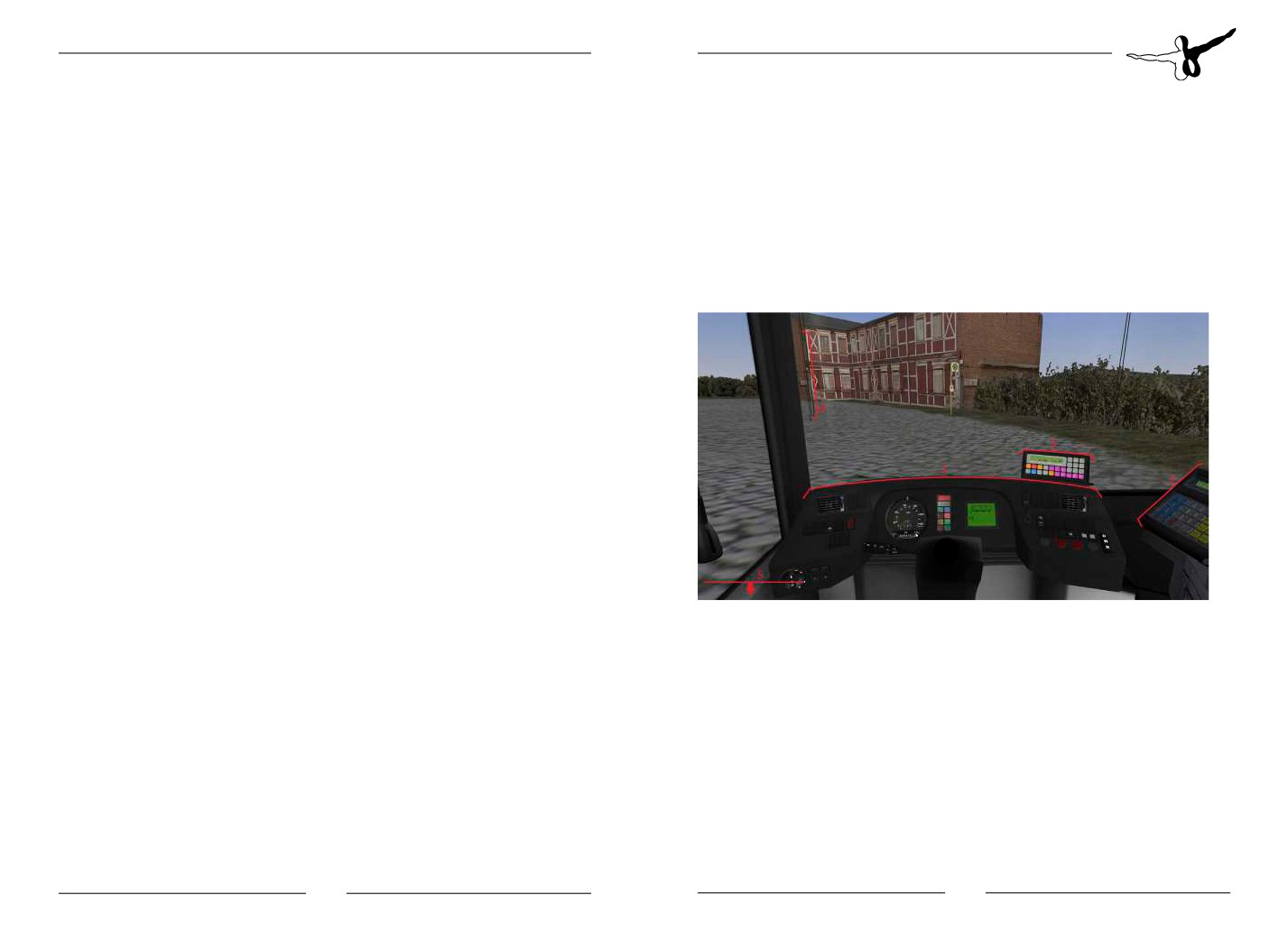
This chapter describes the usual operation of the busses. The VDV
dashboard is standardised and used in many other vehicles, so you
Top speed:
85 km/h
might already be familiar with its controls. In the following sections
Unladen weight:
14,300 kg
you’ll find images of all operable elements with a corresponding
description/function.
Total weight:
24,730 kg
First of all, press “F1” on your keyboard to jump to the interior view of
Seating places:
40
the vehicle.
Standing places:
81
MAN A20:
Length:
11,980 mm
Width:
2,500 mm
Height:
2,880 mm (without air conditioning)
Engine:
D2XX6LUH 220-310 HP
Gearbox:
Voith DIWA 4 speed automatic with
retarder
Top speed:
95 km/h
Unladen weight:
11,900 kg
1. Dashboard
Total weight:
18,000 kg
2. Payment counter & ticket printer
Seating places:
48
3. IBIS
Standing places:
49
4. Sun shield
5. Roof hatch controls/various switches
10
11
Aerosoft GmbH 2016
OMSI 2 Add-on MAN Citybus Series
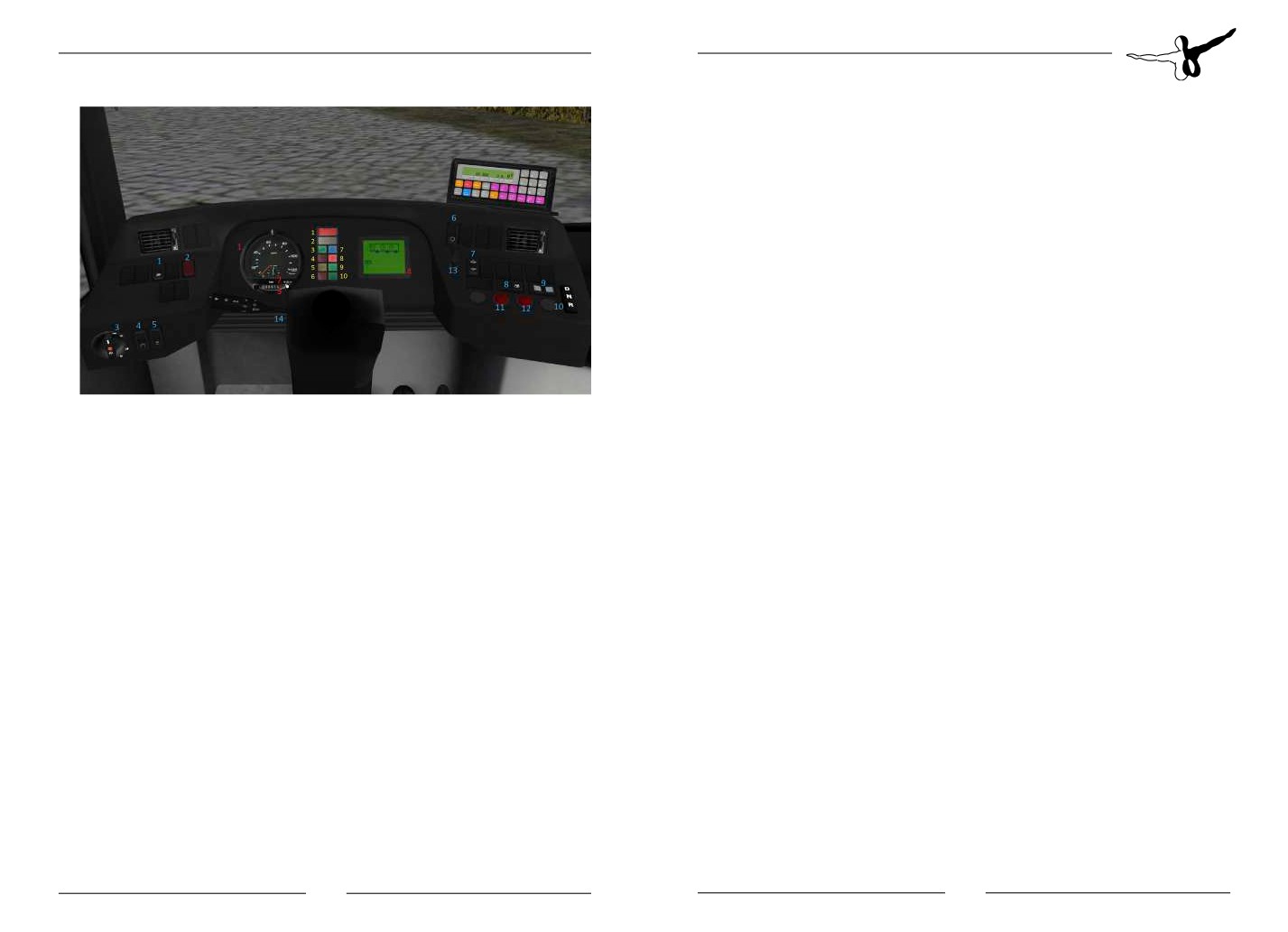
Dashboard switches blue
1. ASR on/off
2. Warning lights on/off
3. Light modes
4. Interior lighting
5. Cash lighting
6. Switching through VDV display
7. Kneeling up/down
8. Door leaves lock
9. Door release automatic door
10. Gear shift button
Dashboard signs red
1. Tachometre
11. Door 1
2. Time
12. Door 2
3. Odometre
13. Bus stop brake
4. VDV info display
14. Steering wheel lever Indicator/Wipers/Horn
Dashboard signs yellow
1. STOP | vehicle not ready for operation | when driving: halt and call
workshop
2. ATTENTION | danger for operational/traffic safety
3. Indicator
4. Supply pressure
5. Stop request
6. N/A
7. High beams
8. Control light ABS/ASR
9. N/A
10. N/A
12
13
Aerosoft GmbH 2016
OMSI 2 Add-on MAN Citybus Series
IBIS
1. Route input
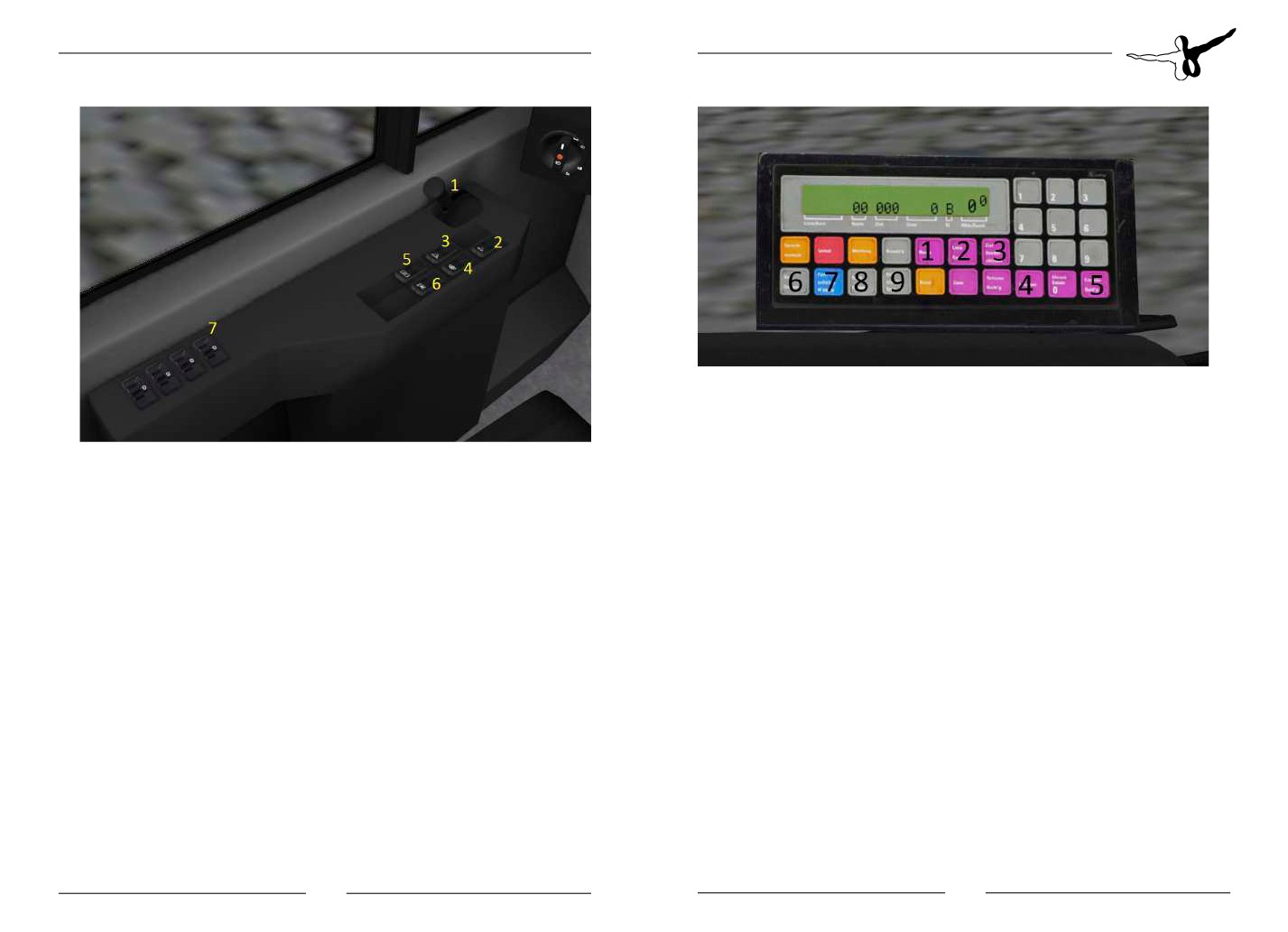
Dashboard - left side
2. Line input
1. Parking brake
3. Destination input
2. Microfone button
4. Delete
3. N/A
5. Enter/Confirm
6. Bus stop forward (mute)
4. Window pane heating
7. Bus stop forward (Announcement)
5. Exterior mirror/Driver’s window heating
8. Bus stop backward (mute)
6. Podium heater fan FAP
9. Automatic forward switching on/off
7. Controls roof switch
INFO: Displays and notifications on the IBIS can be confirmed with
button “5”
The IBIS controls are similar to the standard vehicles from OMSI.
The button “2” chooses the line, button “1” chooses the route and
button “3” the destination. The buttons “6-9” are used to switch
forward the bus stops, while buttons “4” and “5” confirm or delete
the inputs, respectively. Entering line “00000” resets the IBIS com-
pletely.
14
15
Aerosoft GmbH 2016
OMSI 2 Add-on MAN Citybus Series
Air conditioning
Ticket printer
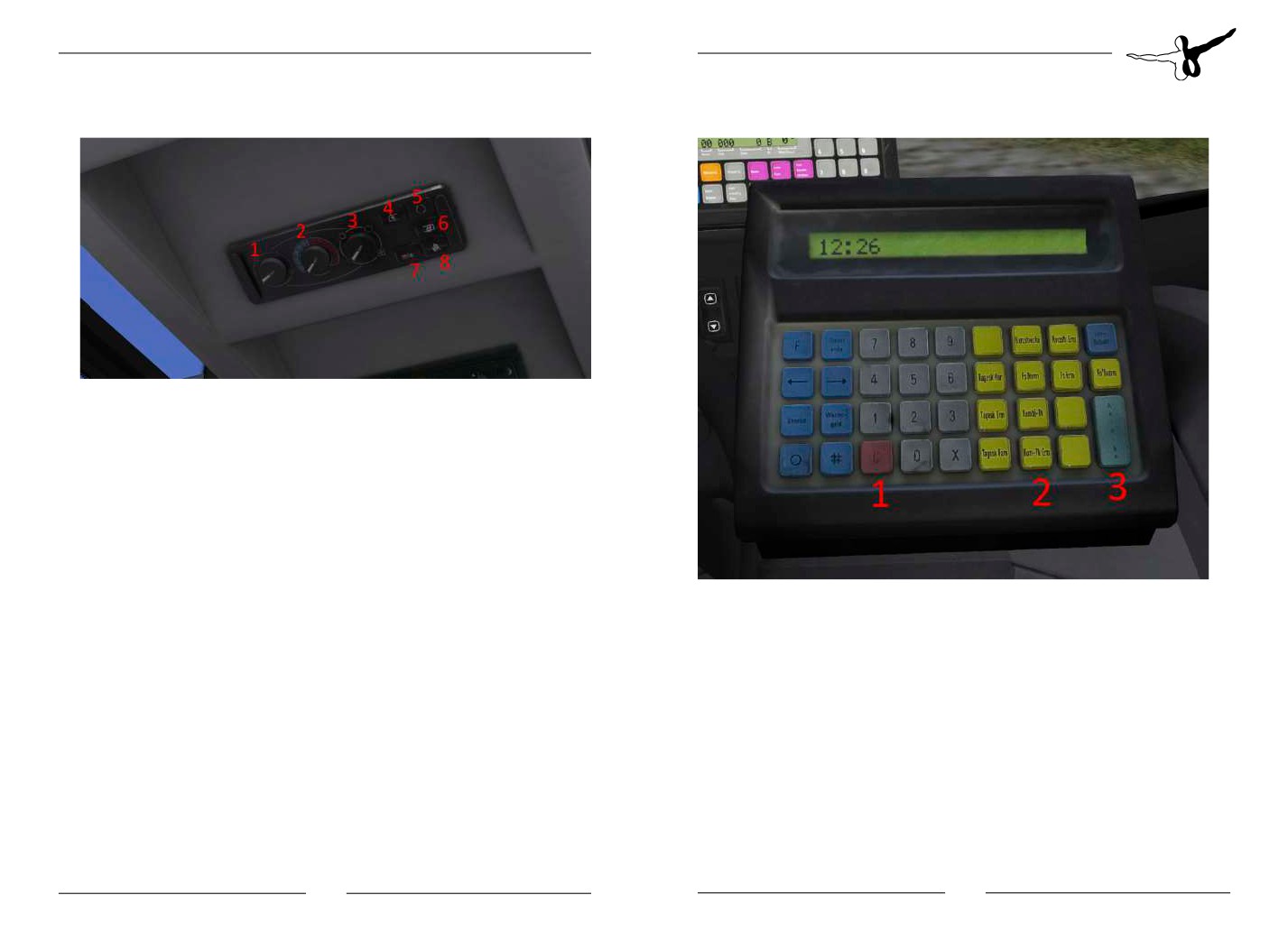
1. Air distribution driver’s area
2. Temperature driver’s area
3. Fans driver’s area
4. Air conditioning driver’s area
5. Fresh air/recirculating air
6. Air conditioning/heating passenger cabin
7. Reheat | dehumidification for active air conditioning
8. Auxiliary heater
INFO: The vehicle has air conditioning. It cooles (only when air con is
1. Button „Cancellation“
active) or heats the interior to a comfortable temperature. Changing
2. Selection ticket
the temperature via the panel is not possible! To turn on conditioning/
3. Button „output“ | prints the ticket
heating simply press button “6“. Should the humidity become to high,
the vehicle can be dehumidified using the “Reheat” button (7).
INFO: The ticket printer with payment counter can be freely adapted
to the personal seating position. Both the payment counter and the
lever between driver’s door and cash can be moved with a mouse
click.
16
17
Aerosoft GmbH 2016
OMSI 2 Add-on MAN Citybus Series
Customisation
[setvar]
mögliche Werte
Beschreibung
Fahrzeug
vis_hubcap_m_NG
0/1
0 - no central
MAN A23
hubcaps
Create your own repaints
1 - central hub-
caps new
If you’ve already got experience in repainting, you can create your own
liveries for the busses. The templates necessary for that can be found
vis_hubcap_h_NG
0/1
0 - no rear
MAN A23
in the subfolder “OMSI 2\Add-ons\MAN Citybus Series\Templates”.
hubcaps
Templates for the interior, wheels and the dashboard can be found
1 - rear hubcaps
here as well.
new
vis_hubcap_v_
0/1
0 - no front
MAN A23
alt_NG
hubcaps
Modding the vehicle
1 - front hub-
Some models are available in the .obj format, which allows the
caps old
community to create extensions and mods. Also, all switches on the
vis_hubcap_m_
0/1
0 - no central
MAN A23
dashboard are available and using their own texture. For experienced
alt_NG
hubcaps
modders, adapting and changing the dashboard is no problem! You
1 - central hub-
can ask the developers of the vehicles at any time if you’ve got
caps old
questions about modding the busses.
vis_hubcap_h_
0/1
0 - no rear
MAN A23
alt_NG
hubcaps
*.cti variables
1 - rear hubcaps
old
This section of the manual describes the use of the variables found in
vis_hubcap_v
0/1
0 - no front
MAN A20
the *.cti file to activate, deactivate or change various vehicle features.
hubcaps
MAN A21
These features are embedded directly into the repaint and cannot be
1 - front hub-
changed from within the game for now. Please use one of the
MAN A26
caps new
included *.cti files as an example and change it to your liking based on
vis_hubcap_m
0/1
0 - no central
MAN A20
the following table:
hubcaps
MAN A21
[setvar]
mögliche Werte
Beschreibung
Fahrzeug
1 - central hub-
MAN A26
caps new
vis_hubcap_v_NG
0/1
0 - no front
MAN A23
hubcaps
vis_hubcap_h
0/1
0 - no rear
MAN A20
hubcaps
1 - front hub-
MAN A21
caps new
1 - rear hubcaps
MAN A26
new
18
19
Aerosoft GmbH 2016
OMSI 2 Add-on MAN Citybus Series
[setvar]
mögliche Werte
Beschreibung
Fahrzeug
[setvar]
mögliche Werte
Beschreibung
Fahrzeug
vis_hubcap_v_alt
0/1
0 - no front
MAN A20
vis_bvg_spiegel
0/1
0 - normal exter-
all
hubcaps
nal mirror
MAN A21
1 - front hub-
MAN A26
1 - external mir-
caps old
ror type „long“
vis_hubcap_m_alt
0/1
0 - no central
MAN A20
vis_vogel_sitze
0/1
0 - seats type
MAN A21
hubcaps
„Kiel“
MAN A21
MAN A23
1 - central hub-
1 - seats type
MAN A26
MAN A26
caps old
„Vogel“
vis_hubcap_h_alt
0/1
0 - no rear
MAN A20
vis_entwerter
0/1
0 - endorser type
all
hubcaps
„Elgeba“
MAN A21
1 - rear hubcaps
1 - endorser type
MAN A26
old
„Klüssendorf“
vis_clima
0/1
0 - no air condi-
all
vis_infrarot
0/1
0 - no infrared
all
tioning
beacons
1 - air condition-
1 - infrared
ing front
beacons at car
body
vis_clima_h
0/1
0 - no air condi-
MAN A23
tioning
vis_mirrors_int
0/1
0 - no door
all
mirror
1 - air condition-
ing rear
1 - door mirror
vis_camera
0/1
0 - no cameras
all
vis_MANLOGO_
0/1
0 - no front
all
in the interior
vorn
MAN logo
1 - cameras in
1 - front MAN
the interior
logo
vis_3rd_brakelight
0/1
0 - no brake
all
vis_MANLOGO_
0/1
0 - no rear MAN
all
light in rear
hinten
logo
window
1 - rear MAN
1 - brake light in
logo
rear window
vis_MANLOGO_in-
0/1
0 - no interior
all
vis_havelschiss_in-
0/1
0 - normal
MAN A21
nen
MAN logo
nenraum
interior
1 - interior MAN
1 - interior type
logo
„Havelbus“
20
21
Aerosoft GmbH 2016
OMSI 2 Add-on MAN Citybus Series
[setvar]
mögliche Werte
Beschreibung
Fahrzeug
[setvar]
mögliche Werte
Beschreibung
Fahrzeug
vis_MANLOGO_
0/1
0 - no side MAN
all
vis_has_rampe
0/1
0 - no ramp at
all
seite
logo
door 2
1 - side MAN
1 - ramp at
logo
door 2
vis_haltefaden
0/1
0 - no hand
all
vis_nebelschein-
0/1
0 - no fog lights
all
straps
werfer
1 - fog lights
1 - hand straps
vis_Innenanzeige
0/1/2
0 - inner display
all
vis_schmutz-
0/1
0 - no dirt traps
all
type „Havelbus“
faenger
1 - dirt traps
1 - inner display
type „BVG“
vis_doorwarm
0/1
0 - no door alert
all
2 - inner display
1 - door alert
type „DVB“
vis_Matrixtype
0/1/2
0 - Flipdot matrix
MAN A21
vis_Seitenschild
0/1
0 - no side shield
all
1 - LCD matrix
MAN A23
1 - left side
2 - LED matrix
MAN A26
shield
vis_Fonttype
0/1
0 - Matrix upper
all
vis_Seitenschild_
0/1
0 - no front side
all
case
vorn
shield
1 - Matrix lower
1 - front side
case
shield
vis_driverside_ma-
0/1
0 - no matrix on
MAN A21
vis_speakers
0/1
0 - no speakers
all
trix
driver’s side
MAN A23
1 - speakers in
1 - matrix on
MAN A26
roof panel
driver’s side
vis_dooropener_
0/1
0 - no outer
all
vis_rearend_big-
0/1
0 - small rear
MAN A21
body
door opener
matrix
matrix
MAN A23
1 - outer door
1 - large rear
MAN A26
opener
matrix
vis_windows_split-
0/1
0 - single-part
all
vis_Motor_PWR_
0/1/2/3/4/5
0 - 310 HP
all
ted
wind shield
mode
1 - 260 HP
1 - parted wind
2 - 270 HP
shield
3 - 280 HP
4 - 220 HP
5 - 360 HP
22
23
Aerosoft GmbH 2016
OMSI 2 Add-on MAN Citybus Series
[setvar]
mögliche Werte
Beschreibung
Fahrzeug
CTI Variables control / vehicle modi-
vis_doortype_v
0/1/2
0 - inner swing
MAN A21
door front
fication
MAN A23
1 - swing door
MAN A26
All the features a vehicle has to offer can be adapted dynamically from
front
within the vehicle as well, independently from the settings specified in
2 - outer swing
the repaint. When a vehicle with specific settings is loaded, the
door front
function display has a higher priority and will overwrite the preset
vis_doortype_m
0/1/2
0 - central inner
MAN A21
variables for the current game session. This allows the player to edit
swing door
MAN A23
pre-configured repaints without having to go to the configuration
1 - central swing
MAN A26
files. The panel is located in the upper panel above the driver’s seat,
door
just as the air conditioning and tachograph.
2 - central outer
swing door
Start screen
vis_doortype_h
0/1/2
0 - inner swing
MAN A21
door rear
MAN A23
1 - swing door
MAN A26
rear
2 - outer swing
door rear
vis_number
0/1
0 - vehicle has
all
wagon number
1 - no wagon
number
24
25
Aerosoft GmbH 2016
OMSI 2 Add-on MAN Citybus Series
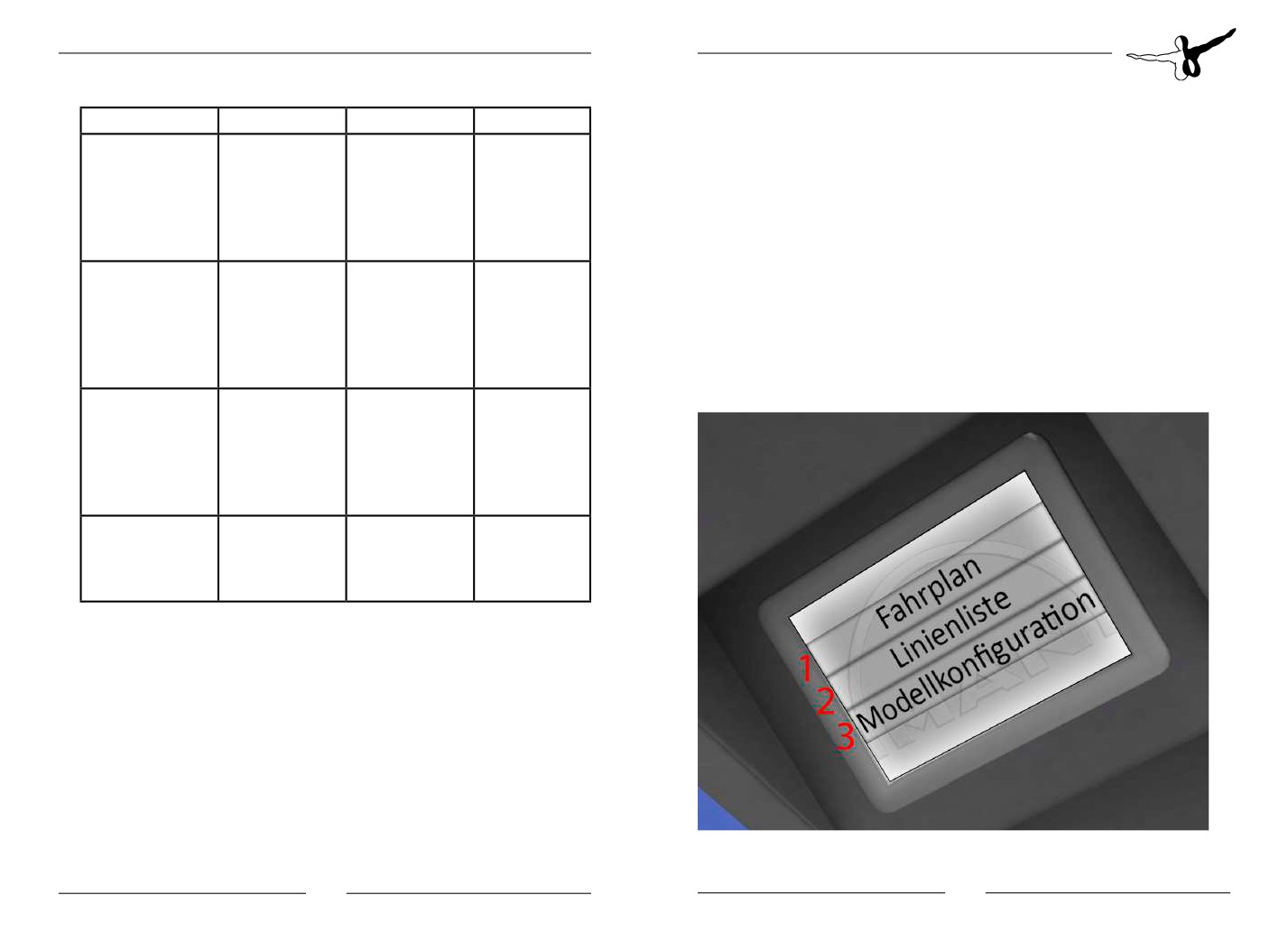
Turning on the onboard electronics will also start up the screen.
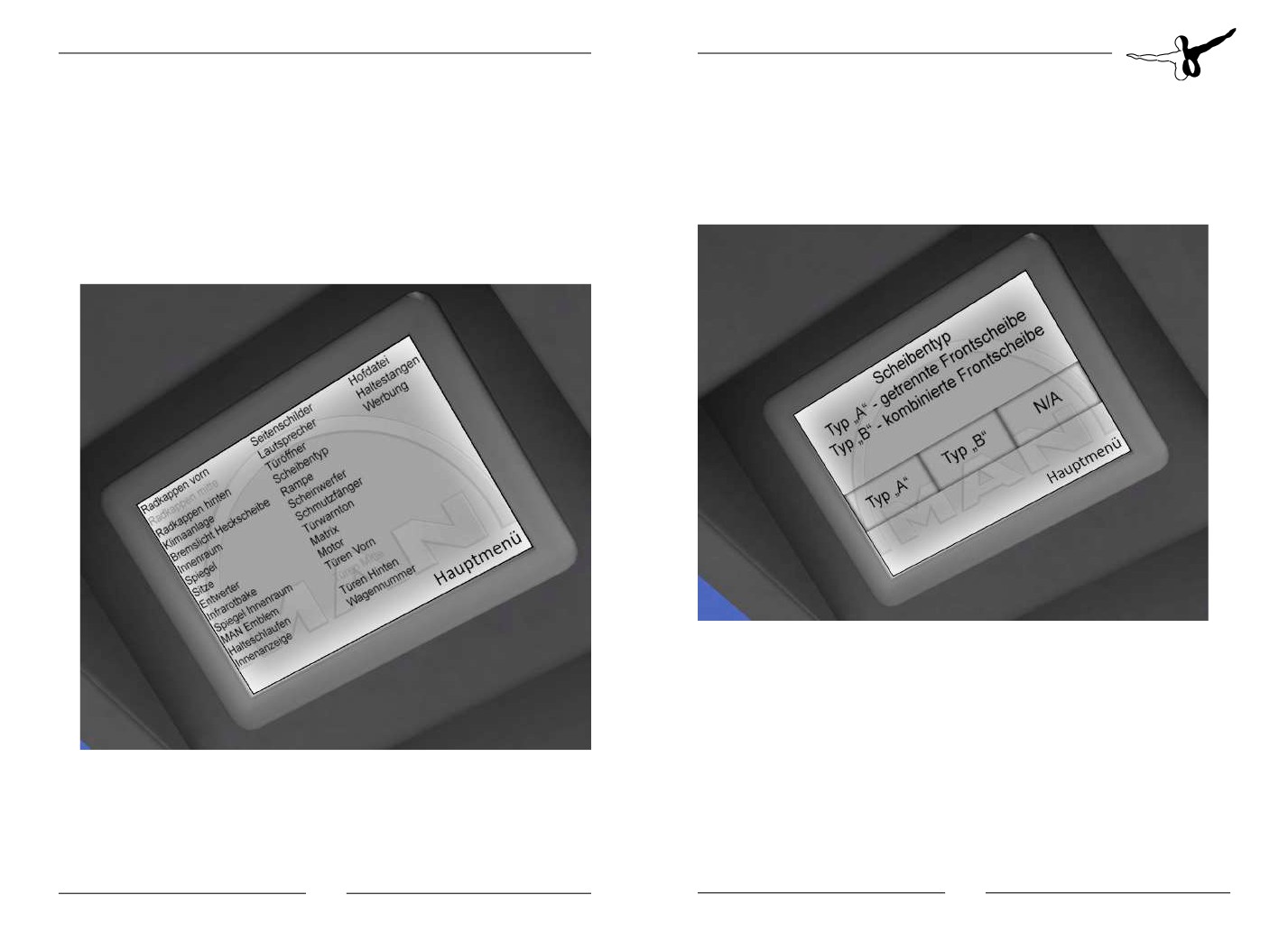
In the submenu model configuration all available settings options can
Following a short loading time, the following options are available:
be modified dynamically. Variables that aren’t modifiable for the
selected vehicle will be greyed out and have no function.
1. Display the current schedule (if schedule is activated)
With a click on for example “screen type”a submenu opens where the
2. Display the list of lines
available modes can be configured:
3. Display submenu “model configuration”
Model configuration
26
27
Aerosoft GmbH 2016
OMSI 2 Add-on MAN Citybus Series
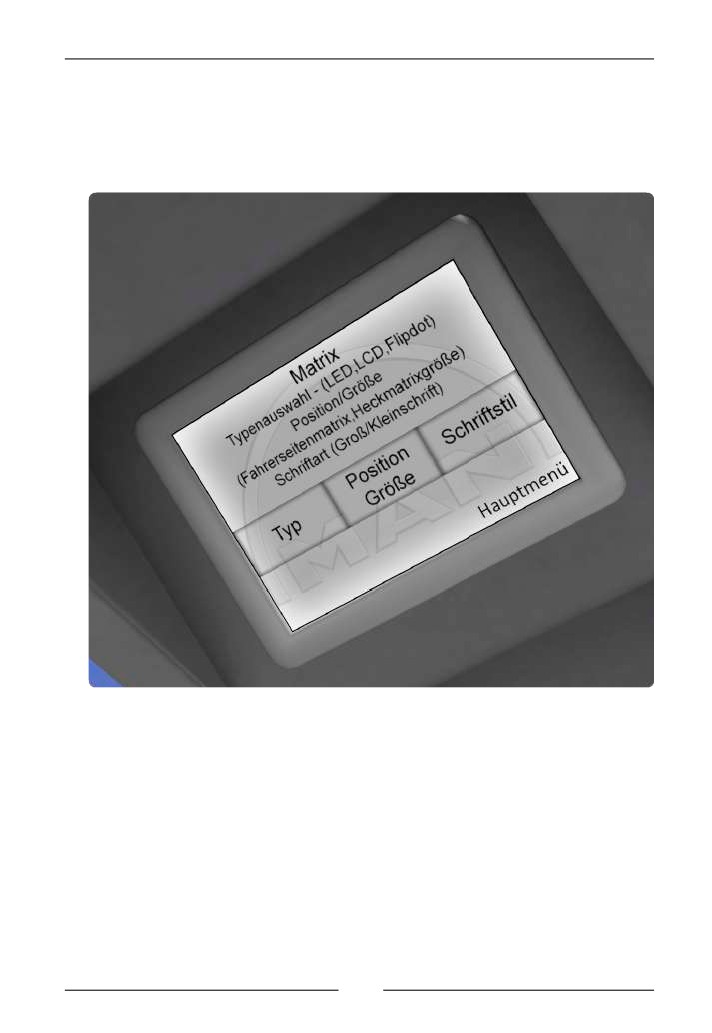
Depending on the complexity this menu might have a submenu as
well; it works the same way, though, and doesn’t need further
explanation:
Click targets with “N/A” are not used and have no function.
Clicking on “main menu”will bring you back to the start screen. The
labels of each of the menu items are self-explanatory or have a short
description above the click targets.
28
Aerosoft GmbH 2016